Floppydata Floppydata
Home Web Scraping

Web Scraping API

Send a URL and get the page as a real browser sees it: JavaScript rendered, CAPTCHAs solved, failed attempts retried through stronger pools. You pay only for successful scrapes.

  • Automatically handle blocks, CAPTCHAs, and anti-bot systems
  • Get the fully rendered HTML of any public page with one API call
  • Official TypeScript and Python SDKs, an MCP server for AI agents, and 24/7 support
Popular targets

Any public URL works — these are just presets.
curl https://api.floppydata.net/v2/web-data/fetch \
--request POST \
--header 'Content-Type: application/json' \
--header 'X-Api-Key: YOUR_API_KEY' \
--data '{
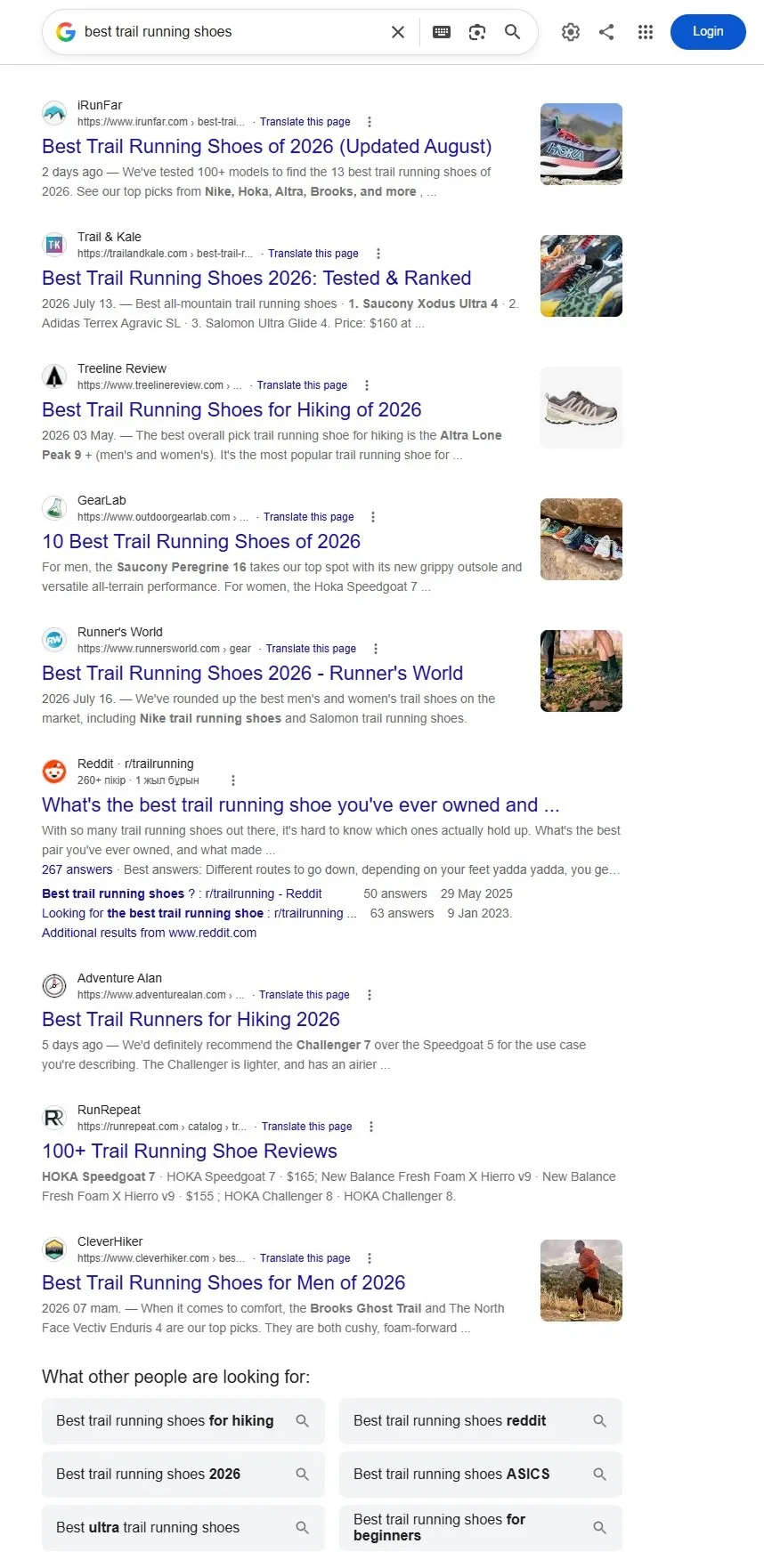
"url": "https://www.google.com/search?q=best+trail+running+shoes",
"countryCode": "US",
"city": "New York",
"difficulty": "auto"
}'
import httpx
response = httpx.post(
"https://api.floppydata.net/v2/web-data/fetch",
headers={
"Content-Type": "application/json",
"X-Api-Key": "YOUR_API_KEY",
},
json={
"url": "https://www.google.com/search?q=best+trail+running+shoes",
"countryCode": "US",
"city": "New York",
"difficulty": "auto",
},
)
data = response.json()
print(data["html"])
const response = await fetch('https://api.floppydata.net/v2/web-data/fetch', {
method: 'POST',
headers: {
'Content-Type': 'application/json',
'X-Api-Key': 'YOUR_API_KEY',
},
body: JSON.stringify({
url: 'https://www.google.com/search?q=best+trail+running+shoes',
countryCode: 'US',
city: 'New York',
difficulty: 'auto',
}),
});
const { html } = await response.json();
console.log(html);
<?php
$ch = curl_init('https://api.floppydata.net/v2/web-data/fetch');
curl_setopt($ch, CURLOPT_POST, true);
curl_setopt($ch, CURLOPT_RETURNTRANSFER, true);
curl_setopt($ch, CURLOPT_HTTPHEADER, [
'Content-Type: application/json',
'X-Api-Key: YOUR_API_KEY',
]);
curl_setopt($ch, CURLOPT_POSTFIELDS, json_encode([
'url' => 'https://www.google.com/search?q=best+trail+running+shoes',
'countryCode' => 'US',
'city' => 'New York',
'difficulty' => 'auto',
]));
$response = curl_exec($ch);
curl_close($ch);
echo $response;
package main
import (
"fmt"
"io"
"net/http"
"strings"
)
func main() {
url := "https://api.floppydata.net/v2/web-data/fetch"
payload := strings.NewReader(`{"url":"https://www.google.com/search?q=best+trail+running+shoes","countryCode":"US","city":"New York","difficulty":"auto"}`)
req, _ := http.NewRequest("POST", url, payload)
req.Header.Add("Content-Type", "application/json")
req.Header.Add("X-Api-Key", "YOUR_API_KEY")
res, _ := http.DefaultClient.Do(req)
defer res.Body.Close()
body, _ := io.ReadAll(res.Body)
fmt.Println(string(body))
}
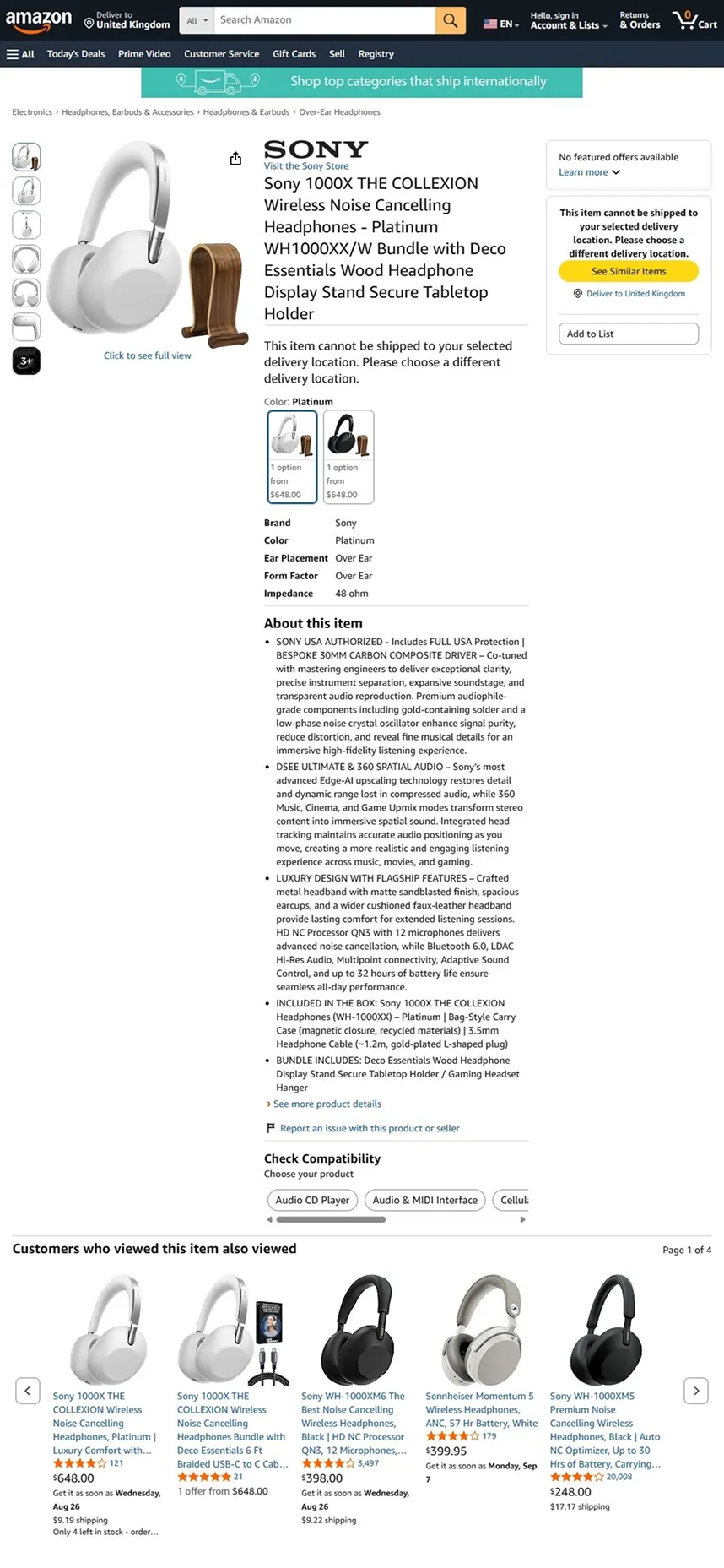
curl https://api.floppydata.net/v2/web-data/fetch \
--request POST \
--header 'Content-Type: application/json' \
--header 'X-Api-Key: YOUR_API_KEY' \
--data '{
"url": "https://www.amazon.com/dp/B0C1000XWH",
"countryCode": "US",
"city": "New York",
"difficulty": "auto"
}'
import httpx
response = httpx.post(
"https://api.floppydata.net/v2/web-data/fetch",
headers={
"Content-Type": "application/json",
"X-Api-Key": "YOUR_API_KEY",
},
json={
"url": "https://www.amazon.com/dp/B0C1000XWH",
"countryCode": "US",
"city": "New York",
"difficulty": "auto",
},
)
data = response.json()
print(data["html"])
const response = await fetch('https://api.floppydata.net/v2/web-data/fetch', {
method: 'POST',
headers: {
'Content-Type': 'application/json',
'X-Api-Key': 'YOUR_API_KEY',
},
body: JSON.stringify({
url: 'https://www.amazon.com/dp/B0C1000XWH',
countryCode: 'US',
city: 'New York',
difficulty: 'auto',
}),
});
const { html } = await response.json();
console.log(html);
<?php
$ch = curl_init('https://api.floppydata.net/v2/web-data/fetch');
curl_setopt($ch, CURLOPT_POST, true);
curl_setopt($ch, CURLOPT_RETURNTRANSFER, true);
curl_setopt($ch, CURLOPT_HTTPHEADER, [
'Content-Type: application/json',
'X-Api-Key: YOUR_API_KEY',
]);
curl_setopt($ch, CURLOPT_POSTFIELDS, json_encode([
'url' => 'https://www.amazon.com/dp/B0C1000XWH',
'countryCode' => 'US',
'city' => 'New York',
'difficulty' => 'auto',
]));
$response = curl_exec($ch);
curl_close($ch);
echo $response;
package main
import (
"fmt"
"io"
"net/http"
"strings"
)
func main() {
url := "https://api.floppydata.net/v2/web-data/fetch"
payload := strings.NewReader(`{"url":"https://www.amazon.com/dp/B0C1000XWH","countryCode":"US","city":"New York","difficulty":"auto"}`)
req, _ := http.NewRequest("POST", url, payload)
req.Header.Add("Content-Type", "application/json")
req.Header.Add("X-Api-Key", "YOUR_API_KEY")
res, _ := http.DefaultClient.Do(req)
defer res.Body.Close()
body, _ := io.ReadAll(res.Body)
fmt.Println(string(body))
}
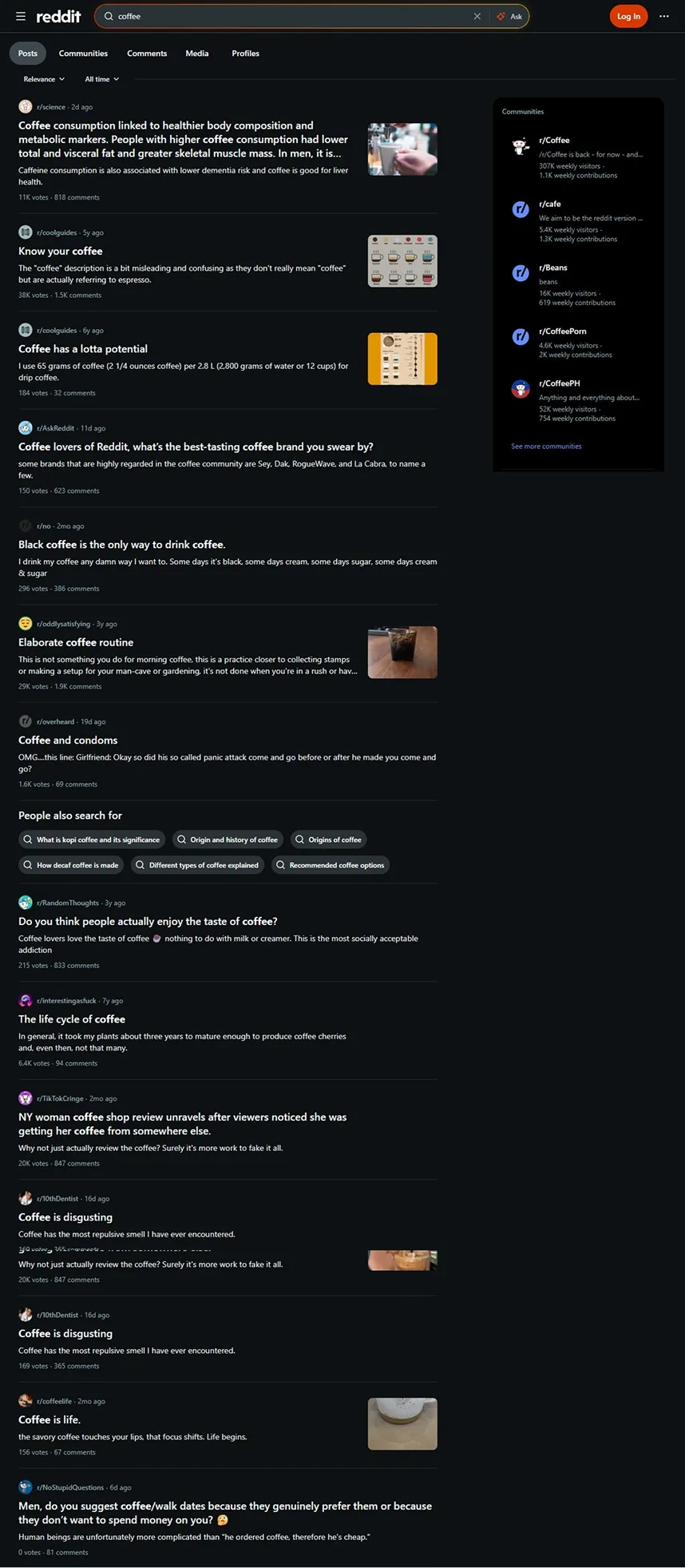
curl https://api.floppydata.net/v2/web-data/fetch \
--request POST \
--header 'Content-Type: application/json' \
--header 'X-Api-Key: YOUR_API_KEY' \
--data '{
"url": "https://www.reddit.com/search/?q=coffee",
"countryCode": "US",
"city": "New York",
"difficulty": "auto"
}'
import httpx
response = httpx.post(
"https://api.floppydata.net/v2/web-data/fetch",
headers={
"Content-Type": "application/json",
"X-Api-Key": "YOUR_API_KEY",
},
json={
"url": "https://www.reddit.com/search/?q=coffee",
"countryCode": "US",
"city": "New York",
"difficulty": "auto",
},
)
data = response.json()
print(data["html"])
const response = await fetch('https://api.floppydata.net/v2/web-data/fetch', {
method: 'POST',
headers: {
'Content-Type': 'application/json',
'X-Api-Key': 'YOUR_API_KEY',
},
body: JSON.stringify({
url: 'https://www.reddit.com/search/?q=coffee',
countryCode: 'US',
city: 'New York',
difficulty: 'auto',
}),
});
const { html } = await response.json();
console.log(html);
<?php
$ch = curl_init('https://api.floppydata.net/v2/web-data/fetch');
curl_setopt($ch, CURLOPT_POST, true);
curl_setopt($ch, CURLOPT_RETURNTRANSFER, true);
curl_setopt($ch, CURLOPT_HTTPHEADER, [
'Content-Type: application/json',
'X-Api-Key: YOUR_API_KEY',
]);
curl_setopt($ch, CURLOPT_POSTFIELDS, json_encode([
'url' => 'https://www.reddit.com/search/?q=coffee',
'countryCode' => 'US',
'city' => 'New York',
'difficulty' => 'auto',
]));
$response = curl_exec($ch);
curl_close($ch);
echo $response;
package main
import (
"fmt"
"io"
"net/http"
"strings"
)
func main() {
url := "https://api.floppydata.net/v2/web-data/fetch"
payload := strings.NewReader(`{"url":"https://www.reddit.com/search/?q=coffee","countryCode":"US","city":"New York","difficulty":"auto"}`)
req, _ := http.NewRequest("POST", url, payload)
req.Header.Add("Content-Type", "application/json")
req.Header.Add("X-Api-Key", "YOUR_API_KEY")
res, _ := http.DefaultClient.Do(req)
defer res.Body.Close()
body, _ := io.ReadAll(res.Body)
fmt.Println(string(body))
}
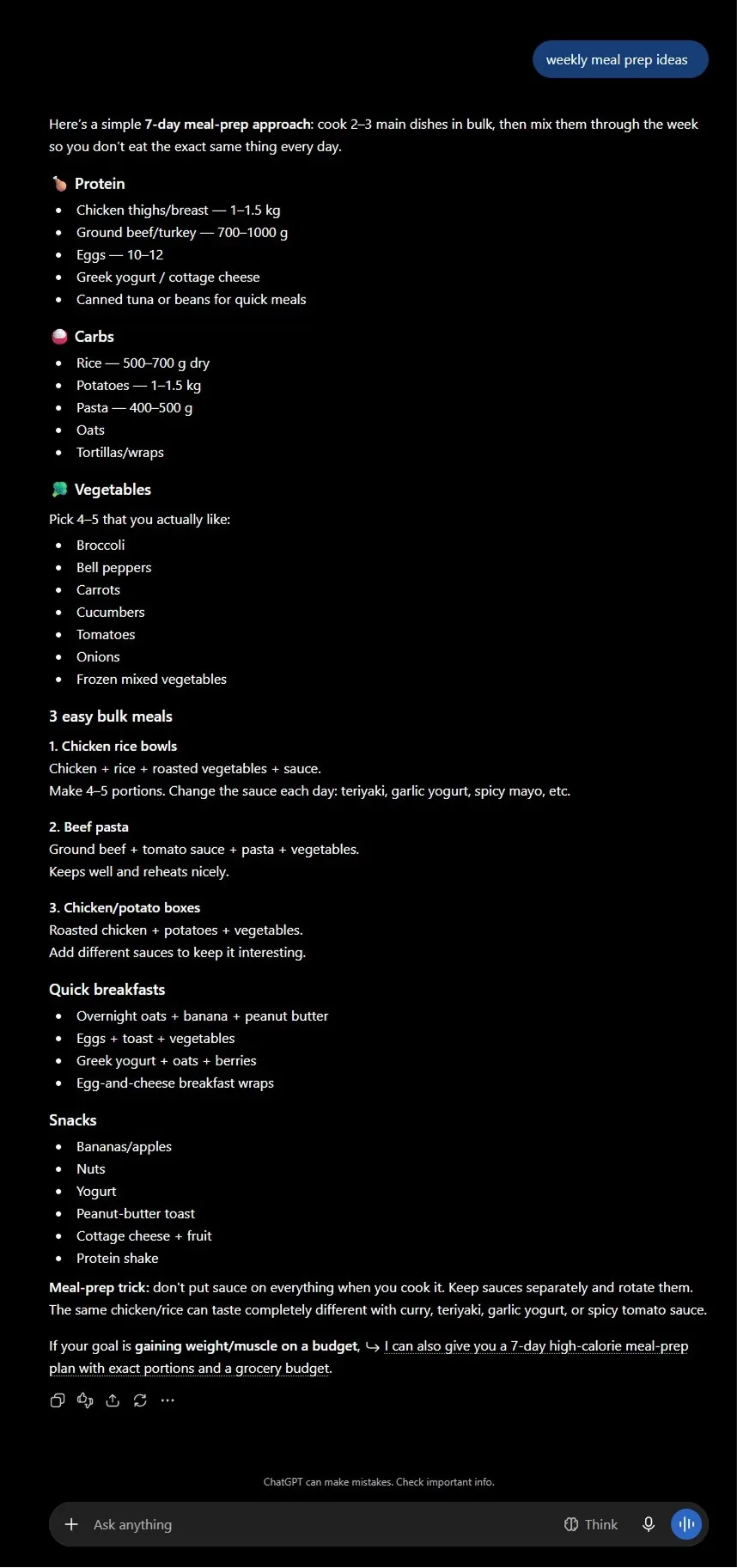
curl https://api.floppydata.net/v2/web-data/fetch \
--request POST \
--header 'Content-Type: application/json' \
--header 'X-Api-Key: YOUR_API_KEY' \
--data '{
"url": "https://chatgpt.com/?q=weekly+meal+prep+ideas",
"countryCode": "US",
"city": "New York",
"difficulty": "auto"
}'
import httpx
response = httpx.post(
"https://api.floppydata.net/v2/web-data/fetch",
headers={
"Content-Type": "application/json",
"X-Api-Key": "YOUR_API_KEY",
},
json={
"url": "https://chatgpt.com/?q=weekly+meal+prep+ideas",
"countryCode": "US",
"city": "New York",
"difficulty": "auto",
},
)
data = response.json()
print(data["html"])
const response = await fetch('https://api.floppydata.net/v2/web-data/fetch', {
method: 'POST',
headers: {
'Content-Type': 'application/json',
'X-Api-Key': 'YOUR_API_KEY',
},
body: JSON.stringify({
url: 'https://chatgpt.com/?q=weekly+meal+prep+ideas',
countryCode: 'US',
city: 'New York',
difficulty: 'auto',
}),
});
const { html } = await response.json();
console.log(html);
<?php
$ch = curl_init('https://api.floppydata.net/v2/web-data/fetch');
curl_setopt($ch, CURLOPT_POST, true);
curl_setopt($ch, CURLOPT_RETURNTRANSFER, true);
curl_setopt($ch, CURLOPT_HTTPHEADER, [
'Content-Type: application/json',
'X-Api-Key: YOUR_API_KEY',
]);
curl_setopt($ch, CURLOPT_POSTFIELDS, json_encode([
'url' => 'https://chatgpt.com/?q=weekly+meal+prep+ideas',
'countryCode' => 'US',
'city' => 'New York',
'difficulty' => 'auto',
]));
$response = curl_exec($ch);
curl_close($ch);
echo $response;
package main
import (
"fmt"
"io"
"net/http"
"strings"
)
func main() {
url := "https://api.floppydata.net/v2/web-data/fetch"
payload := strings.NewReader(`{"url":"https://chatgpt.com/?q=weekly+meal+prep+ideas","countryCode":"US","city":"New York","difficulty":"auto"}`)
req, _ := http.NewRequest("POST", url, payload)
req.Header.Add("Content-Type", "application/json")
req.Header.Add("X-Api-Key", "YOUR_API_KEY")
res, _ := http.DefaultClient.Do(req)
defer res.Body.Close()
body, _ := io.ReadAll(res.Body)
fmt.Println(string(body))
}
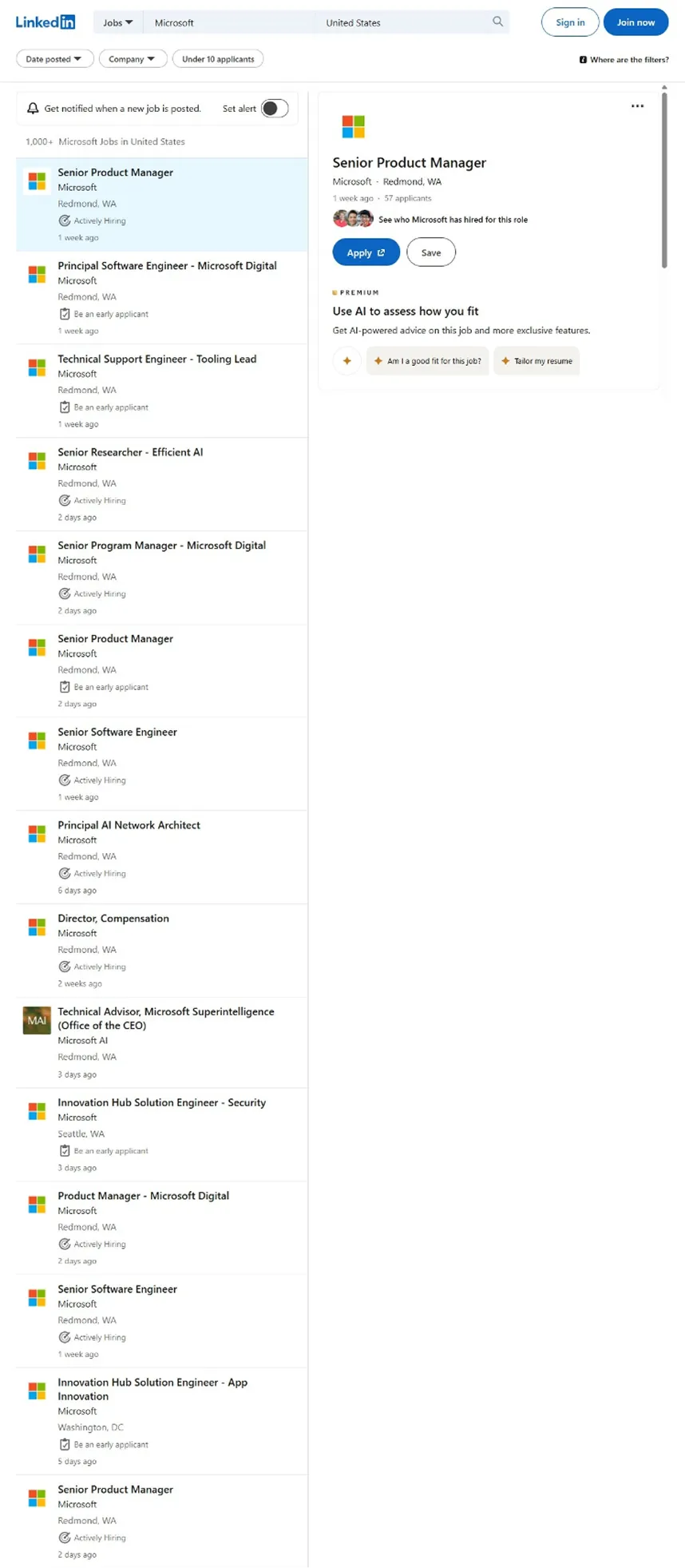
curl https://api.floppydata.net/v2/web-data/fetch \
--request POST \
--header 'Content-Type: application/json' \
--header 'X-Api-Key: YOUR_API_KEY' \
--data '{
"url": "https://www.linkedin.com/jobs/search/?keywords=microsoft&location=United+States",
"countryCode": "US",
"city": "New York",
"difficulty": "auto"
}'
import httpx
response = httpx.post(
"https://api.floppydata.net/v2/web-data/fetch",
headers={
"Content-Type": "application/json",
"X-Api-Key": "YOUR_API_KEY",
},
json={
"url": "https://www.linkedin.com/jobs/search/?keywords=microsoft&location=United+States",
"countryCode": "US",
"city": "New York",
"difficulty": "auto",
},
)
data = response.json()
print(data["html"])
const response = await fetch('https://api.floppydata.net/v2/web-data/fetch', {
method: 'POST',
headers: {
'Content-Type': 'application/json',
'X-Api-Key': 'YOUR_API_KEY',
},
body: JSON.stringify({
url: 'https://www.linkedin.com/jobs/search/?keywords=microsoft&location=United+States',
countryCode: 'US',
city: 'New York',
difficulty: 'auto',
}),
});
const { html } = await response.json();
console.log(html);
<?php
$ch = curl_init('https://api.floppydata.net/v2/web-data/fetch');
curl_setopt($ch, CURLOPT_POST, true);
curl_setopt($ch, CURLOPT_RETURNTRANSFER, true);
curl_setopt($ch, CURLOPT_HTTPHEADER, [
'Content-Type: application/json',
'X-Api-Key: YOUR_API_KEY',
]);
curl_setopt($ch, CURLOPT_POSTFIELDS, json_encode([
'url' => 'https://www.linkedin.com/jobs/search/?keywords=microsoft&location=United+States',
'countryCode' => 'US',
'city' => 'New York',
'difficulty' => 'auto',
]));
$response = curl_exec($ch);
curl_close($ch);
echo $response;
package main
import (
"fmt"
"io"
"net/http"
"strings"
)
func main() {
url := "https://api.floppydata.net/v2/web-data/fetch"
payload := strings.NewReader(`{"url":"https://www.linkedin.com/jobs/search/?keywords=microsoft&location=United+States","countryCode":"US","city":"New York","difficulty":"auto"}`)
req, _ := http.NewRequest("POST", url, payload)
req.Header.Add("Content-Type", "application/json")
req.Header.Add("X-Api-Key", "YOUR_API_KEY")
res, _ := http.DefaultClient.Do(req)
defer res.Body.Close()
body, _ := io.ReadAll(res.Body)
fmt.Println(string(body))
}
{
"html": "<!doctype html><html><head><title>…</title></head><body>…</body></html>",
"sourceUrl": "https://www.google.com/search?q=best+trail+running+shoes",
"fetchedAt": "2026-08-17T12:00:00.000Z"
}
{
"html": "<!doctype html><html><head><title>…</title></head><body>…</body></html>",
"sourceUrl": "https://www.amazon.com/dp/B0C1000XWH",
"fetchedAt": "2026-08-17T12:00:00.000Z"
}
{
"html": "<!doctype html><html><head><title>…</title></head><body>…</body></html>",
"sourceUrl": "https://www.reddit.com/search/?q=coffee",
"fetchedAt": "2026-08-17T12:00:00.000Z"
}
{
"html": "<!doctype html><html><head><title>…</title></head><body>…</body></html>",
"sourceUrl": "https://chatgpt.com/?q=weekly+meal+prep+ideas",
"fetchedAt": "2026-08-17T12:00:00.000Z"
}
{
"html": "<!doctype html><html><head><title>…</title></head><body>…</body></html>",
"sourceUrl": "https://www.linkedin.com/jobs/search/?keywords=microsoft&location=United+States",
"fetchedAt": "2026-08-17T12:00:00.000Z"
}
Render example Search results Product page Community posts AI answer Job listings
Google — Search results rendered by the Web Scraping API
Amazon — Product page rendered by the Web Scraping API
Reddit — Community posts rendered by the Web Scraping API
ChatGPT — AI answer rendered by the Web Scraping API
LinkedIn — Job listings rendered by the Web Scraping API
$0 for failed requests
207 countries, plus city targeting
5 free scrapes to start
24/7 support

All the Reasons to Choose Floppydata Web Scraping API

Unlock any website, automate scraping, and stay ahead of anti-bot systems with our industry-leading feature set.

Automated CAPTCHA Solving

Effortlessly bypass website blocks and anti-bot systems.

Challenge log
Cloudflare challenge ✓ solved
reCAPTCHA v3 ✓ solved
Rate limit 429 ✓ retried

Real Browser Rendering

Loads pages the way a real browser does, so dynamic sites return complete data. Powered by Floppydata.

Raw HTML
<div class="product">
  <h1>SuperFast Laptop</h1>
  <span class="price">
    $1,299.99</span>
  <div class="rating"
    data-value="4.8">_
Parsed JSON
{
  "name": "SuperFast Laptop",
  "price": 1299.99,
  "currency": "USD",
  "rating": 4.8
}
Global Geo-Targeting

Global Geo-Targeting

Pick the exit country, out of 207, and the city for every request.

JavaScript Rendering

JavaScript Rendering

Extract data from dynamic and JavaScript-heavy websites.

Automatic Retries, Billed Once

Automatic Retries, Billed Once

A failed attempt is retried through stronger pools, up to 3 times, and you pay for one request.

Search and Fetch with One Key

Search and Fetch with One Key

Search Google for the pages you need, then fetch them. Each successful search or fetch is one request.

One platform for every use case

E-commerce

Data collection as an ongoing process, not a one-time action: prices, assortment and product pages fetched on schedule and turned into orderly datasets.

  • Monitoring prices and assortment
  • Creating product catalogs
  • Analyzing competitors
Try free
$0 for failed requests
207 countries, plus city targeting

Marketing

Watch competitors and the pages that matter: the API handles blocks, CAPTCHAs and anti-bot systems while your team gets the content.

  • Analyzing competitors
  • Tracking changes on websites
  • Collecting content
Try free
207 countries, plus city targeting
24/7 support

Fintech

A stable web data pipeline for analytics and BI: failed attempts are retried through stronger pools and never billed.

  • Tracking changes on websites
  • Preparing datasets
  • Monitoring prices and assortment
Try free
$0 for failed requests
24/7 support

Market research

Turn rendered pages into orderly datasets, ready for analytics, BI, or machine learning.

  • Preparing datasets
  • Collecting content
  • Monitoring prices and assortment
Try free
HTML rendered in a real browser
207 countries, plus city targeting

Seamless Compatibility with Any AI/ML Workflow and Data Infrastructure

Run Floppydata inside model training pipelines, scraping agents, browser automation, ETL jobs, and analytics stacks without changing how your team already ships data-heavy workloads.

How does the scraping API work?

Instead of directly accessing the site, the request is sent to the scraping API, and it already interacts with the target resource. This reduces the risk of restrictions and makes the process predictable.

A typical scenario looks like this:

  1. 1 you pass the URL and parameters
  2. 2 The API processes the page
  3. 3 returns the rendered HTML
  4. 4 the information immediately enters the data ingestion pipeline.
Task lifecycle
$ POST /v2/web-data/fetch {"url": "…", "countryCode": "US"}
✓ queued · task_id=9f3a
→ fetching via US residential IP
→ solving Cloudflare challenge… ok (1.2s)
→ rendering JavaScript… ok
✓ 200 OK — 214 KB received
→ parsed → JSON delivered to your pipeline

When the project grows, you send a request for every page you need: the links found on one page become the next requests, so you can collect several levels of a site. Your parser then turns the rendered pages into orderly structured datasets.

As a result, a stable web data pipeline is formed, which can be used in analytics, BI, or machine learning.

Where the web data extraction API is used

The modern web data extraction API is not just a parsing tool. It is an element of the digital infrastructure.

Within the company, such a data scraping API becomes part of the overall web data platform: the pages it returns are stored and used for reporting or forecasting.

For high-load projects, the API takes a request for every page you need, and you pay only for the ones that succeed.

What to look for when choosing web scraping solutions

When choosing web scraping solutions, it is important to look beyond just query processing speed. Stability and predictability of the result are much more important.

It is worth considering:

  • Support for dynamic pages
  • The ability to scale
  • Transparent web scraping API pricing
  • Availability of the web scraping free trial
  • Convenience of documentation

If the system integrates into an existing web data pipeline without complex improvements, this is a good indicator of quality.

Web scraping free trial 5 successful scrapes

Plans & Pricing

Only pay for successful data extraction — no surprises, no hidden fees.

Trial Free 5 successful scrapes Try Free
Basic $9 10K successful scrapes Try It
Enterprise Custom Tailored to your needs Talk to Team

Easy to Start, Easier to Scale

  1. 1

    Define target URL and connect to the API with a single line of code

  2. 2

    Set the country, city and difficulty, or call it from the TypeScript and Python SDKs

  3. 3

    Get the rendered HTML back, with the source URL and the fetch time

Read documentation
Live example · X-API-Key required
fetch('https://api.floppydata.net/v2/web-data/fetch', {
    method: 'POST',
    headers: {
        'X-Api-Key': 'YOUR_API_KEY',
        'Content-Type': 'application/json'
    },
    body: JSON.stringify({ url: 'https://example.com' })
});
requests.post(
    'https://api.floppydata.net/v2/web-data/fetch',
    headers={
        'X-Api-Key': 'YOUR_API_KEY',
        'Content-Type': 'application/json'
    },
    json={'url': 'https://example.com'}
)
curl -X POST https://api.floppydata.net/v2/web-data/fetch \
  -H "X-Api-Key: $API_KEY" \
  -H "Content-Type: application/json" \
  -d '{"url": "https://example.com"}'

Frequently Asked Questions

What exactly is web scraping?

Web Scraping is an automatic collection of web pages. The system receives the site code and extracts the necessary information for further use.

Is scraping an API legal?

The collection of open data is usually allowed, but it is important to take into account the rules of use of a particular site and the current legislation.

How to use scraper API?

To work, it is enough to send an HTTP request to the API with the required URL. The service loads the page in a real browser and returns its rendered HTML.

What is meant by scraping data?

Data scraping is the process of collecting and storing data from the web to be reviewed, used, or integrated into a system later.