Floppydata Floppydata
Startseite Web-Scraping

Web-Scraping-API

Schluss mit Scraping-Blockaden, CAPTCHAs und fehlgeschlagenen Anfragen. Erfassen Sie Daten von jeder Website nahtlos. 99,9 % Erfolgsquote.

  • Blockaden, CAPTCHAs und Anti-Bot-Systeme automatisch bewältigen
  • Vollständige Webdaten extrahieren – HTML, JSON oder TXT – mit einem Klick
  • Nahtlose API-Integration mit 99,9 % Erfolgsquote und 24/7-Support
Beliebte Ziele

Jede öffentliche URL funktioniert – das sind nur Voreinstellungen.
curl https://api.floppydata.net/v2/web-data/fetch \
--request POST \
--header 'Content-Type: application/json' \
--header 'X-Api-Key: YOUR_API_KEY' \
--data '{
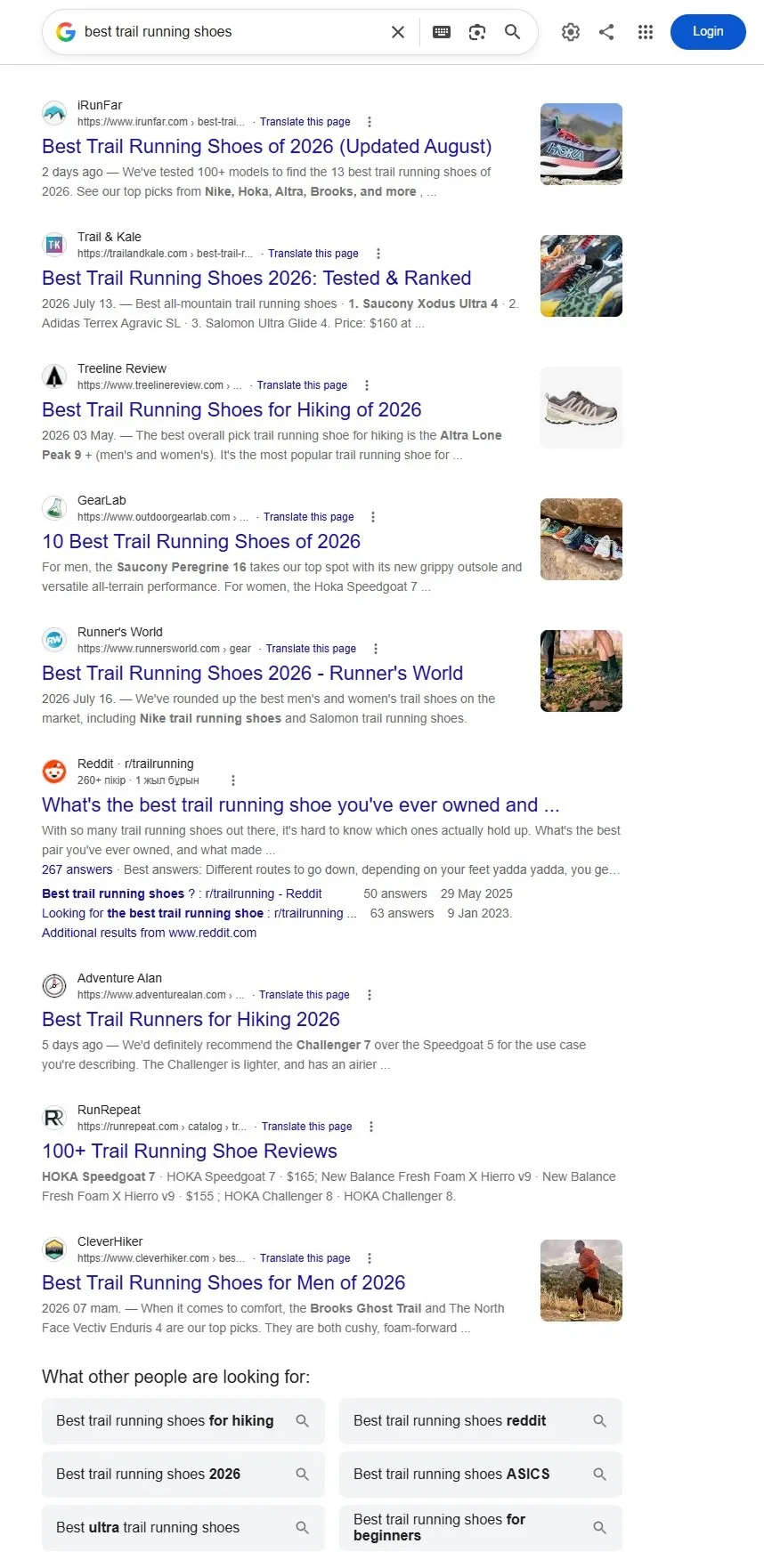
"url": "https://www.google.com/search?q=best+trail+running+shoes",
"countryCode": "US",
"city": "New York",
"difficulty": "auto"
}'
import httpx
response = httpx.post(
"https://api.floppydata.net/v2/web-data/fetch",
headers={
"Content-Type": "application/json",
"X-Api-Key": "YOUR_API_KEY",
},
json={
"url": "https://www.google.com/search?q=best+trail+running+shoes",
"countryCode": "US",
"city": "New York",
"difficulty": "auto",
},
)
data = response.json()
print(data["html"])
const response = await fetch('https://api.floppydata.net/v2/web-data/fetch', {
method: 'POST',
headers: {
'Content-Type': 'application/json',
'X-Api-Key': 'YOUR_API_KEY',
},
body: JSON.stringify({
url: 'https://www.google.com/search?q=best+trail+running+shoes',
countryCode: 'US',
city: 'New York',
difficulty: 'auto',
}),
});
const { html } = await response.json();
console.log(html);
<?php
$ch = curl_init('https://api.floppydata.net/v2/web-data/fetch');
curl_setopt($ch, CURLOPT_POST, true);
curl_setopt($ch, CURLOPT_RETURNTRANSFER, true);
curl_setopt($ch, CURLOPT_HTTPHEADER, [
'Content-Type: application/json',
'X-Api-Key: YOUR_API_KEY',
]);
curl_setopt($ch, CURLOPT_POSTFIELDS, json_encode([
'url' => 'https://www.google.com/search?q=best+trail+running+shoes',
'countryCode' => 'US',
'city' => 'New York',
'difficulty' => 'auto',
]));
$response = curl_exec($ch);
curl_close($ch);
echo $response;
package main
import (
"fmt"
"io"
"net/http"
"strings"
)
func main() {
url := "https://api.floppydata.net/v2/web-data/fetch"
payload := strings.NewReader(`{"url":"https://www.google.com/search?q=best+trail+running+shoes","countryCode":"US","city":"New York","difficulty":"auto"}`)
req, _ := http.NewRequest("POST", url, payload)
req.Header.Add("Content-Type", "application/json")
req.Header.Add("X-Api-Key", "YOUR_API_KEY")
res, _ := http.DefaultClient.Do(req)
defer res.Body.Close()
body, _ := io.ReadAll(res.Body)
fmt.Println(string(body))
}
curl https://api.floppydata.net/v2/web-data/fetch \
--request POST \
--header 'Content-Type: application/json' \
--header 'X-Api-Key: YOUR_API_KEY' \
--data '{
"url": "https://www.amazon.com/dp/B0C1000XWH",
"countryCode": "US",
"city": "New York",
"difficulty": "auto"
}'
import httpx
response = httpx.post(
"https://api.floppydata.net/v2/web-data/fetch",
headers={
"Content-Type": "application/json",
"X-Api-Key": "YOUR_API_KEY",
},
json={
"url": "https://www.amazon.com/dp/B0C1000XWH",
"countryCode": "US",
"city": "New York",
"difficulty": "auto",
},
)
data = response.json()
print(data["html"])
const response = await fetch('https://api.floppydata.net/v2/web-data/fetch', {
method: 'POST',
headers: {
'Content-Type': 'application/json',
'X-Api-Key': 'YOUR_API_KEY',
},
body: JSON.stringify({
url: 'https://www.amazon.com/dp/B0C1000XWH',
countryCode: 'US',
city: 'New York',
difficulty: 'auto',
}),
});
const { html } = await response.json();
console.log(html);
<?php
$ch = curl_init('https://api.floppydata.net/v2/web-data/fetch');
curl_setopt($ch, CURLOPT_POST, true);
curl_setopt($ch, CURLOPT_RETURNTRANSFER, true);
curl_setopt($ch, CURLOPT_HTTPHEADER, [
'Content-Type: application/json',
'X-Api-Key: YOUR_API_KEY',
]);
curl_setopt($ch, CURLOPT_POSTFIELDS, json_encode([
'url' => 'https://www.amazon.com/dp/B0C1000XWH',
'countryCode' => 'US',
'city' => 'New York',
'difficulty' => 'auto',
]));
$response = curl_exec($ch);
curl_close($ch);
echo $response;
package main
import (
"fmt"
"io"
"net/http"
"strings"
)
func main() {
url := "https://api.floppydata.net/v2/web-data/fetch"
payload := strings.NewReader(`{"url":"https://www.amazon.com/dp/B0C1000XWH","countryCode":"US","city":"New York","difficulty":"auto"}`)
req, _ := http.NewRequest("POST", url, payload)
req.Header.Add("Content-Type", "application/json")
req.Header.Add("X-Api-Key", "YOUR_API_KEY")
res, _ := http.DefaultClient.Do(req)
defer res.Body.Close()
body, _ := io.ReadAll(res.Body)
fmt.Println(string(body))
}
curl https://api.floppydata.net/v2/web-data/fetch \
--request POST \
--header 'Content-Type: application/json' \
--header 'X-Api-Key: YOUR_API_KEY' \
--data '{
"url": "https://www.reddit.com/search/?q=coffee",
"countryCode": "US",
"city": "New York",
"difficulty": "auto"
}'
import httpx
response = httpx.post(
"https://api.floppydata.net/v2/web-data/fetch",
headers={
"Content-Type": "application/json",
"X-Api-Key": "YOUR_API_KEY",
},
json={
"url": "https://www.reddit.com/search/?q=coffee",
"countryCode": "US",
"city": "New York",
"difficulty": "auto",
},
)
data = response.json()
print(data["html"])
const response = await fetch('https://api.floppydata.net/v2/web-data/fetch', {
method: 'POST',
headers: {
'Content-Type': 'application/json',
'X-Api-Key': 'YOUR_API_KEY',
},
body: JSON.stringify({
url: 'https://www.reddit.com/search/?q=coffee',
countryCode: 'US',
city: 'New York',
difficulty: 'auto',
}),
});
const { html } = await response.json();
console.log(html);
<?php
$ch = curl_init('https://api.floppydata.net/v2/web-data/fetch');
curl_setopt($ch, CURLOPT_POST, true);
curl_setopt($ch, CURLOPT_RETURNTRANSFER, true);
curl_setopt($ch, CURLOPT_HTTPHEADER, [
'Content-Type: application/json',
'X-Api-Key: YOUR_API_KEY',
]);
curl_setopt($ch, CURLOPT_POSTFIELDS, json_encode([
'url' => 'https://www.reddit.com/search/?q=coffee',
'countryCode' => 'US',
'city' => 'New York',
'difficulty' => 'auto',
]));
$response = curl_exec($ch);
curl_close($ch);
echo $response;
package main
import (
"fmt"
"io"
"net/http"
"strings"
)
func main() {
url := "https://api.floppydata.net/v2/web-data/fetch"
payload := strings.NewReader(`{"url":"https://www.reddit.com/search/?q=coffee","countryCode":"US","city":"New York","difficulty":"auto"}`)
req, _ := http.NewRequest("POST", url, payload)
req.Header.Add("Content-Type", "application/json")
req.Header.Add("X-Api-Key", "YOUR_API_KEY")
res, _ := http.DefaultClient.Do(req)
defer res.Body.Close()
body, _ := io.ReadAll(res.Body)
fmt.Println(string(body))
}
curl https://api.floppydata.net/v2/web-data/fetch \
--request POST \
--header 'Content-Type: application/json' \
--header 'X-Api-Key: YOUR_API_KEY' \
--data '{
"url": "https://chatgpt.com/?q=weekly+meal+prep+ideas",
"countryCode": "US",
"city": "New York",
"difficulty": "auto"
}'
import httpx
response = httpx.post(
"https://api.floppydata.net/v2/web-data/fetch",
headers={
"Content-Type": "application/json",
"X-Api-Key": "YOUR_API_KEY",
},
json={
"url": "https://chatgpt.com/?q=weekly+meal+prep+ideas",
"countryCode": "US",
"city": "New York",
"difficulty": "auto",
},
)
data = response.json()
print(data["html"])
const response = await fetch('https://api.floppydata.net/v2/web-data/fetch', {
method: 'POST',
headers: {
'Content-Type': 'application/json',
'X-Api-Key': 'YOUR_API_KEY',
},
body: JSON.stringify({
url: 'https://chatgpt.com/?q=weekly+meal+prep+ideas',
countryCode: 'US',
city: 'New York',
difficulty: 'auto',
}),
});
const { html } = await response.json();
console.log(html);
<?php
$ch = curl_init('https://api.floppydata.net/v2/web-data/fetch');
curl_setopt($ch, CURLOPT_POST, true);
curl_setopt($ch, CURLOPT_RETURNTRANSFER, true);
curl_setopt($ch, CURLOPT_HTTPHEADER, [
'Content-Type: application/json',
'X-Api-Key: YOUR_API_KEY',
]);
curl_setopt($ch, CURLOPT_POSTFIELDS, json_encode([
'url' => 'https://chatgpt.com/?q=weekly+meal+prep+ideas',
'countryCode' => 'US',
'city' => 'New York',
'difficulty' => 'auto',
]));
$response = curl_exec($ch);
curl_close($ch);
echo $response;
package main
import (
"fmt"
"io"
"net/http"
"strings"
)
func main() {
url := "https://api.floppydata.net/v2/web-data/fetch"
payload := strings.NewReader(`{"url":"https://chatgpt.com/?q=weekly+meal+prep+ideas","countryCode":"US","city":"New York","difficulty":"auto"}`)
req, _ := http.NewRequest("POST", url, payload)
req.Header.Add("Content-Type", "application/json")
req.Header.Add("X-Api-Key", "YOUR_API_KEY")
res, _ := http.DefaultClient.Do(req)
defer res.Body.Close()
body, _ := io.ReadAll(res.Body)
fmt.Println(string(body))
}
curl https://api.floppydata.net/v2/web-data/fetch \
--request POST \
--header 'Content-Type: application/json' \
--header 'X-Api-Key: YOUR_API_KEY' \
--data '{
"url": "https://www.linkedin.com/jobs/search/?keywords=microsoft&location=United+States",
"countryCode": "US",
"city": "New York",
"difficulty": "auto"
}'
import httpx
response = httpx.post(
"https://api.floppydata.net/v2/web-data/fetch",
headers={
"Content-Type": "application/json",
"X-Api-Key": "YOUR_API_KEY",
},
json={
"url": "https://www.linkedin.com/jobs/search/?keywords=microsoft&location=United+States",
"countryCode": "US",
"city": "New York",
"difficulty": "auto",
},
)
data = response.json()
print(data["html"])
const response = await fetch('https://api.floppydata.net/v2/web-data/fetch', {
method: 'POST',
headers: {
'Content-Type': 'application/json',
'X-Api-Key': 'YOUR_API_KEY',
},
body: JSON.stringify({
url: 'https://www.linkedin.com/jobs/search/?keywords=microsoft&location=United+States',
countryCode: 'US',
city: 'New York',
difficulty: 'auto',
}),
});
const { html } = await response.json();
console.log(html);
<?php
$ch = curl_init('https://api.floppydata.net/v2/web-data/fetch');
curl_setopt($ch, CURLOPT_POST, true);
curl_setopt($ch, CURLOPT_RETURNTRANSFER, true);
curl_setopt($ch, CURLOPT_HTTPHEADER, [
'Content-Type: application/json',
'X-Api-Key: YOUR_API_KEY',
]);
curl_setopt($ch, CURLOPT_POSTFIELDS, json_encode([
'url' => 'https://www.linkedin.com/jobs/search/?keywords=microsoft&location=United+States',
'countryCode' => 'US',
'city' => 'New York',
'difficulty' => 'auto',
]));
$response = curl_exec($ch);
curl_close($ch);
echo $response;
package main
import (
"fmt"
"io"
"net/http"
"strings"
)
func main() {
url := "https://api.floppydata.net/v2/web-data/fetch"
payload := strings.NewReader(`{"url":"https://www.linkedin.com/jobs/search/?keywords=microsoft&location=United+States","countryCode":"US","city":"New York","difficulty":"auto"}`)
req, _ := http.NewRequest("POST", url, payload)
req.Header.Add("Content-Type", "application/json")
req.Header.Add("X-Api-Key", "YOUR_API_KEY")
res, _ := http.DefaultClient.Do(req)
defer res.Body.Close()
body, _ := io.ReadAll(res.Body)
fmt.Println(string(body))
}
{
"html": "<!doctype html><html><head><title>…</title></head><body>…</body></html>",
"sourceUrl": "https://www.google.com/search?q=best+trail+running+shoes",
"fetchedAt": "2026-08-17T12:00:00.000Z"
}
{
"html": "<!doctype html><html><head><title>…</title></head><body>…</body></html>",
"sourceUrl": "https://www.amazon.com/dp/B0C1000XWH",
"fetchedAt": "2026-08-17T12:00:00.000Z"
}
{
"html": "<!doctype html><html><head><title>…</title></head><body>…</body></html>",
"sourceUrl": "https://www.reddit.com/search/?q=coffee",
"fetchedAt": "2026-08-17T12:00:00.000Z"
}
{
"html": "<!doctype html><html><head><title>…</title></head><body>…</body></html>",
"sourceUrl": "https://chatgpt.com/?q=weekly+meal+prep+ideas",
"fetchedAt": "2026-08-17T12:00:00.000Z"
}
{
"html": "<!doctype html><html><head><title>…</title></head><body>…</body></html>",
"sourceUrl": "https://www.linkedin.com/jobs/search/?keywords=microsoft&location=United+States",
"fetchedAt": "2026-08-17T12:00:00.000Z"
}
Rendering-Beispiel Suchergebnisse Produktseite Community-Beiträge KI-Antwort Stellenanzeigen
Google – Suchergebnisse, gerendert von der Web-Scraping-API
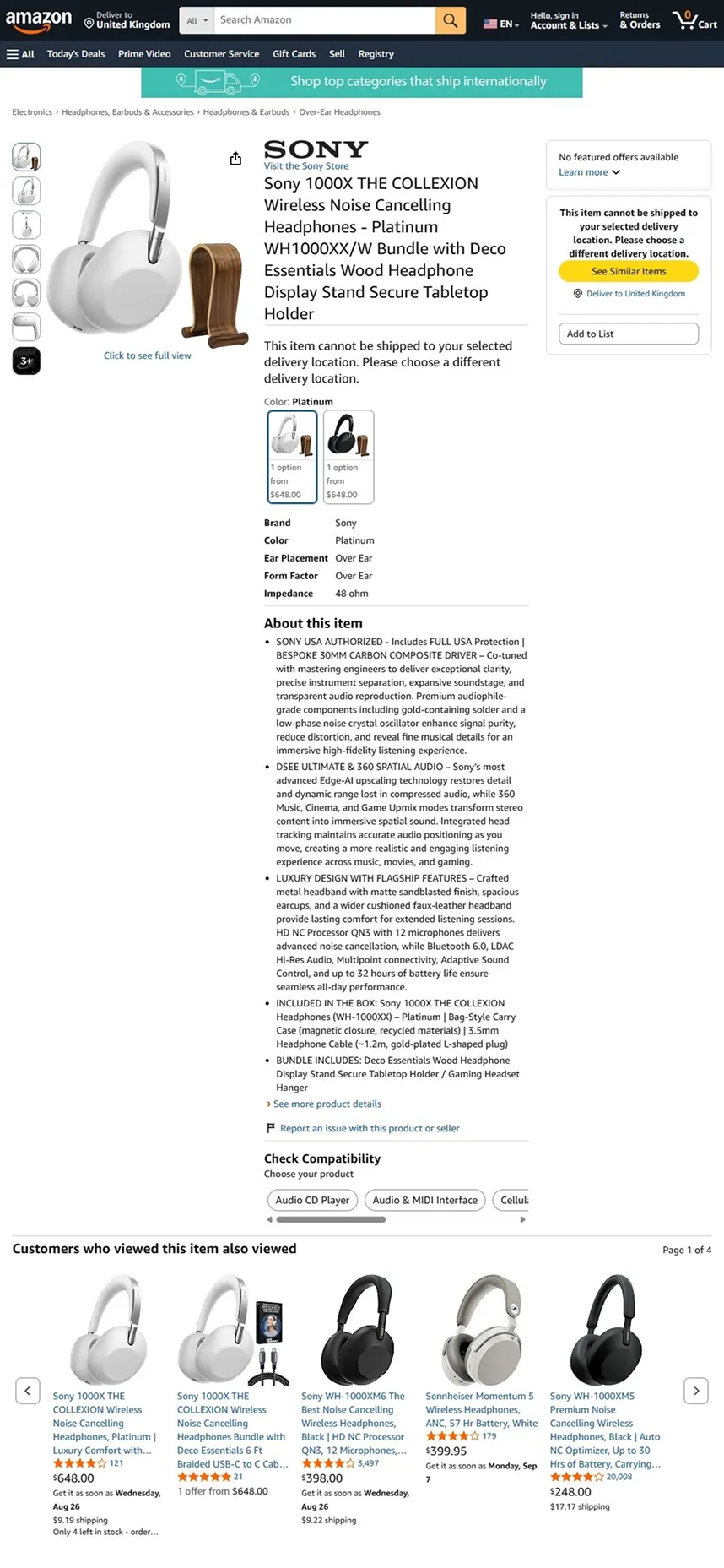
Amazon – Produktseite, gerendert von der Web-Scraping-API
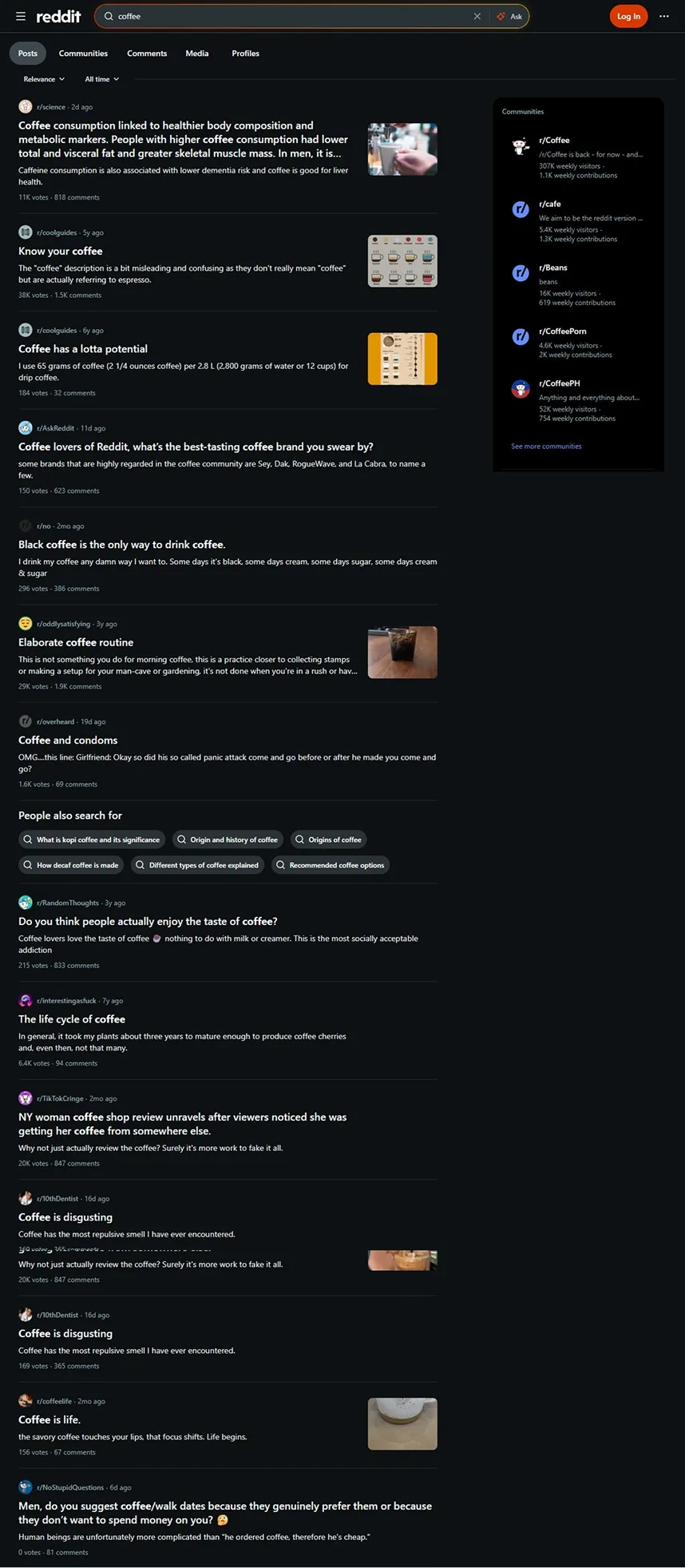
Reddit – Community-Beiträge, gerendert von der Web-Scraping-API
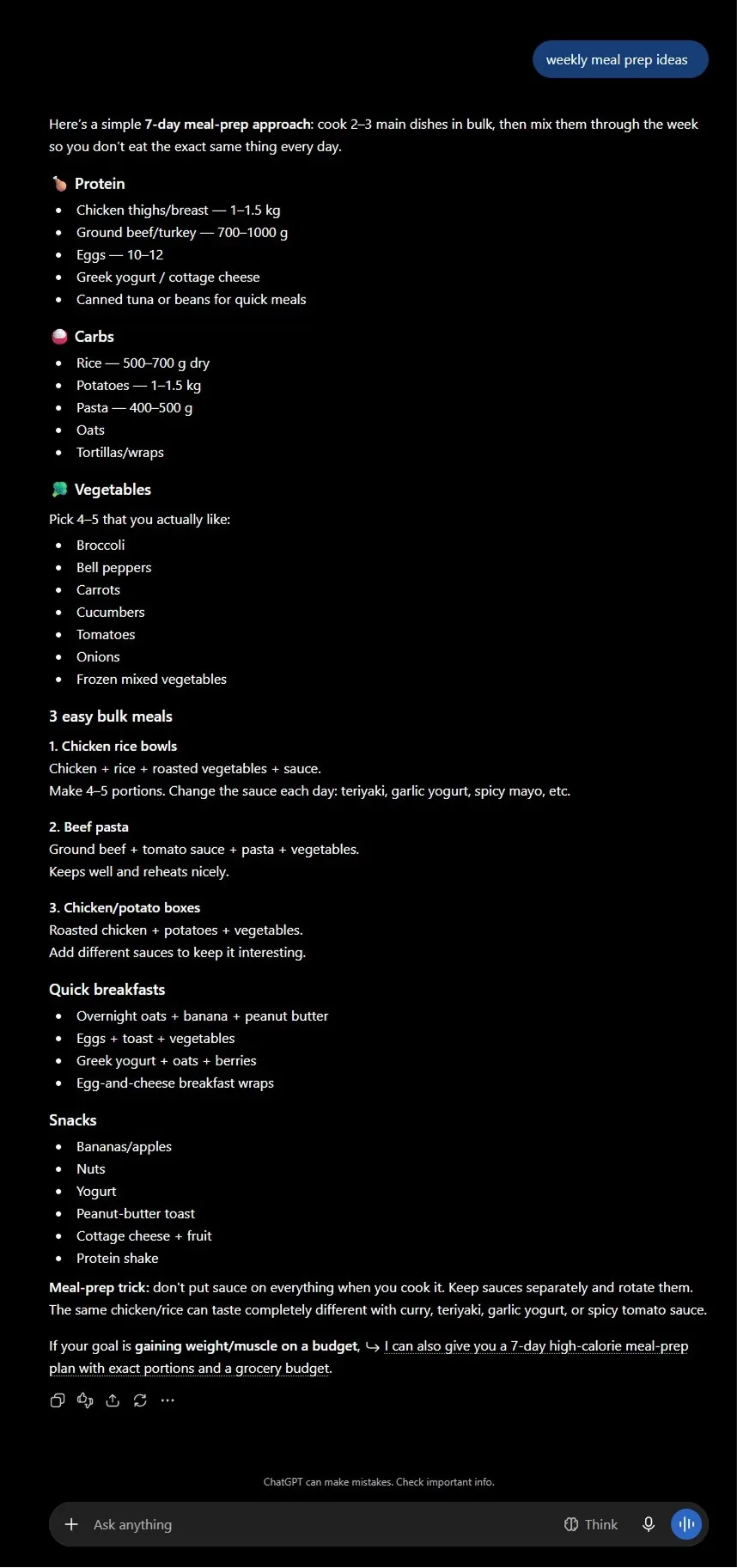
ChatGPT – KI-Antwort, gerendert von der Web-Scraping-API
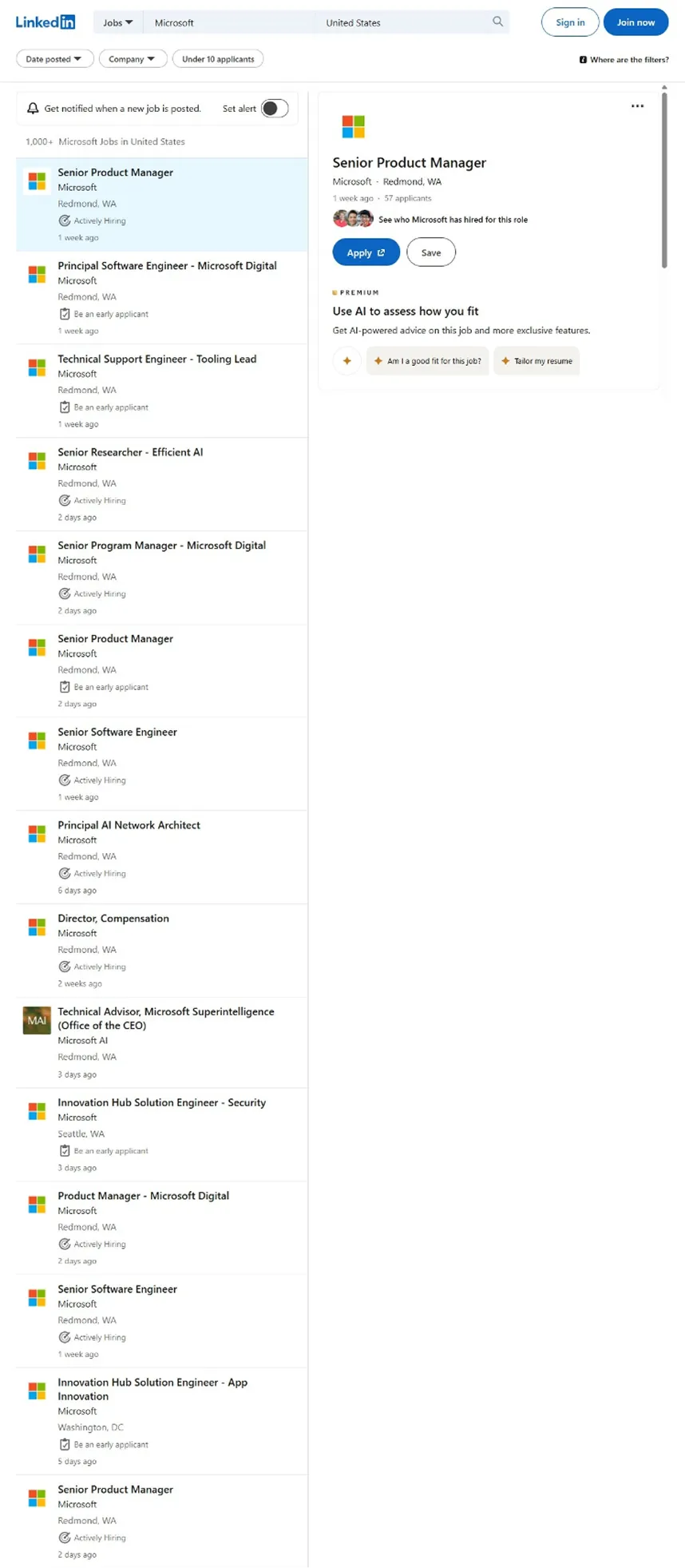
LinkedIn – Stellenanzeigen, gerendert von der Web-Scraping-API
99.9% Erfolgsquote
195+ Länder, Städte & ASNs
HTML · JSON · TXT Ausgabeformate
24/7 Support

Alle Gründe für die Web-Scraping-API von Floppydata

Erschließen Sie jede Website, automatisieren Sie das Scraping und bleiben Sie Anti-Bot-Systemen mit unserem branchenführenden Funktionsumfang einen Schritt voraus.

Automatische CAPTCHA-Lösung

Website-Blockaden und Anti-Bot-Systeme mühelos umgehen.

Challenge-Protokoll
Cloudflare-Challenge ✓ gelöst
reCAPTCHA v3 ✓ gelöst
Rate-Limit 429 ✓ wiederholt

Rendering in einem echten Browser

Lädt Seiten wie ein echter Browser, sodass dynamische Websites vollständige Daten liefern. Powered by Floppydata.

Roh-HTML
<div class="product">
  <h1>SuperFast Laptop</h1>
  <span class="price">
    $1,299.99</span>
  <div class="rating"
    data-value="4.8">_
Geparstes JSON
{
  "name": "SuperFast Laptop",
  "price": 1299.99,
  "currency": "USD",
  "rating": 4.8
}
Globales Geo-Targeting

Globales Geo-Targeting

Greifen Sie auf Webinhalte aus über 195 Ländern, Städten und ASNs zu.

JavaScript-Rendering

JavaScript-Rendering

Extrahieren Sie Daten aus dynamischen und JavaScript-lastigen Websites.

Intelligente IP-Rotation & Wiederholungen

Intelligente IP-Rotation & Wiederholungen

Automatische Rotation und Wiederholungslogik halten große Aufträge stabil.

Persistente Sessions & Cookie-Verwaltung

Persistente Sessions & Cookie-Verwaltung

Halten Sie Sessions stabil für mehrstufige Abläufe und die Datenextraktion in angemeldeten Bereichen.

Eine Plattform für jeden Anwendungsfall

E-Commerce

Datenerfassung als fortlaufender Prozess statt als einmalige Aktion: Preise, Sortiment und Produktseiten werden zu geordneten, strukturierten Datensätzen.

  • Preise und Sortiment überwachen
  • Produktkataloge erstellen
  • Wettbewerber analysieren
Kostenlos testen
99.9% Erfolgsquote
195+ Länder, Städte & ASNs

Marketing

Behalten Sie Wettbewerber und wichtige Seiten im Blick: Die API kümmert sich um Blockaden, CAPTCHAs und Anti-Bot-Systeme, während Ihr Team die Inhalte erhält.

  • Wettbewerber analysieren
  • Änderungen auf Websites verfolgen
  • Inhalte erfassen
Kostenlos testen
195+ Länder, Städte & ASNs
24/7 Support

Fintech

Eine stabile Webdaten-Pipeline für Analytics und BI – zuverlässige Leistung auch bei hoher Last.

  • Änderungen auf Websites verfolgen
  • Datensätze aufbereiten
  • Preise und Sortiment überwachen
Kostenlos testen
99.9% Erfolgsquote
24/7 Support

Marktforschung

Wandeln Sie ungeordnete Seiten in geordnete, strukturierte Datensätze um – bereit für Analytics, BI oder maschinelles Lernen.

  • Datensätze aufbereiten
  • Inhalte erfassen
  • Preise und Sortiment überwachen
Kostenlos testen
HTML · JSON · TXT Ausgabeformate
195+ Länder, Städte & ASNs

Nahtlos kompatibel mit jedem KI-/ML-Workflow und jeder Dateninfrastruktur

Setzen Sie Floppydata in Pipelines für das Modelltraining, Scraping-Agenten, Browser-Automatisierung, ETL-Jobs und Analyse-Stacks ein – ohne zu ändern, wie Ihr Team datenintensive Workloads bereits ausliefert.

Wie funktioniert die Scraping-API?

Statt direkt auf die Website zuzugreifen, wird die Anfrage an die Scraping-API gesendet, die dann mit der Zielressource interagiert. Das verringert das Risiko von Einschränkungen und macht den Prozess planbar.

Ein typischer Ablauf sieht so aus:

  1. 1 Sie übergeben die URL und die Parameter
  2. 2 Die API verarbeitet die Seite
  3. 3 liefert die Daten in einem praktischen Format zurück
  4. 4 die Informationen gelangen sofort in die Data-Ingestion-Pipeline.
Aufgabenablauf
$ POST /v2/web-data/fetch {"url": "…", "countryCode": "US"}
✓ queued · task_id=9f3a
→ fetching via US residential IP
→ solving Cloudflare challenge… ok (1.2s)
→ rendering JavaScript… ok
✓ 200 OK — 214 KB received
→ parsed → JSON delivered to your pipeline

Erfordert das Projekt Skalierung, wird die Web-Crawling-API angebunden, die Links folgen und Daten aus mehreren Ebenen einer Website erfassen kann. Für die Automatisierung großer Datenmengen kommt eine leistungsfähige Datenextraktions-API zum Einsatz, die ungeordnete Seiten in geordnete, strukturierte Datensätze umwandelt.

So entsteht eine stabile Webdaten-Pipeline, die sich in Analytics, BI oder maschinellem Lernen einsetzen lässt.

Wo die Webdaten-Extraktions-API zum Einsatz kommt

Die moderne Webdaten-Extraktions-API ist nicht bloß ein Parsing-Tool, sondern ein Baustein der digitalen Infrastruktur.

Innerhalb des Unternehmens wird eine solche Daten-Scraping-API zum Bestandteil der gesamten Webdaten-Plattform. Die Informationen werden automatisch gespeichert und für Reporting oder Prognosen genutzt.

Für Projekte mit hoher Last wird die Crawling-API gewählt, mit der Sie viele Seiten gleichzeitig verarbeiten können.

Worauf Sie bei der Wahl von Web-Scraping-Lösungen achten sollten

Bei der Wahl von Web-Scraping-Lösungen sollten Sie nicht nur auf die Geschwindigkeit der Anfrageverarbeitung achten. Stabilität und Vorhersagbarkeit des Ergebnisses sind deutlich wichtiger.

Berücksichtigen Sie dabei:

  • Unterstützung für dynamische Seiten
  • Skalierbarkeit
  • Transparente Preise der Web-Scraping-API
  • Verfügbarkeit einer kostenlosen Web-Scraping-Testphase
  • Übersichtliche Dokumentation

Lässt sich das System ohne aufwendige Anpassungen in eine bestehende Webdaten-Pipeline integrieren, ist das ein guter Qualitätsindikator.

Kostenlose Web-Scraping-Testphase 5 erfolgreiche Scrapes

Pläne & Preise

Sie zahlen nur für erfolgreiche Datenextraktion – keine Überraschungen, keine versteckten Gebühren.

Testphase Kostenlos 5 erfolgreiche Scrapes Kostenlos testen
Basic $9 10.000 erfolgreiche Scrapes Testen
Enterprise Individuell Auf Ihre Anforderungen zugeschnitten Team kontaktieren

Einfach zu starten, noch einfacher zu skalieren

  1. 1

    Legen Sie die Ziel-URL fest und binden Sie die API mit nur einer Codezeile an

  2. 2

    Passen Sie die Crawl-Parameter an und fügen Sie Ihre eigene Logik mit Python oder JavaScript ein

  3. 3

    Rufen Sie Website-Daten als Markdown-, Text-, HTML- oder JSON-Dateien ab

Dokumentation lesen
Live-Beispiel · X-API-Key nötig
fetch('https://api.floppydata.net/v2/web-data/fetch', {
    method: 'POST',
    headers: {
        'X-Api-Key': 'YOUR_API_KEY',
        'Content-Type': 'application/json'
    },
    body: JSON.stringify({ url: 'https://example.com' })
});
requests.post(
    'https://api.floppydata.net/v2/web-data/fetch',
    headers={
        'X-Api-Key': 'YOUR_API_KEY',
        'Content-Type': 'application/json'
    },
    json={'url': 'https://example.com'}
)
curl -X POST https://api.floppydata.net/v2/web-data/fetch \
  -H "X-Api-Key: $API_KEY" \
  -H "Content-Type: application/json" \
  -d '{"url": "https://example.com"}'

Häufig gestellte Fragen

Was genau ist Web-Scraping?

Web-Scraping ist die automatische Erfassung von Webseiten. Das System erhält den Code der Website und extrahiert die benötigten Informationen zur weiteren Verwendung.

Ist das Scraping einer API legal?

Die Erfassung offener Daten ist in der Regel erlaubt, wichtig ist jedoch, die Nutzungsregeln der jeweiligen Website und die geltende Gesetzgebung zu beachten.

Wie verwendet man eine Scraping-API?

Dazu genügt es, eine HTTP-Anfrage mit der gewünschten URL an die API zu senden. Der Dienst verarbeitet die Seite und liefert die strukturierten Daten zurück.

Was versteht man unter Daten-Scraping?

Daten-Scraping ist der Vorgang, Daten aus dem Web zu erfassen und zu speichern, damit sie später geprüft, genutzt oder in ein System integriert werden können.