Romanian Proxies – Overview
Romanian proxies are a must for anyone who’s trying to access geographically restricted content or websites within the country. However, if great performance and high trust scores are your only priority, Romania remains worthy of consideration. Due to the country’s robust fiber-optic and 5G infrastructure, Romania provides fast and stable connections (average speeds reaching up to 230 Mbps) alongside high trust scores for residential and mobile IPs. Romania ranks among the top 10 countries with the fastest Internet connection worldwide. For Eastern European users Romanian proxies often provide very low ping.
Overall, Romanian proxies are a great choice for data-heavy tasks like large-scale data scraping or real-time activities like gaming. In this article we’ll go over how to get a Romanian IP address using Floppydata’s Proxy Generator, what settings your proxy consists of, and everything you need to know about those settings.
Proxy Romania Configuration
Floppydata’s greatest advantage is the service’s Proxy Generator that embeds all routing instructions into one username. This username, a.k.a. the proxy URL string, then holds and controls your proxy settings and defines the route of your request. The settings include:
- IP type
- Country
- City
- Rotation
- Protocol
Many other advanced providers will have you jumping through hoops (looking through convoluted guides; searching for parameters in different parts of the dashboard; selecting, or even assembling, proxies manually) to acquire an IP address. This not only unnecessarily overcomplicates your workflow but often results in mistakes that drain your time and wallet.
Floppydata utilizes one clean dashboard tab where it automatically configures the proxy string based on your chosen parameters – your IP is ready to use within seconds. Thus, the Proxy Generator provides a simpler setup, fewer errors, and faster onboarding.
Username Structure
First, let’s establish what your proxy string consists of and how each setting affects your routing configuration.
The URL string follows a simple format that’s comprised of:
a (base credential) and a chain of [smart parameters]
(USERNAME)-[PARAM1-VALUE1-PARAM2-VALUE2...]Once you’ve chosen all the necessary routing settings, you will get a username string that looks something like this:
user-123-type-residential-session-123-country-RO-city-Craiova-rotation-10Translated into common English, this means:
Use residential proxies, route through Romania, narrow to Craiova, rotation interval – every 10 minutes.
Parameters & Credentials
Your proxy string will change based on routing instructions because each parameter adds a layer to the routing logic and Floppydata embeds said instructions directly into the URL. Now, let’s break down the string and identify how each parameter affects your IP.
1. User-123
The first parameter is your username – a base credential and your main account identifier. The username is very important because it’s used by the server to check if you’re authorized to use the service.
Once you sign into Floppydata’s dashboard, the service will generate a unique username for your profile. Later on you can create additional usernames with your own name tags that will help you tell them apart. This is extremely helpful if you want to create distinct proxy pools or if you have several teammates working on one dashboard.
2. Type
This smart parameter defines what type of IP will be used for your proxy and, in turn, what your connection will be routed through. If this parameter is omitted, the default is ‘residential’. There are four available values:
| Parameter | Value | Example |
| type | residential | user-123-type-residential |
| type | mobile | user-123-type-mobile |
| type | datacenter | user-123-type-datacenter |
| type | isp | user-123-type-isp |
Every IP type comes with its own pros and cons. For example, datacenter proxies are the most affordable option that provides amazing speed and success rate but suffers from low trust scores, which makes them prone to blocks by anti-bot systems. On the other hand, mobile proxies are rarely detected and banned by websites, their disadvantage lies in variable speed and high price point.
If you don’t want to waste your time and money it is extremely important to match the proxy type to your use case – determine your tasks in advance, then choose the best suitable type of connection for the project.
3. Session-123
This parameter is an ID of your session that tells the server to keep you connected to the IP you’re using. Here, the value is automatically generated – a unique code for each proxy. Combined with rotation set to 0 (i.e. keep IP) it enables sticky sessions. In this case, to change your proxy without modifying other smart parameters, all you need to do is write in a different value after ‘session’.
4. Country
Here, you define the exit node i.e. the country you’re connecting to. For example, if you want to get a Romanian IP address in Netherlands – the exit node that you put in your proxy URL is Romania (RO), the Netherlands (NE) would be the entry node.
It’s important to note that the values for this parameter are written as two-letter country codes similar to internet domains.
| Parameter | Value | Description | Example |
| country | US | United States | user-123-type-residential-session-123-country-US |
| country | RO | Romania | user-123-type-mobile-session-123-country-RO |
| country | FR | France | user-123-type-isp-session-123-country-FR |
Country-level targeting is a crucial smart parameter since it’s the main reason users resort to proxies – changing their digital geographic location from the comfort of their own home. Accurate targeting helps with bypassing geo-restrictions and tasks where localization plays a key role – scraping, SEO, social media and account management, or ad verification.
5. City
For the most precise geo-targeting, Floppydata offers deeper levels of localization with ‘city’ and ‘asn’ smart parameters. Inside the United States, the service also supports state-level targeting.
Here, the values are written as full names of the cities, underscores are used instead of spaces. If this parameter is omitted, the values will be assigned at random within the chosen country.
| Parameter | Value | Description | Example |
| city | New York | United States | user-123-type-residential-session-123-country-US-city-New_York |
| city | Suceava | Romania | user-123-type-mobile-session-123-country-RO-city-Suceava |
| city | Lyon | France | user-123-type-isp-session-123-country-FR-city-Lyon |
Marketplaces, search engines, and even regular websites scan all data off of your IP and, more often than not, change their content based not only on the country of your request but also on the city of connection. For software QA ASN-level targeting is used to test the system’s performance across internet providers.
In case your tasks (such as market research, SEO or SERP scraping, ad verification) require maximum geographic accuracy, this parameter is a must.
6. Rotation
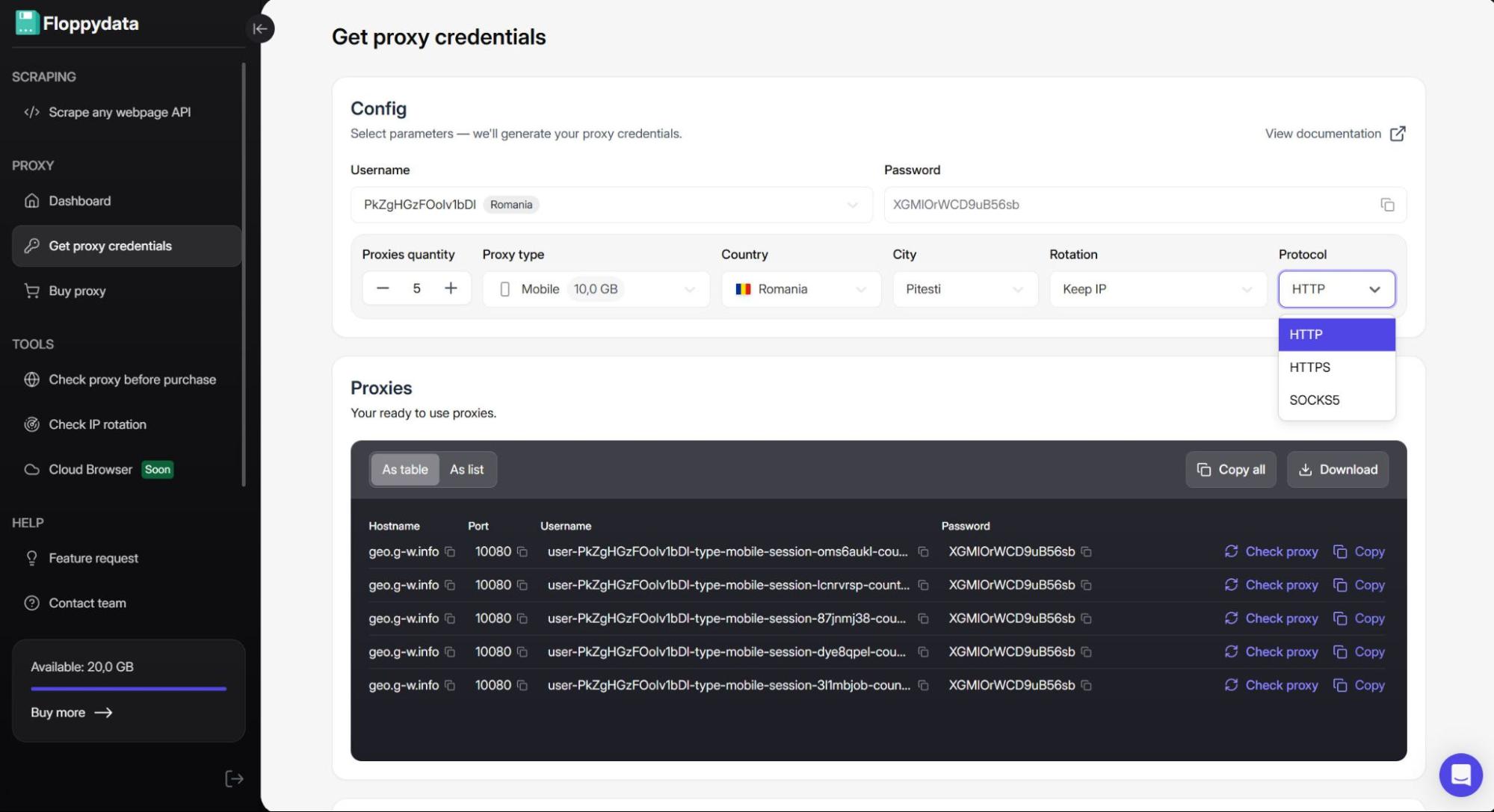
This smart parameter controls how long the server keeps you connected to one proxy before “jumping” to the next on the list. In the dashboard you can choose to keep your IP as long as possible, rotate upon each request, or change proxies once every 5, 10, 15, 20, or 60 minutes.
Note that omitting this parameter will set the proxy to rotate on each request. Embedded into the URL string, the values are:
| Description | Parameter | Value | Example |
| Keep IP | rotation | 0 | user-123-type-residential-session-123-country-US-rotation-0 |
| On each request | – | – | user-123-type-mobile-session-123-country-RO |
| Every 5 minutes | rotation | 5 | user-123-type-isp-session-123-country-FR-rotation-5 |
| Every 10 minutes | rotation | 10 | user-123-type-datacenter-session-123-country-DE-rotation-10 |
| Every 15 minutes | rotation | 15 | user-123-type-isp-session-123-country-RU-rotation-15 |
| Every 20 minutes | rotation | 20 | user-123-type-mobile-session-123-country-BB-rotation-20 |
| Every 60 minutes | rotation | 60 | user-123-type-residential-session-123-country-EG-rotation-60 |
Rotation is a great setting that helps you automate session intervals and is important for both users who need to change their IPs regularly (for data scraping or parsing, ad verification, arbitrage, SEO monitoring) and those who require strict control over sticky sessions (social media management, banking and fintech, video streaming and gaming).
Connection Details & Authentication
There are a couple of additional credentials that define your connection from a more technical standpoint – those credentials are called connection details. To explain further, the username string we’ve talked about in the previous section defines how your IP functions, while connection details specify where your IP is situated on the Internet and which “door” the proxy needs to go through to find its destination.
Floppydata allows you to get connection details separately from the username string or in a form of one complete URL with following formats:
- Protocol://Username:Password@Hostname:Port
- Hostname:Port:Username:Password
- Hostname:Port@Username:Password
- Username:Password:Hostname:Port
In this case “Username” is the full proxy string we’ve configured in the previous section. The final result should look something like this:
http://user-123-type-residential-session-123-country-RO-city-Craiova-rotation-10:[email protected]:100801. Hostname
Each address on the Internet has a numerical IP, often long, hard to remember, and even harder to manage. That is why many servers use designated names and leave it to your computer to translate it back into the numerical address.
Ultimately, the hostname is a standard connection detail that serves as a label for the proxy server (or a collection of different servers) you’re connecting to. Floppydata’s servers use ‘geo.g-w.info’ as their hostname.
2. Port & Protocol
Proxy protocol is a set of rules that defines how the data is packaged and sent between your device, the proxy server, and the destination site.
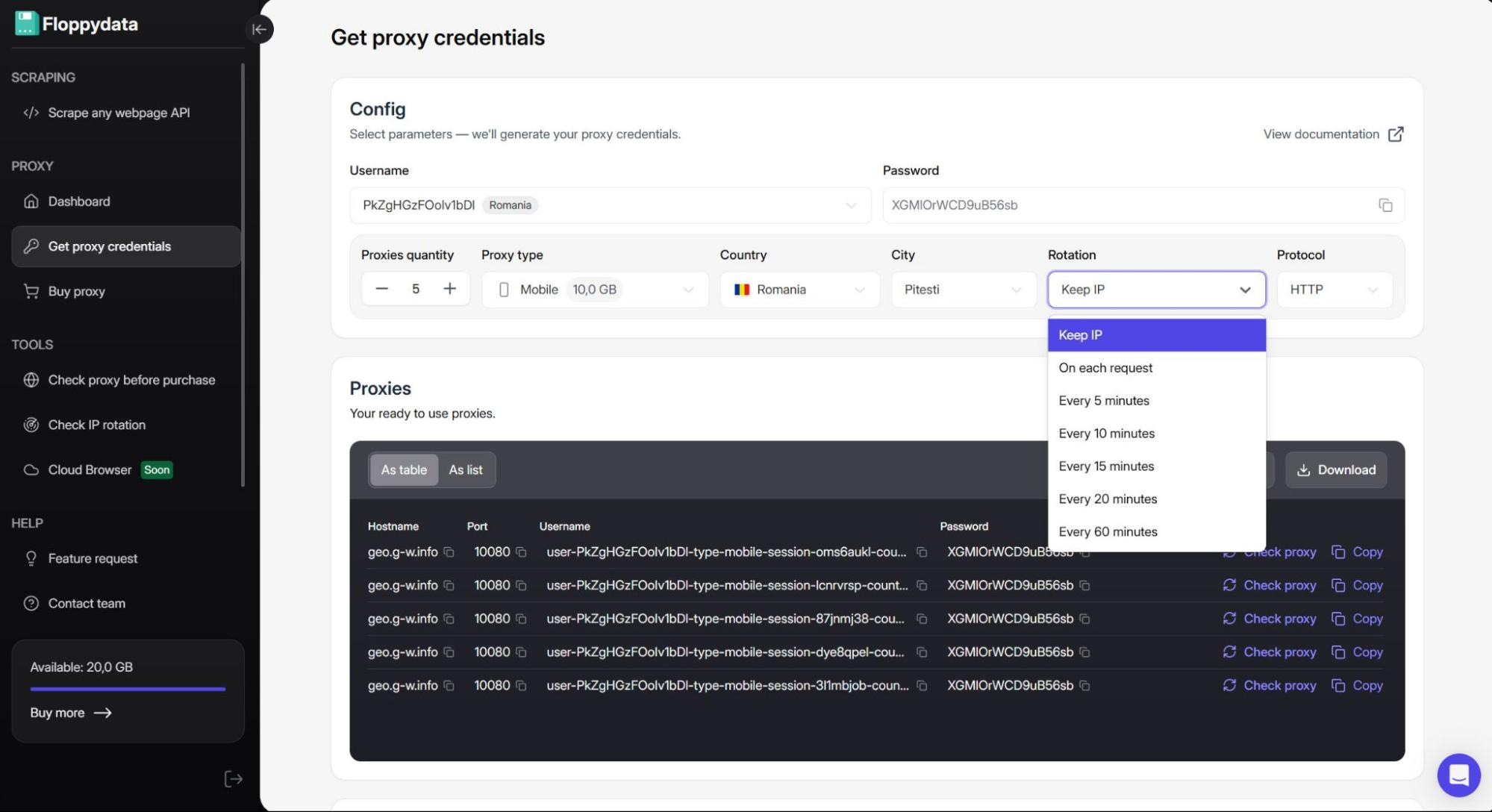
The nature of this credential suggests that it’s worth paying attention to – the chosen protocol determines how well your data and IP information are encrypted while also affecting the success of connection and the performance of your proxy itself. Floppydata supports 3 most popular protocols:
- HTTP: The most common and easy-to-use protocol designed for web browsing at high speed. On the downside, this protocol lacks encryption. Best fit for large-scale web-scraping and automation.
- HTTPS: An encrypted version of HTTP. This protocol is great for web-related tasks that require secure data transmission like online payment.
- SOCKS5: Also known as Socket Secure protocol, it supports various types of online traffic and provides the best encryption. It performs great with heavy data transfers (video streaming, downloading, P2P sharing) and is suitable for tasks that require proxying several different protocols (gaming, VoIP, Telegram).
In most cases the protocol is set via its designated port number which is just another way to tell the proxy server which type of connection to use. For the available protocols Floppydata assigns following ports:
- Port 10080 for HTTP proxies
- Port 10443 for HTTPS proxies
- Port 10800 for SOCKS5 proxies
3. Password
The password is the authentication credential that proves to the host that you’re authorized to use the bandwidth connected to your account and access the server. Typically, the password is directly paired to your account’s username.
In Floppydata’s case, a unique password is randomly generated alongside each username – if you add a user in the dashboard, the service will create both username and password for said user.
How to Get a Romanian IP Address: Step-by-Step
Now, as we’ve established what each credential does to the IP, let’s move to Floppydata’s dashboard and get your ready-to-use proxy string.
Step 1:
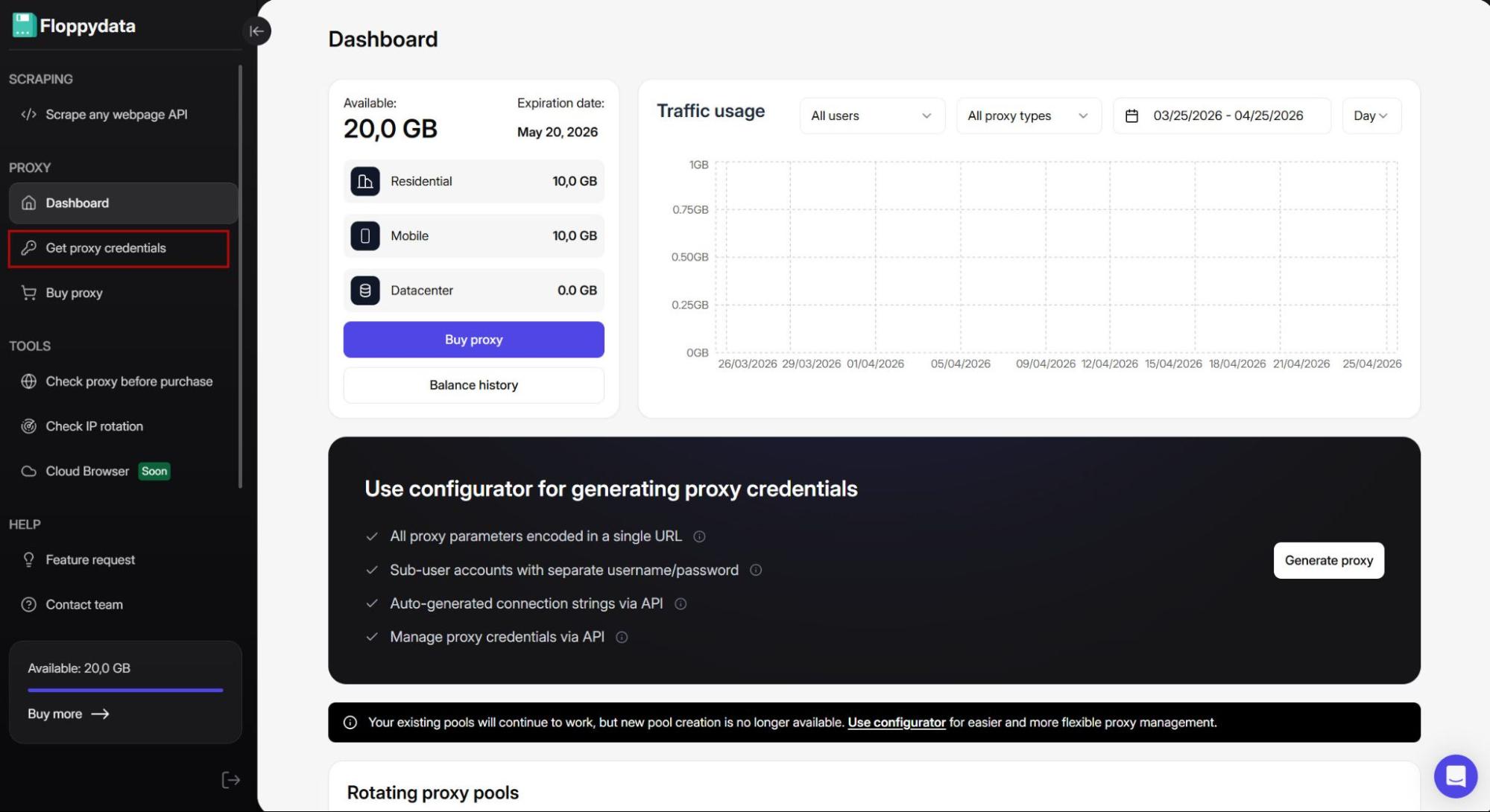
Once you log into your account, you will be met with the main page of the dashboard that contains your traffic usage and available bandwidth. Look at the panel on the left and click the “Get proxy credentials” tab to access the Proxy Configurator.
Step 2:
Even if you’ve just signed up for the service, you’ll find that the username and password are already generated for your account. I will add another user which will serve as a dedicated pool for my Romanian proxies.
Step 3:
Right under the username are the smart parameters Floppydata uses to configure the proxy string. The first parameter you see is the “Proxies quantity”.
The name is pretty self-explanatory – this feature allows you to add up to 100 IPs to your proxy pool using the same routing instructions for each IP. If later you’d want to modify the settings, the changes will apply to every proxy string in your pool.
Step 4:
Next up is “Proxy type”. The settings are conveniently arranged as drop-down lists – all you have to do is find the needed value on the list and click it.
As you can see the service embeds the chosen routing instructions into the username URL automatically and does so with every available smart parameter.
Step 5:
Now, “Country”. Here, you don’t have to scroll through 195+ locations Floppydata offers, just type the country name into the box and when the needed location pops up – click on it. Same goes for “City” if you choose to add this parameter.
Step 6:
The next smart parameter is “Rotation”, choose whether you want to keep your IP as long as possible or pick an appropriate rotation interval.
Step 7:
Lastly, choose the connection type that fits your task best using the “Protocol” list.
With that your proxies are ready to use. In the field labeled “Proxies” you can organize your IPs as a list or a table, check them, and copy or download their credentials.
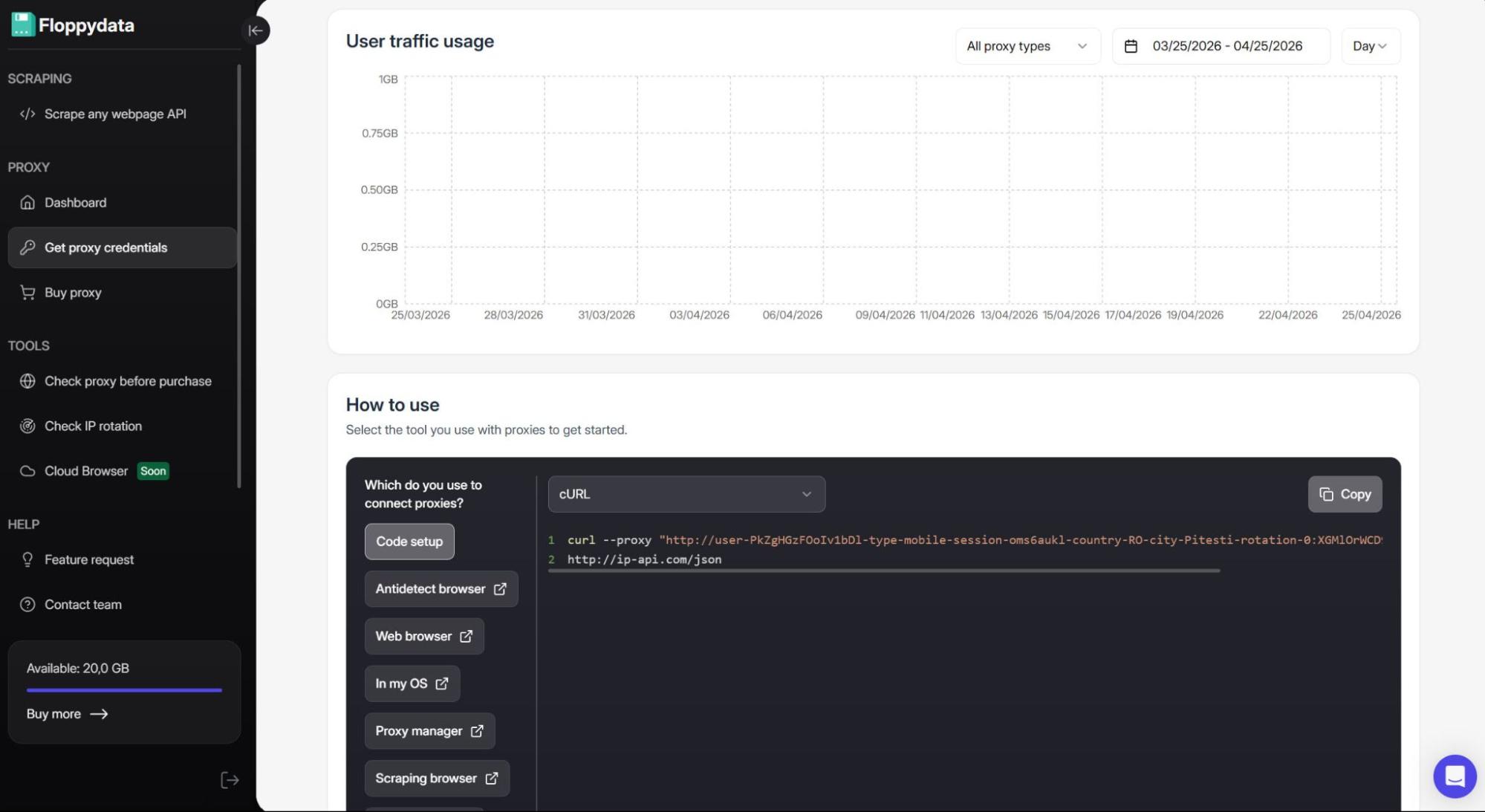
If you scroll down you’ll find two additional fields – one that tracks your traffic usage and another that contains code setup and thorough integration guides for a wide variety of tools.
Integrating Proxy Romania
The URL strings we’ve configured can be used with many different services – antidetect, web, and scraping browsers; operating systems; automation tools; and proxy managers. For extensive integration guides you can visit Floppydata’s Integrations page and search for the exact tool you’re using.
Since each service has its own unique interface and terminology may vary from one tool to another, we’ll go over the basics of where your credentials need to go. Once you understand the fundamentals, you can apply them anywhere.
Sometimes, all you have to do is just copy and paste the URL string. For example, adding a proxy in the antidetect browser Gologin takes literal seconds.
Some tools, like Foxy Proxy, might require you to input the credentials separately. In that case, simply click on the credential itself to copy it and then paste it into the respective field of the tool.
For both instances, it’s important to note that the field labeled “Username” or “Login” is where you put the entire username string and not just the code given to your account.
Checking Romanian Proxies
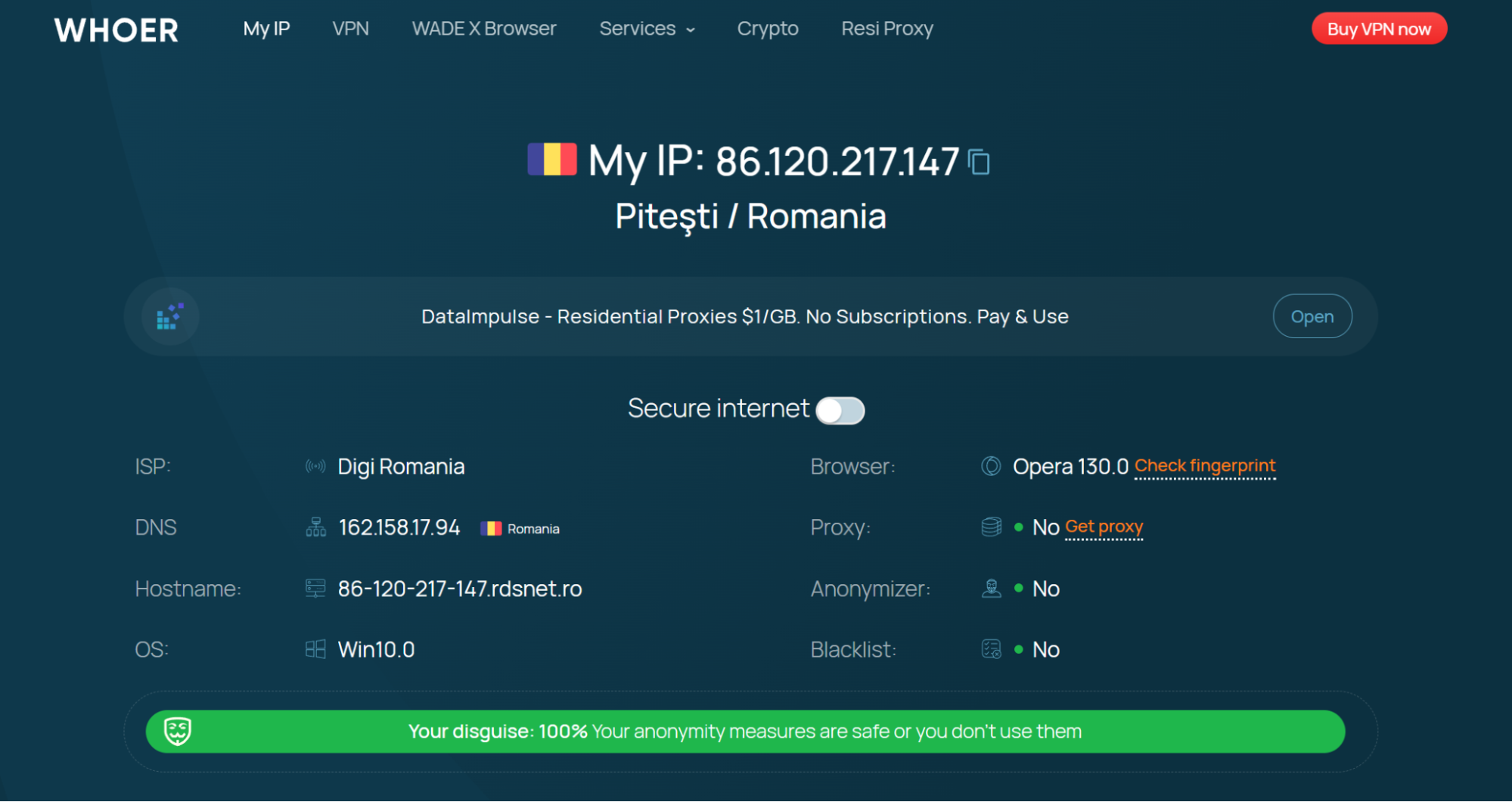
Once you’ve set the proxy up and turned it on you need to verify that your IP is actually Romanian. Although you can test your proxies right on the dashboard, it doesn’t hurt to double-check.
To make sure that your IP works correctly you can go to Whoer or any other similar proxy checking website.
Conclusion
Acquiring an IP address might feel overwhelming, especially when all those smart parameters and long unreadable URLs get involved. Hopefully, now as you understand how your proxy is configured and what it consists of, the task will get more manageable. Whether you’d like to configure your proxies manually or let the service take the reins, Floppydata’s Proxy Generator keeps the process comprehensible and stress-free, while their clean dashboard ensures that getting proxies takes you less time than reading this article.