.4UVmK5aw_1uGpNi.svg)
.AzQB9McO_PVSYK.svg)
.DjhlE8MO_Z1DYVxU.svg)
.DM2pllEO_1cxFXE.svg)
.CvN5042A_Z10D5qc.svg)
.Dcqs_gC__NRL3p.svg)

Table of Contents
- Why is my eBay account suspended for no reason?
- Temporary vs. Permanent restriction on my eBay account
- How to unsuspend eBay account: Step-by-Step
- If my eBay account is suspended, can I open another?
- How can Floppydata and anti-detect browsers keep your eBay account safe?
- Why do I use Floppydata to keep my eBay account unsuspended?
- Building a safe multi-account setup with Floppydata: step-by-step
- Conclusion
I remember one day logging into my eBay account to add a new listing when I was faced with an MC011 suspension out of nowhere.
I saw a flash of my whole business collapsing before my eyes at that moment. I was already imagining myself going broke and being back at my 9-5 job.
But luckily, I managed to get my account back by following a simple step-by-step process. I also fixed my whole setup and never experienced such a thing again.
In this guide, after I explain the reasons behind eBay account suspensions, I’ll give you all my tips and procedures to:
- Get your eBay account unsuspended the right way
- Keep your account safe with proxies and an anti-detect browser.
Let’s get into it.
TL;DRDon’t have time to read the whole guide? Here are the important things to know:
• eBay bans you based on automated risk algorithms, policy violations, if you suddenly get a spike in sales, or if it detects that you’re connecting from an IP address that has been banned before.
• The ban can be temporary, which you can easily fix by providing certain docs, or permanent.
• Don’t open a new account on the same IP address; this will cause an instant ban because eBay will detect it.
• To safely rebuild or manage multiple accounts, you must isolate both your network and hardware layers. My method is pairing Floppydata proxies with anti-detect browsers like GoLogin or 1Browser.
Why is my eBay account suspended for no reason?
eBay will never ban you for no reason. There’s always one, and they’re transparent about them in their suspension emails. Some of these reasons are:
- Automatic bans through eBay’s security systems that could ban you before a human agent ever intervenes based on subtle pattern anomalies
- Your account being linked with a previously banned or restricted user, especially via matching IP addresses
- If your account is new or has been dormant, and then you suddenly start listing high volumes and getting a lot of sales, it can trigger an automatic fraud prevention control
- Logging in through commercial VPNs and rapidly shifting geographic locations can flag security protocols
- Listing trademarked, copyrighted, or high-risk brand items
- If you have a lot of unresolved buyer disputes and item-not-received cases, this would make eBay brand new as well
- You could be faced with a standard MC011 precautionary hold that requires identity verification and supplier invoices or proof of inventory before account functionality is restored
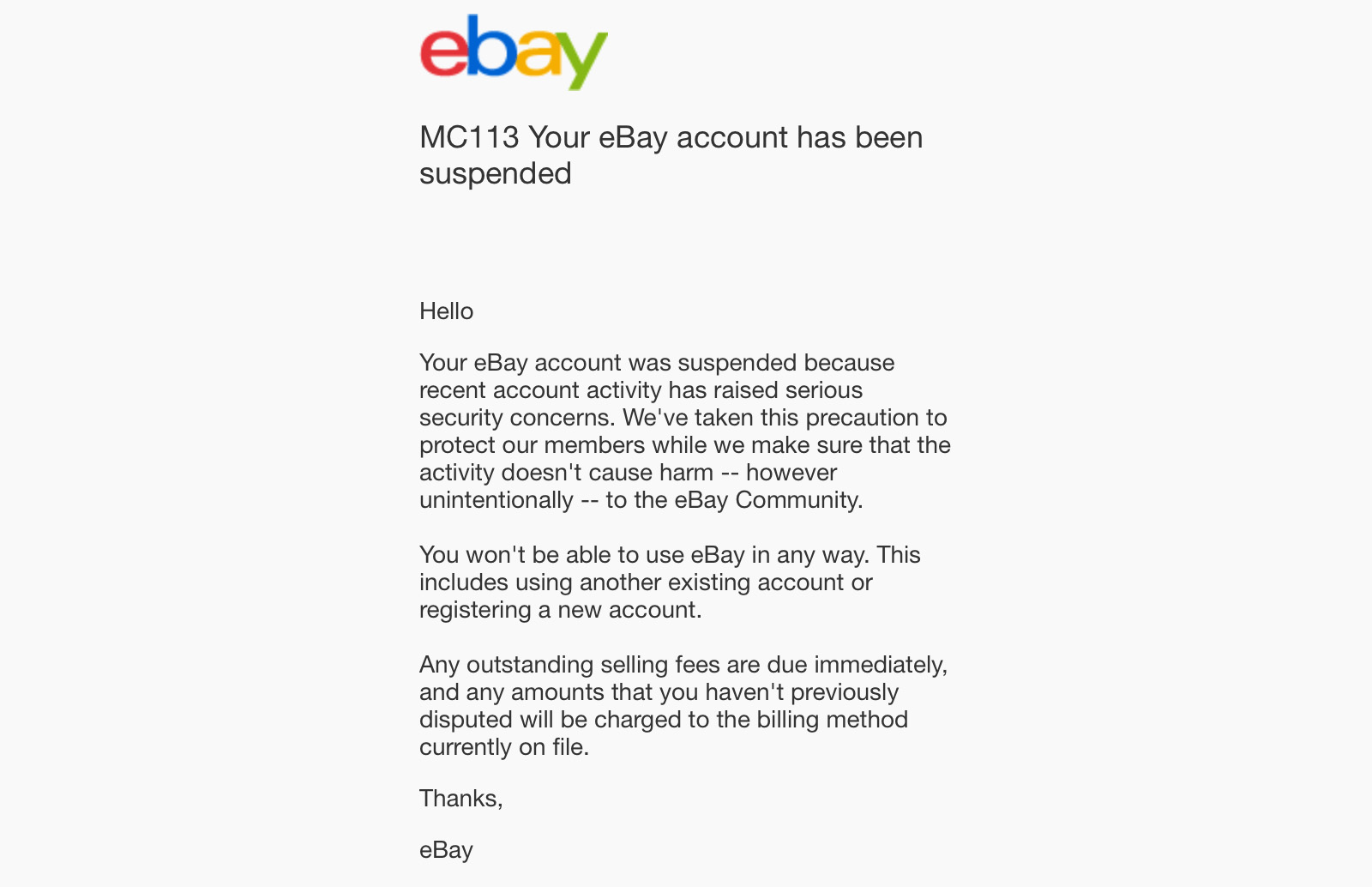
Here’s an example of an MC113 suspension email:
Temporary vs. Permanent restriction on my eBay account
Sometimes you’re banned forever, and sometimes you’re banned for only a few hours to a few weeks. Here’s how these two types of penalties compare:
| Feature | Temporary Restriction | Permanent Suspension |
| Typical Duration | 7 to 30 days | forever |
| Listing Status | Placed lower in search or hidden | All active listings removed immediately |
| Payouts | Held only until issues resolve | Held for 30-60 days |
| Account Linking | Low risk to your other stealth accounts | High risk of instant bans for linked accounts |
| Reinstatement | High once the core issue is fixed | Extremely low unless a formal appeal succeeds |
How to unsuspend eBay account: Step-by-Step
Here’s how you can get your account back in 5 steps:
- First, carefully read the eBay email that they have sent you. Notice the exact policy violation you have made and the case ID because you will need to reference them in your appeal
- Then gather all your evidence in a single folder and all your documents, including your government ID, a recent utility bill, and supplier invoices. Make sure every name and address on these documents perfectly match your eBay account.
- Then fix the root cause before you send your appeal. For example, if you owe them money, pay them immediately and refund any buyer cases you have, and upload any missing tracking numbers. Just solve any problem that might cause the declining of your appeal.
- Now you can write your appeal; make it short and keep it professional
- Then finally, you can submit through the link provided in your original suspension email, upload your docs in clear PDFs, and follow up if they don’t respond within 72 hours
If my eBay account is suspended, can I open another?
Short answer: Not with the same IP address and setup.
The reason behind this is that when eBay banned you, it’s not just your email address that has been banned. It’s your whole digital identity, which includes your IP address, your browser, fingerprint, and your physical hardware details as well.
If you keep the same setup and try to register again, you’ll get detected and suspended immediately by an automatic system.
But what if you clear your cookies, activate incognito mode, and use a VPN?
It still won’t work.
So what’s this solution? You actually need a completely new, isolated digital environment if you want to start fresh and avoid a linking trap.
You can, for example, change your device by buying a new laptop/phone, change your internet service provider, move to a new house…etc.
Or, you can use Floppydata proxies paired with an anti-detect browser. And this will take only 5 minutes of your time.
How can Floppydata and anti-detect browsers keep your eBay account safe?
There are two main ways you can use proxies to protect your eBay e-commerce business:
-
Creating a new account with a new digital identity
The goal is to make sure eBay security algorithms see you as a regular person browsing from home. And if you’re someone who has been banned, then your IP address will be on eBay’s black list, so you have to get yourself a new identity.
To do that, you have to change your IP address first. That’s where Floppydata comes in.
It’s a proxy provider that will give you an IP address that you can use instead of your real one.
A VPN does exactly the same thing, but I will always urge you to use a proxy instead because eBay probably knows every VPN’s server and will flag it immediately the moment you connect with it.
However, if you use a proxy from Floppydata, you’ll be using an IP address that is sourced from a real physical home Internet connection, and to eBay, you will look like a regular person sitting on their couch in a house in Ohio or London.
That’s the goal.
-
Creating multiple eBay accounts
Relying on just one account is a massive risk in 2026 because eBay can ban you just because you got a sudden spike in sales.
However, running multiple stores from one IP address is even riskier. So, you need other IP addresses to create multiple stores, and a good anti-detect browser where you can create a separate profile for each store.
Why do I use Floppydata to keep my eBay account unsuspended?
You can use any proxy provider you want, but I personally prefer Floppydata because it offers a huge pool of over 65 million IPs across 195 countries. This means you have the choice to get an IP address that matches your physical billing address.
I specifically use their static residential proxies, which are ethically sourced and can work for long hours without any leaks of my real IP.
I also like Floppydata because it provides static residential IPs that stay consistent for long periods of time, and its network can integrate easily with anti-detect browsers like Gologin and 1Browser.
Building a safe multi-account setup with Floppydata: step-by-step
Grab your laptop and follow these steps:
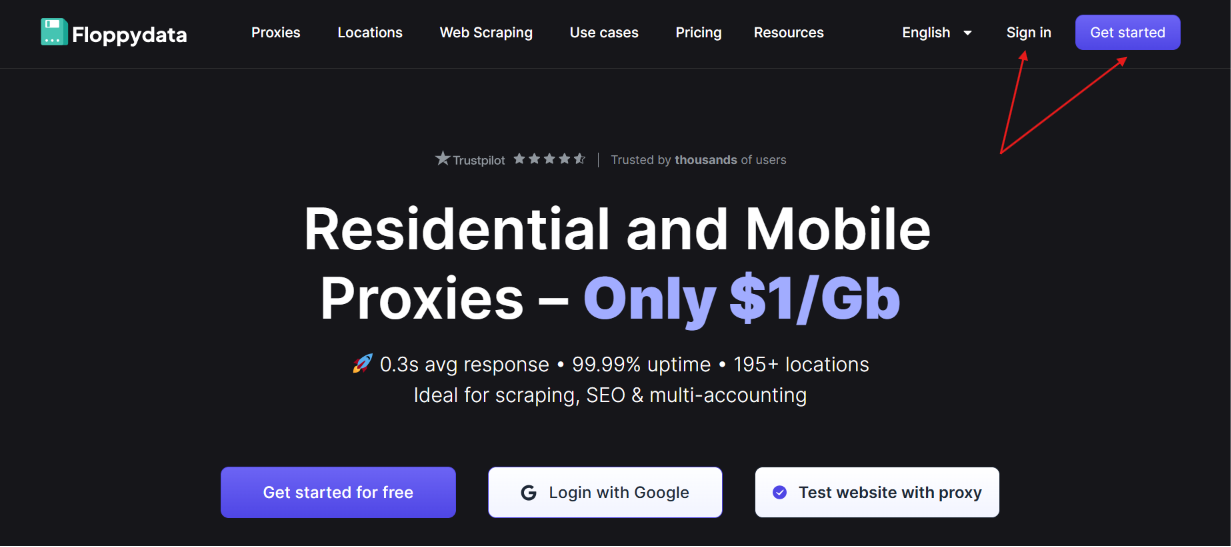
Step 1: Go to the Floppydata website and create your account if you haven’t already
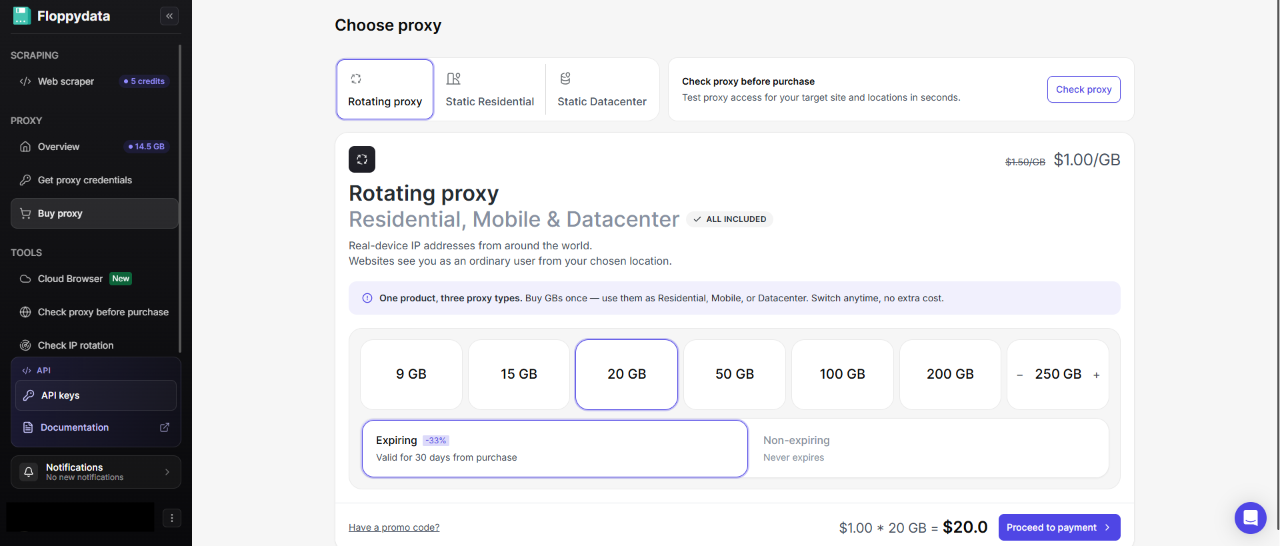
Step 2: Choose an adequate plan for your needs
Step 3: Click on the Get proxy credentials tab in the left menu, and select your desired setups from each drop-down list.
In the example image below, I chose:
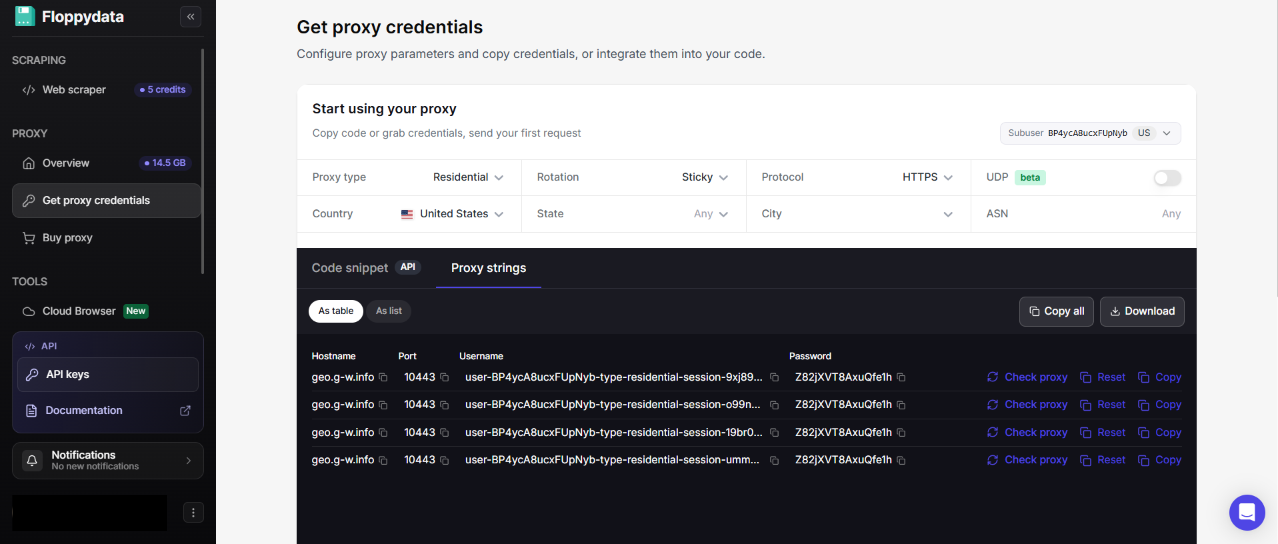
- Proxy type: Residential
- Session: Sticky
- Protocol: HTTPS
- Country: United States
And kept the rest to default.
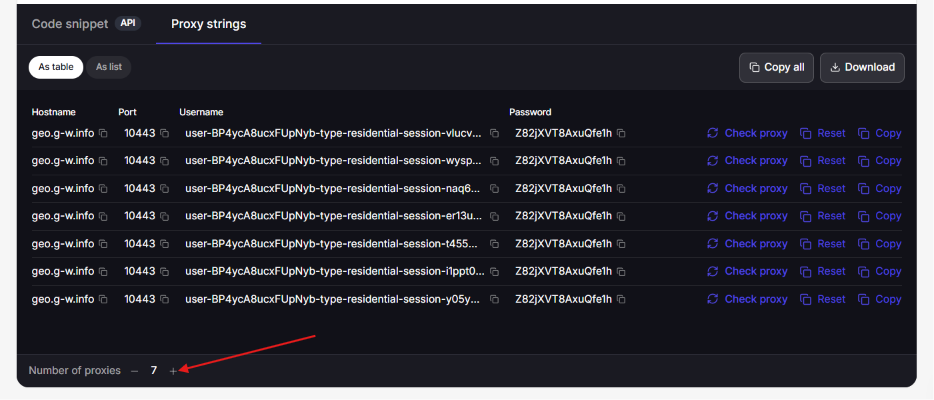
Step 4: You can add as many proxies as you want:
Here’s a guide on how to set up your Floppydata proxies with Gologin
As for 1Browser, here’s how to set up your Floppydata proxies in it:
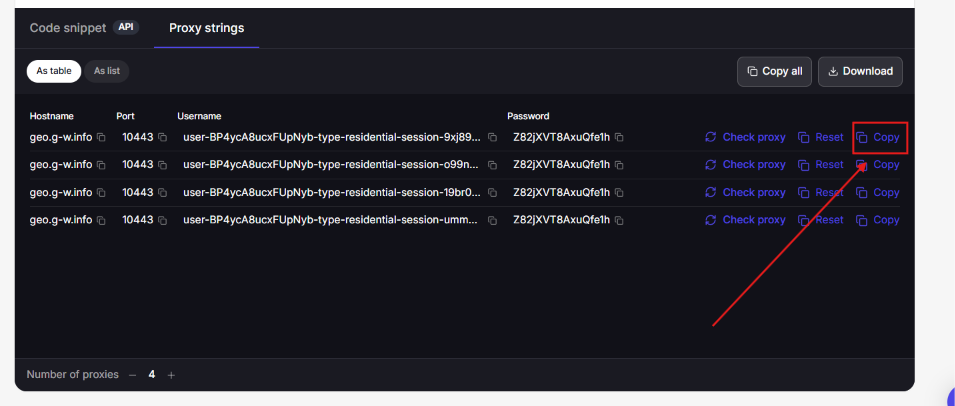
Step 1: Copy your proxy’s complete address by clicking on the copy symbol
Step 2: Download the browser through this link
Step 3: Open your account and your first profile (you can create 10 profiles for free with 1Browser)
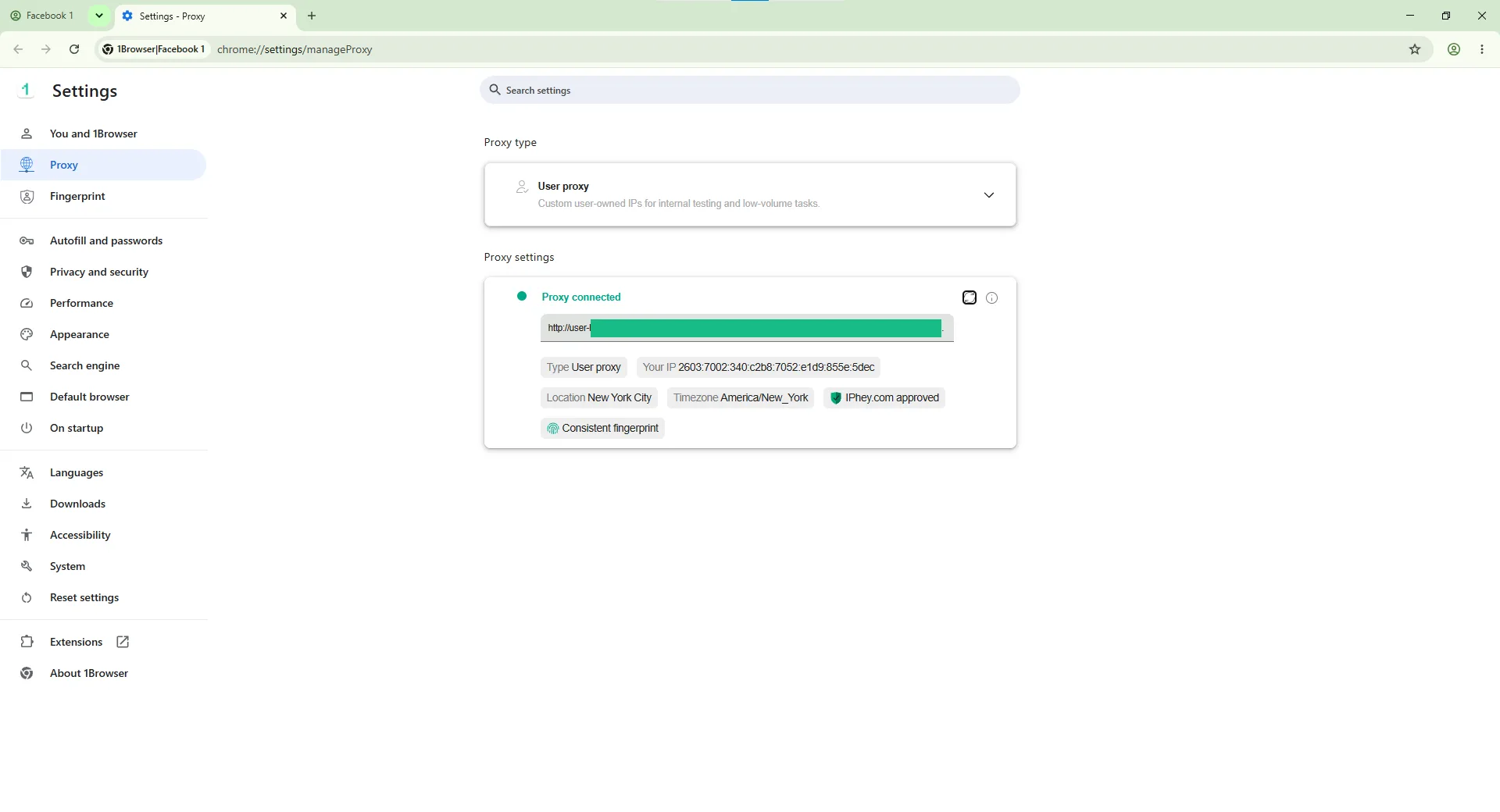
Step 4: Go to settings, specifically Proxy settings, and select User proxy. Paste your proxy information there, and click the Enter key to connect your proxy with 1Browser
Now, you can safely create your new eBay account with your new IP address.
Conclusion
In this guide, I taught you how to get your eBay account unsuspended, and I showed you how to fix the root cause using Floppydata proxies. You can use Floppydata proxies to create a new account after being suspended, or you can use multiple proxies on an anti-detect browser on different profiles to create multiple eBay accounts and avoid certain bans related to a high volume of operations on a single account.
I hope this guide was helpful. Thanks for reading!