Table of Contents
There’s no feeling worse than finding out your IP has been banned. You become unable to access your social accounts after that website blocks your IP address. It’s not always your fault that your IP got banned. But it’s really problematic for social media content creators.
I often have to monitor the social accounts of multiple clients. So I’ve seen these bans from both sides: what triggers them and how they get lifted.
This article explains what an IP ban is, why it happens and how to get it lifted the legitimate way.
Explaining the Term “IP Ban”
I remember I once had a client whose Instagram account got banned because I was careless when accessing it: too many logins from too many places in one day, and Instagram blocked the IP…
You must have some questions in your mind at this stage. What is a IP ban? How does an IP ban work? Let me explain this concept to you and dispel some myths regarding IP address bans. It’ll help you understand what actually happens when you get IP-banned!
An IP address ban simply means that a certain IP address is blocked from accessing a site or other online services. When your IP is banned by a social site, it means that the social site has blocked all forms of communication from that specific IP; it can’t access its services anymore.
Some websites block IPs belonging to an entire country. For instance, many state-owned sites in the US block other countries from accessing them. These IP blocks are also caused by:
- Violating Terms of Service
- Engaging in spamming
- Hacking attempts
- Malicious behavior
Not all bans are permanent; some IP address bans last 24 hours, while others last many days.
I knew a friend who used to post spam, trashposting comments on a movie forum. Mods got tired of him and ultimately banned his IP. Netflix also bans people in certain countries from watching certain shows. You may now wonder what happens when you’re IP-banned.
What Happens When You Get IP Banned
Your devices are all connected to the internet and assigned a unique IP address. It acts like a digital mailing address. Websites use your IP to identify you and track your activities online. So, if your IP gets banned, this is what happens to you:
- The website adds your IP to its firewall’s blacklist
- Any requests coming from your banned IP are then denied
- You can’t access that website with your IP (or someone sharing your IP or logging in to their account from your IP)
- You’ll see messages like “Access Denied” or “Your IP has been banned”
Getting an IP Address Ban Lifted
You now understand the IP banned meaning. But how do you get an IP address ban lifted?
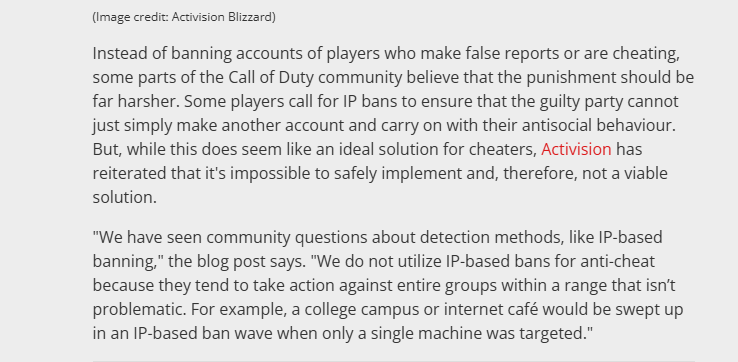
IP banning is a pretty big deal; that’s why there’s such a hullabaloo around Meta blocking IPs. Call of Duty doesn’t want to ban players’ IPs for ethical reasons! Their representative says:
“We do not utilize IP-based bans for anti-cheat because they tend to take action against entire groups within a range that isn’t problematic. For example, a college campus or internet café would be swept up in an IP-based ban wave when only a single machine was targeted.”
Often you can simply wait for the ban to expire. Like I said, IP address bans are usually 24-hour restrictions. Permanent bans are very rare. So, you need to take them seriously. For ordinary users, the legitimate ways to get a ban lifted are:
- Contacting the website blocking you
- Contacting your workplace’s IT administrator
- Explaining the whole situation and proving your ID
- Completing the site’s own verification steps
- Going to a friend’s house to check if your account is banned as well
Shared and Dynamic IPs: When the Ban Isn’t Yours
Many IP bans hit people who did nothing wrong. Your IP is shared by everyone on your home Wi-Fi, office, dorm or café network, and mobile carriers put thousands of users behind one address. If a site blocks such an address because of someone else, here is what helps:
- Contact the site’s support, say that you share the connection and ask them to review the block.
- On a work or campus network, ask the IT administrator: they can ask the site to lift the block or find the device that caused it.
- If your provider gives you a dynamic IP, a short block on an address someone used before you usually ends on its own. A static IP that was misused before is a question for your provider.
- Check your own devices for malware, which can send spam or attacks from your IP without you knowing.
IP Bans in Online Games
Game servers ban IPs too. In League of Legends, Riot handles most penalties at the account level and keeps IP and device blocks for serious cases; we explain it in League of Legends IP ban. For Roblox, see how to appeal a Roblox ban.
Valheim works differently. Its servers are run by players or hosting companies, and each server’s admin keeps their own ban list (bannedlist.txt) with a Steam ID or an IP. Common reasons are breaking the server’s rules, griefing, or frequent reconnections that the host’s protection treats as an attack. Only that server’s admin can lift a Valheim ban, so ask them, usually on the server’s Discord.
IP Bans on Forums and Imageboards
Forums and imageboards such as 4chan ban by IP because posting there needs no account. A 4chan ban page shows the reason, the board and when the ban ends, and many bans can be appealed from that page. Some blocks cover a whole range of IPs because of abuse from that network, often a mobile carrier; they are not aimed at you. Getting around a ban with a new IP breaks the rules of 4chan and most forums and usually leads to a longer ban.
Social networks have their own rules and appeal forms. For Instagram, see our guide to the Instagram IP ban.
Managing Several Client Accounts Without Mixing Them
The best setup for an agency (in my opinion) is a proxy combined with an anti-detect browser. I use Gologin, since it lets me create a separate profile for each client, with its own cookies and its own stable IP address from Floppydata. Logins of one client never mix with another’s. This keeps accounts tidy; it is not a way back into a banned account, and creating new accounts after a ban breaks most platforms’ rules.
Final Thoughts
You can think of IP address bans as online restrictions to protect digital platforms. But you need to understand how these bans are applied & how you can manage their impact. Most bans are temporary, and the legitimate way past the rest is an appeal to the site that set them.
I always use Floppydata to keep my clients’ social media accounts on stable, separate connections. You can sign up as well.
FAQ
What is an IP ban?
An IP ban blocks a specific IP from accessing a site - usually for spam, ToS violations, or suspicious activity. It denies requests from that IP until the block is lifted.
How do I get an IP ban lifted?
Wait for a temporary ban to expire, or contact the site and ask for a review, especially if you share the IP with others. Getting around a ban with a new IP or a new account breaks most sites’ rules and usually makes the ban longer.
What is a Valheim IP ban?
A Valheim IP ban blocks your IP from joining a server after rule violations or suspicious activity, stopping you from reconnecting until the server’s admin lifts it.