Introduction
PHP was one of my first languages as a web developer back in the days, and I still like using it for scraping.
This tutorial covers what I actually use in production. I’ll walk you through a complete PHP web scraping workflow using Floppydata Web Unlocker as the scraping layer.
Why Floppydata?
Because it provides a scraping API that eliminates the need to manage proxies, headers, or anti-bot logic. By the end of this article, you will have sound knowledge of how to perform web scraping with PHP.
What is PHP web scraping?
PHP web scraping is the process of using PHP code to extract data from websites. Not every site gives you an API, like Twitter does for instance, so in many cases the only way to get the information you need is to fetch the page and parse the HTML yourself.
PHP makes a lot of sense for this if you already use it every day. You can drop the scraped data straight into an existing backend, store it in MySQL, or run the scraper on a cron job without introducing another language into the stack.
The main issue is not whether PHP can scrape. It absolutely can. The real question is how well your scraper handles blocked requests, location-based restrictions, and aggressive CAPTCHAs.
That’s exactly why I pair PHP with Floppydata Web Unlocker to help bridge the gap.
PHP web scraping libraries worth knowing (2026)
PHP has plenty of scraping libraries, but honestly, I’ve settled on just a few that I actually use. Here’s a quick look at them.
- Guzzle: A solid HTTP client that handles POST requests, JSON payloads, redirects, and headers cleanly. We’ll use it throughout this tutorial to talk to the Web Unlocker API.
- Symfony DomCrawler: This lets you navigate HTML and XML using CSS selectors or XPath. When paired with the symfony/css-selector component, it gives you jQuery-style filtering that works reliably on messy HTML. It’s standalone, so you don’t need the rest of Symfony.
- Symfony HttpBrowser: This is the modern replacement for the now-deprecated Goutte library. It is built on top of BrowserKit and DomCrawler, and lets you simulate clicks, form submissions, and redirect chains. Great when your scraping logic spans multiple pages.
- DiDOM: DiDOM is a fast, zero-dependency parser with a jQuery-like API. Perfect for smaller scripts where you want to avoid pulling in Symfony components.
- Symfony Panther: Drives a real Chrome or Chromium browser via WebDriver. You reach for this when a site renders everything in JavaScript (React, Vue, heavy SPAs) and a plain HTTP request returns an empty shell. It’s heavier, so I only use it when nothing else works.
Goutte used to be a common recommendation, but it is deprecated now, so I would not recommend building a fresh project around it.
For this guide, Guzzle plus Symfony DomCrawler is enough. Because the Web Unlocker already executes JavaScript and returns the final rendered HTML, we don’t need to run a headless browser on our end.
Prerequisites
Before you write any code, make sure you have the following four things in place. If you’ve never set up a PHP project from scratch, don’t worry, I’ll walk you through every step.
1. PHP 8.2 or newer
PHP comes pre-installed on many Mac and Linux systems, but it never hurts to check. Open your terminal and check your PHP version:
php -vIf PHP is already installed, you should see a version number. For this tutorial, use PHP 8.2 or newer. That is the safest starting point with the dependency versions we are going to install.
If PHP is missing, follow along to install it:
# Windows (Chocolatey, run PowerShell as Administrator)
choco install php

# macOS (Homebrew)
brew install php
After installation, run php -v again to confirm the version. On Homebrew, you do not need separate php-curl or php-xml packages for this tutorial. Those extensions are already included with the main PHP installation.
2. Composer
Composer is the standard package manager for PHP. It’s basically the npm or pip equivalent for PHP projects. We will use it to install Guzzle and the Symfony parser packages.
First, check whether it is already available:
composer --versionIf Composer is not installed yet, use:
# Windows (Chocolatey, as Administrator)
choco install composer

# macOS (Homebrew)
brew install composer
Once that is done, composer --version should print a version number, and you are ready to create the project.
3. A Floppydata account
Create a Floppydata account and copy your API key from the dashboard. Every new account gets 5 free scrapes for the Web Unlocker.
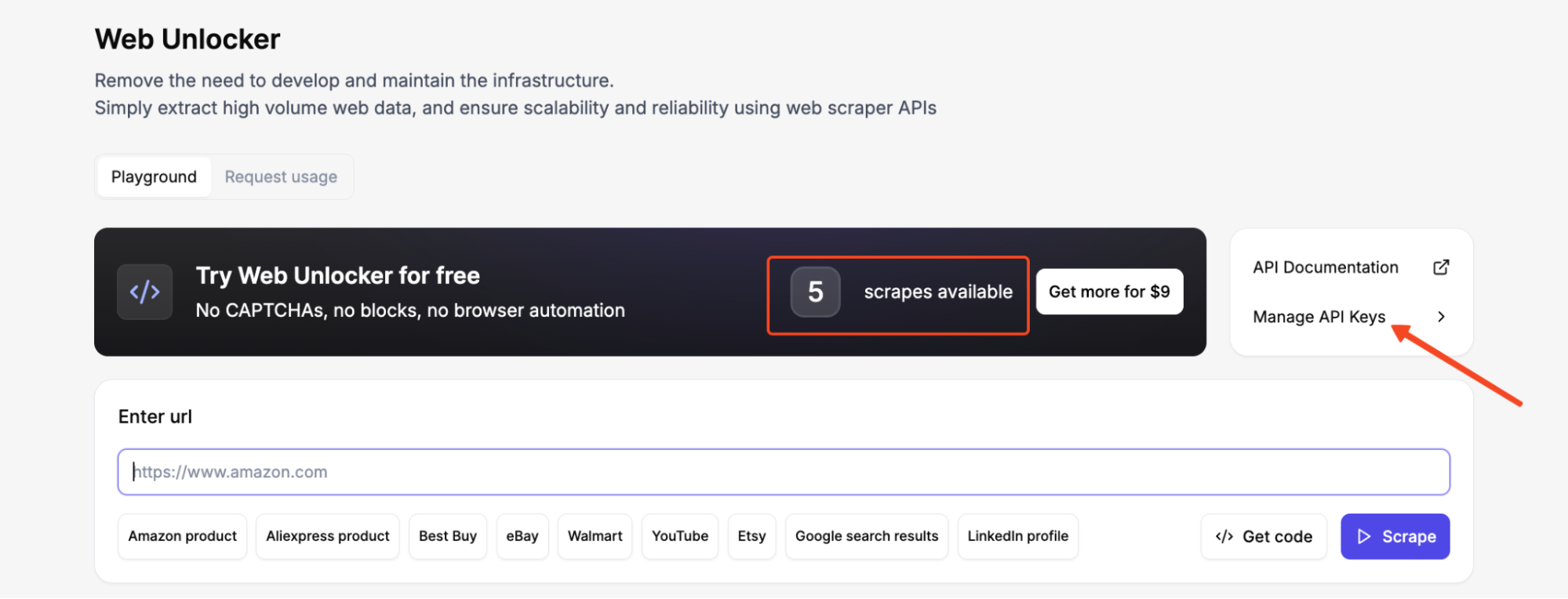
After logging into your dashboard, go to Manage API Keys in the Web Unlocker and generate an API key. Copy it immediately and store it somewhere safe.
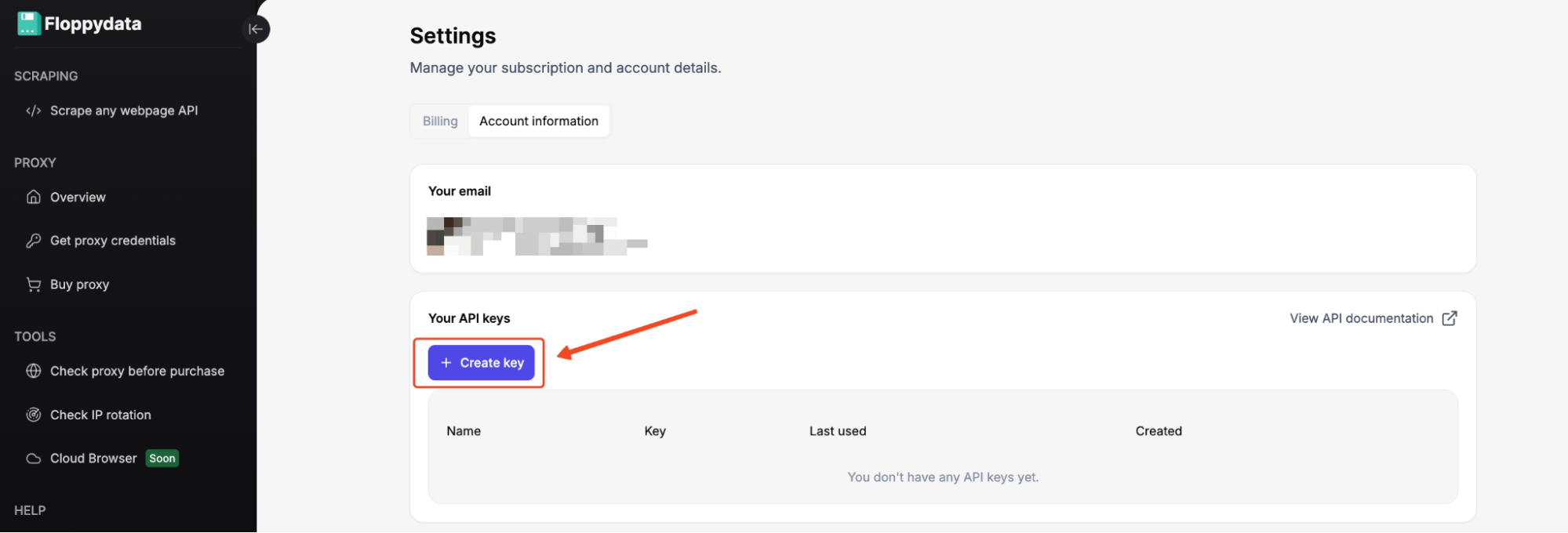
You’ll use this key in the X-Api-Key header of every Web Unlocker request. We’ll add it to our code in a few minutes.
4. Project directory and dependencies
Now let’s create the folder where our scraper will live and install the PHP libraries we need. In your terminal:
mkdir php-scrape-countries
cd php-scrape-countries
Initialize a fresh Composer project:
composer init --name="myname/country-scraper" --require="php:^8.2" --no-interactionNow install the packages we need:
composer require guzzlehttp/guzzle symfony/dom-crawler:^7.4 symfony/css-selector:^7.4Composer will download all three libraries plus their dependencies into a vendor/ folder and create a composer.json file that tracks exactly which versions you’re using.
From now on, every PHP file in the project can load the dependencies with:
require_once __DIR__ . '/vendor/autoload.php';At this point, the setup is complete, and we can move on to the scraper itself.
How to scrape data with PHP using Floppydata Web Unlocker
Step #1: Test your target
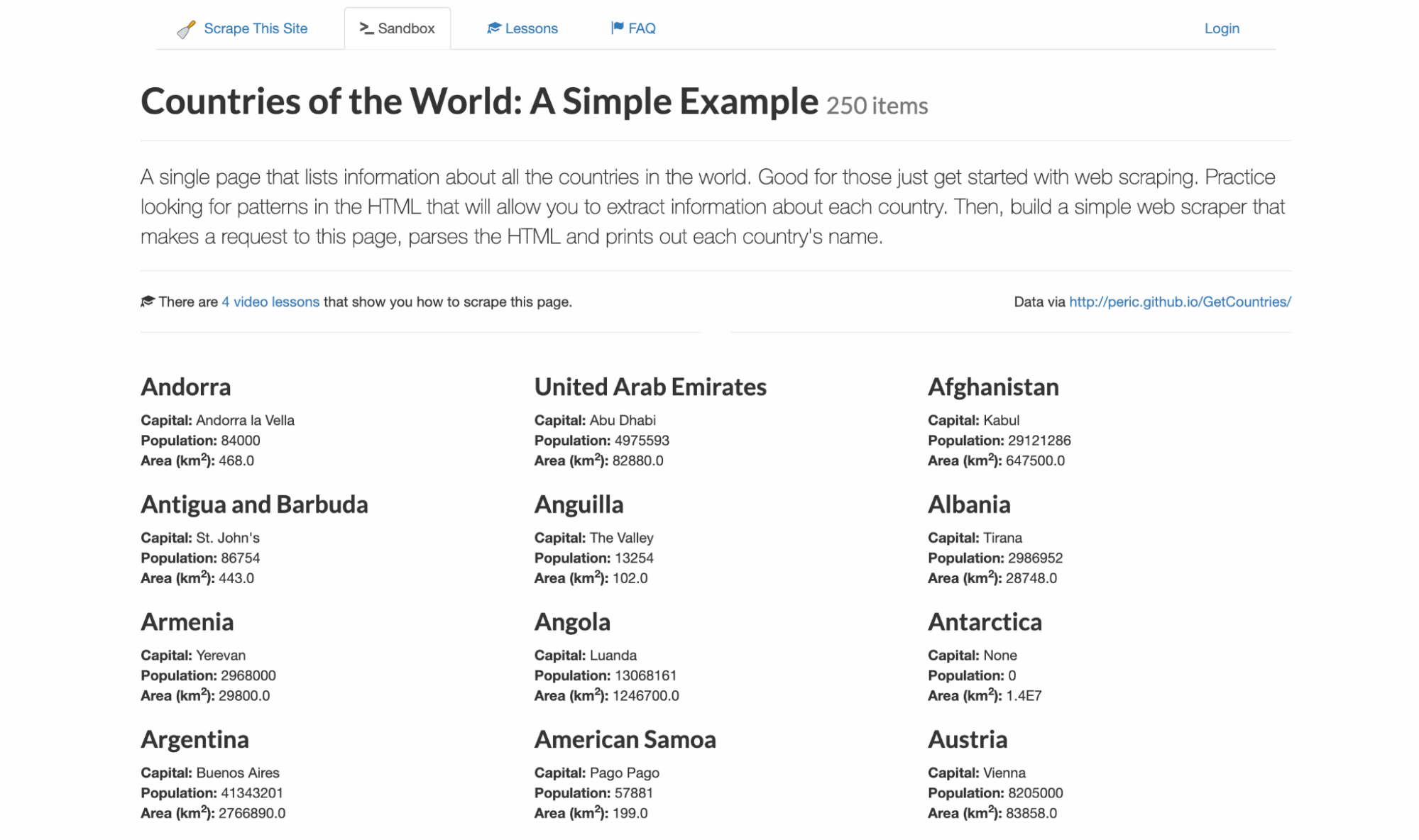
I never like writing code blind so I know exactly what selectors and data structure to expect. For this example, I’ll be targeting scrapethissite, a demo site for scraping data. It contains a listing of all 250 countries with their capital, population, and area.
To follow along, visit the Floppydata Web Unlocker Playground. This no-code tool is available right from your dashboard, and it lets you see the exact HTML the API will return without setting up a project.
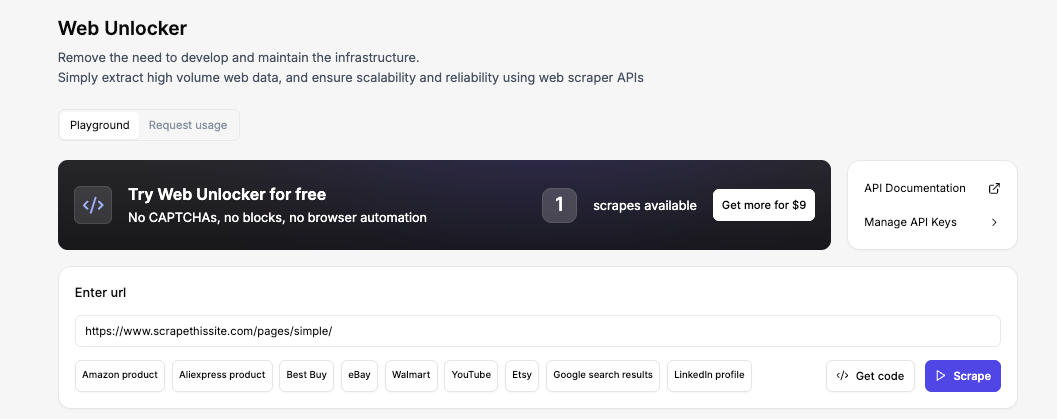
Now, enter the URL, and click Scrape. Within seconds, you’ll see the full HTML in the Output preview. That’s the exact same HTML your PHP script will receive a few steps from now.
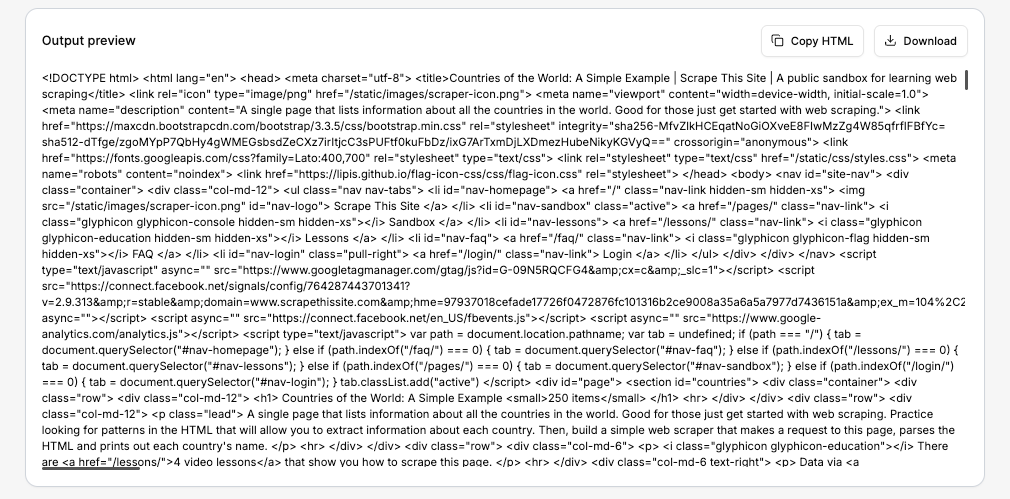
If the data looks right, you can copy the HTML or download the response. But in our case, we’ll let the PHP script do that automatically.
Step #2: Sending Your First Web Unlocker Request with Guzzle
The core of the entire workflow is a POST request to Floppydata’s endpoint:
https://client-api.floppy.host/v1/webUnlockerTo do this, we first create a Guzzle client and prepare the request configuration. Then we send the request and handle the response.
Create a file called scrape.php and start with the basic skeleton:
<?php
// scrape.php

require_once __DIR__ . '/vendor/autoload.php';

use GuzzleHttp\Client;

$apiKey = 'YOUR_API_KEY';   // Replace with your real key
$targetUrl = 'https://www.scrapethissite.com/pages/simple/';

$client = new Client([
    'base_uri' => 'https://client-api.floppy.host',
    'timeout' => 60,
]);
Replace YOUR_API_KEY with your real key. Now we build the actual POST call. We send JSON to the API endpoint, include the API key in the headers, and pass the target URL plus a few args in the body:
$response = $client->post('/v1/webUnlocker', [
    'headers' => [
        'Content-Type' => 'application/json',
        'X-Api-Key' => $apiKey,
    ],
    'json' => [
        'url' => $targetUrl,
        'country' => 'US',
        'city' => 'New York',
        'difficulty' => 'low',
        'expiration' => 0,
    ],
]);

$payload = json_decode((string) $response->getBody(), true);
$html = $payload['html'] ?? '';
echo "HTML received! Length: " . strlen($html) . " characters\n";
The country and city fields tell the Web Unlocker which geographic location to route the request through. The difficulty field controls how aggressively the unlocker handles anti-bot protections. I’m using low here because our sandbox target does not have any protection.
For protected targets behind Cloudflare or DataDome, set this to medium so the unlocker applies stronger fingerprinting and CAPTCHA-solving logic.
Now, note that the Web Unlocker returns the raw HTML inside a JSON object, which means you need to decode the JSON and pull the actual page markup from the html field.
If you forget this and treat the whole response body as HTML, your parser will break. With this, the request side is done, and we can move on to parsing.
Step #3: Inspect the page structure
After the request succeeds, the next job is to inspect the page structure and target the repeated elements that hold the data we want. Each country on the page follows this exact HTML pattern:
<div class="col-md-4 country">
    <h3 class="country-name">
        <i class="flag-icon flag-icon-ad"></i>
        Andorra
    </h3>
    <div class="country-info">
        <strong>Capital:</strong> <span class="country-capital">Andorra la Vella</span><br>
        <strong>Population:</strong> <span class="country-population">84000</span><br>
        <strong>Area (km<sup>2</sup>):</strong> <span class="country-area">468.0</span><br>
    </div>
</div>
That repeated structure is what makes this page beautifully predictable. Every country card uses the same class names: .country for the wrapper, .country-name for the heading, and .country-capital, .country-population, and .country-area for the data fields inside .country-info.
Step #4: Parsing data with Symfony DomCrawler
Because the classes are consistent across all 250 entries, we can loop through every .country element and pull the values from the child selectors. But first, let’s add a small helper function to help us clean up the text we extract:
use Symfony\Component\DomCrawler\Crawler;

function normalizeText(string $text): string
{
    return preg_replace('/\s+/', ' ', trim($text)) ?? trim($text);
}
If you look at the raw HTML, the country names have extra whitespace and newlines around them because of the <i> flag icon tags sitting inside the <h3>.
The normalizeText() function helps strip leading and trailing whitespace, then uses a regex to collapse any remaining runs of spaces or newlines so that names like Andorra or St. John’s come back cleanly instead of carrying leftover whitespace from the HTML.
With the helper ready, we create a Crawler instance and loop over each country card:
$crawler = new Crawler($html);
$countries = [];

$crawler->filter('.country')->each(function (Crawler $node) use (&$countries): void {
    $countries[] = [
        'name' => normalizeText($node->filter('.country-name')->text()),
        'capital' => normalizeText($node->filter('.country-capital')->text()),
        'population' => normalizeText($node->filter('.country-population')->text()),
        'area' => normalizeText($node->filter('.country-area')->text()),
    ];
});

echo 'Parsed ' . count($countries) . " countries\n";
DomCrawler gives us a clean way to move through the HTML using CSS selectors. We start by wrapping the HTML in a Crawler object, then filter down to every .country block on the page. Inside each block, we grab the name, capital, population, and area.
At this point, if you run the script, you should see “Parsed 250 countries” printed to the terminal.
Step #5: Export the results to CSV and JSON
Once the parser gives you a $countries array, exporting the data becomes very simple.
$csvHandle = fopen('countries.csv', 'w');

fputcsv($csvHandle, ['Country', 'Capital', 'Population', 'Area (km2)'], ',', '"', '');

foreach ($countries as $country) {
    fputcsv($csvHandle, [
        $country['name'],
        $country['capital'],
        $country['population'],
        $country['area'],
    ], ',', '"', '');
}

fclose($csvHandle);

file_put_contents('countries.json', json_encode($countries, JSON_PRETTY_PRINT | JSON_UNESCAPED_SLASHES));
The CSV export is useful because it gives readers a file they can open immediately in Excel, Google Sheets, or any other spreadsheet tool. The JSON export is just as handy if they want to feed the scraped data into another PHP script or an API later.
One small update here is the explicit escape argument in fputcsv(). On newer PHP versions, this avoids deprecation warnings and keeps the example clean when readers run it from the terminal.
Step #6: Put everything together in one script
Now that each part works on its own, here is the full script:
<?php

declare(strict_types=1);

require_once __DIR__ . '/vendor/autoload.php';

use GuzzleHttp\Client;
use Symfony\Component\DomCrawler\Crawler;

function normalizeText(string $text): string
{
    return preg_replace('/\s+/', ' ', trim($text)) ?? trim($text);
}

$apiKey = 'YOUR_API_KEY';
$targetUrl = 'https://www.scrapethissite.com/pages/simple/';

if ($apiKey === 'YOUR_API_KEY') {
    fwrite(STDERR, "Replace YOUR_API_KEY before running the script.\n");
    exit(1);
}

$client = new Client([
    'base_uri' => 'https://client-api.floppy.host',
    'timeout' => 60,
]);

try {
    $response = $client->post('/v1/webUnlocker', [
        'headers' => [
            'Content-Type' => 'application/json',
            'X-Api-Key' => $apiKey,
        ],
        'json' => [
            'url' => $targetUrl,
            'country' => 'US',
            'city' => 'New York',
            'difficulty' => 'low',
            'expiration' => 0,
        ],
    ]);
} catch (Throwable $e) {
    fwrite(STDERR, "Request failed: {$e->getMessage()}\n");
    exit(1);
}

$payload = json_decode((string) $response->getBody(), true);

if (!is_array($payload) || !isset($payload['html']) || !is_string($payload['html'])) {
    fwrite(STDERR, "Unexpected API response. Expected JSON with an html field.\n");
    exit(1);
}

$crawler = new Crawler($payload['html']);
$countries = [];

$crawler->filter('.country')->each(function (Crawler $node) use (&$countries): void {
    $countries[] = [
        'name' => normalizeText($node->filter('.country-name')->text()),
        'capital' => normalizeText($node->filter('.country-capital')->text()),
        'population' => normalizeText($node->filter('.country-population')->text()),
        'area' => normalizeText($node->filter('.country-area')->text()),
    ];
});

if ($countries === []) {
    fwrite(STDERR, "No countries were parsed.\n");
    exit(1);
}

$csvHandle = fopen(__DIR__ . '/countries.csv', 'w');

if ($csvHandle === false) {
    fwrite(STDERR, "Could not create countries.csv.\n");
    exit(1);
}

fputcsv($csvHandle, ['Country', 'Capital', 'Population', 'Area (km2)'], ',', '"', '');

foreach ($countries as $country) {
    fputcsv($csvHandle, [
        $country['name'],
        $country['capital'],
        $country['population'],
        $country['area'],
    ], ',', '"', '');
}

fclose($csvHandle);

file_put_contents(__DIR__ . '/countries.json', json_encode($countries, JSON_PRETTY_PRINT | JSON_UNESCAPED_SLASHES));

echo 'Done! Parsed ' . count($countries) . " countries.\n";
echo "Saved countries.csv and countries.json\n";
Replace ‘YOUR_API_KEY’ and run it like this:
php scrape.phpWhen everything is set up correctly, the script will fetch the page through Web Unlocker, parse all 250 countries, and write both countries.csv and countries.json to your project folder.
Viewing the results
After the script finishes, you can open countries.csv immediately. The first few rows will look like:
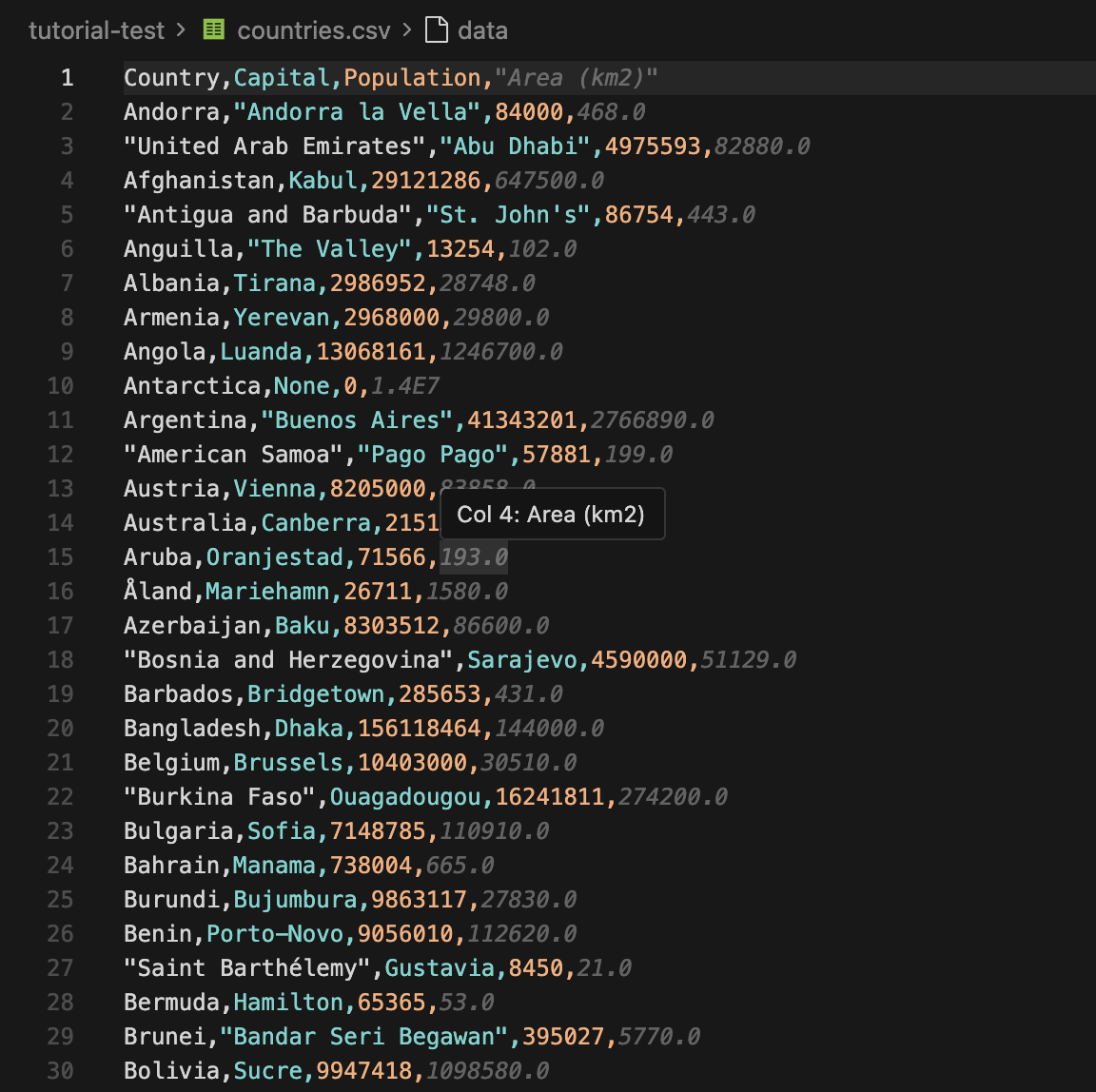
You can now import the CSV into a spreadsheet or send the JSON into another application. If you want to use this workflow for price tracking, you can pair it with Floppydata’s price monitoring proxies so do well to check that out.
Dealing with Anti-Scraping Measures
A simple, static page is not hard to parse, as we have just seen. But protected sites can be a headache.
You could run into blocks, missing data, CAPTCHAs, JavaScript rendering, or rate limits. That is where a normal PHP scraper starts to struggle.
Here are the common issues you may face:
- IP Blocking: Websites can block your IP address if they detect multiple requests coming from the same IP in a short period.
- CAPTCHAs: CAPTCHA systems are used to differentiate between bots and humans by presenting challenges that are difficult for bots to solve.
- Rate Limiting: Websites often limit the number of requests you can make in a given time frame to prevent excessive scraping.
- User-Agent Detection: Non-browser user agents get blocked because they do not look like real visitors.
- JavaScript Challenges: The content only loads after JavaScript execution, which a plain HTTP request may miss.
You can try to solve these issues manually, but that is neither convenient nor scalable.
That’s where Floppydata Web Unlocker comes in. Instead of solving each challenge yourself, you can offload the entire anti-bot layer and focus on extracting and storing the data.
Floppydata Web Unlocker handles:
- IP rotation with a large pool of residential and datacenter proxies
- Browser fingerprinting and headless browsers
- JavaScript rendering for dynamic pages
- Automatic retries and CAPTCHA solving
- Geo-targeting down to the city level
If you need more control, Floppydata also offers static residential proxies for long-session scraping and datacenter proxies for high-speed volume work.
But for most protected pages, Web Unlocker is the fastest way to get from a blocked request to parseable HTML.
Final thoughts
PHP is a very capable language for web scraping, and by now, you should have a solid foundation on web scraping with PHP.
I’ll stop this tutorial at this point since it is an introduction to web scraping with PHP. In future tutorials, we’ll expand our scraper so it can follow links, handle pagination, and scrape more complex targets.
If you’d like to learn more about web scraping in the meantime, check out these resources:
Ready to try the Web Unlocker? Get started today with 5 free scrapes and scrape anything without the headache.