Introduction
Being one of the top real estate platforms in the U.S, Zillow becomes a platform many businesses want to scrape for property data. The platform currently receives around 243 million visits per month, so naturally, it holds a huge amount of useful real estate data.
However, developers often share on Reddit how they find it hard to bypass Zillow’s firewall or get permanently blocked while trying to scrape. If you just experienced this and are looking for a stable guide that works, read on.
In this guide, I’ll show you how to extract key listing data from Zillow using Python and a simple web API.
What is Zillow Scraping?
Zillow scraping is the process of collecting publicly available real estate data from Zillow pages and turning it into a structured format, such as CSV or JSON, that you can actually use for business or personal purposes
Instead of opening listings one by one, you can use a scraper to pull the key details from search pages and property listing detail pages.
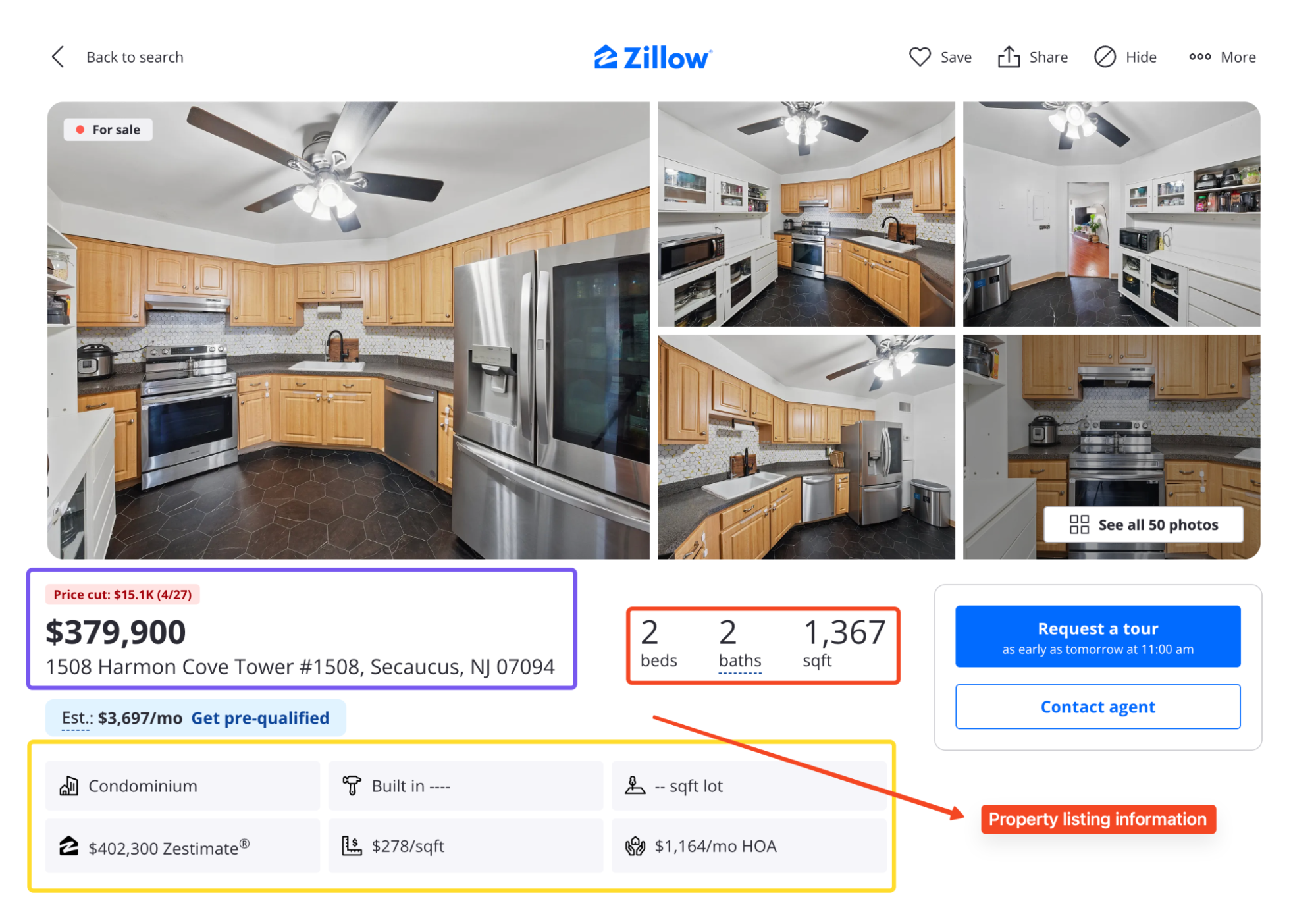
Between both pages, you can pull out:
- Price, address, beds, baths, square footage, status, and days on market
- Zestimate and Rent Zestimate
- Listing photos and broker name
- Price history and tax history
Why Scrape Zillow Data?
Imagine being able to access up-to-the-minute property listings, pricing details, and market analytics without manually opening hundreds of Zillow pages.
That is the real value of scraping Zillow.
If you work in real estate, property investment, market research, lead generation, or pricing analysis, Zillow has useful public data that can help you spot trends faster.
What Makes Zillow So Hard to Scrape?
Zillow does not go as far as some platforms when it comes to blocking bots, but it is still built to shut down traffic that does not look human.
Most scrapers fail for two reasons. Let’s look at both:
PerimeterX Protection
Zillow uses PerimeterX to detect and block bot traffic in real time. If your scraper has the wrong headers, comes from a low-trust IP, or sends too many requests too quickly, it can get flagged.
Most of the time, that flag leads to a CAPTCHA puzzle, which would break most scrapers. PerimeterX also checks many signals, including headers, browser behavior, TLS fingerprints, request speed, and IP reputation.
If the traffic feels automated, the scraper may never reach the actual listing data.
So even if you render the page in a headless browser, that does not guarantee success. You still need high-quality proxies, clean sessions and realistic request behavior.
That is why I prefer using Floppydata’s Web Unlocker for scraping Zillow.
Unstructured HTML and No Stable Selectors
Parsing Zillow can also be as frustrating as getting past its defenses. There are almost no consistent class names, IDs, or data attributes in the page source.
Elements that look simple, like the price or address are wrapped in generic <div> tags or have no identifiers at all.
Even worse, class names change often and don’t follow any pattern. So you have to use flexible matching (like keyword-based find() or even regex) to pull data from raw text nodes.
This makes Zillow one of the most unstable sites to scrape if you’re relying on static selectors.
Extract Listing Information from Zillow With Python
For this guide, I’ll target Zillow’s Boston search results page, which contains multiple property listings. From there, we can extract fields like price, address, beds, baths, square footage, status, and listing links.
Note: Zillow pages change often. If the Boston page looks different by the time you read this, go to Zillow, search for any city or neighborhood, copy the results URL, and replace it in the code.
Let’s start with the setup:
Prerequisites
You will need three things before starting:
- Python 3.10 or higher installed on your machine
- A Floppydata account with an API key for the Web Unlocker
- Two Python libraries: requests for HTTP calls and beautifulsoup4 for HTML parsing
If you do not have a Floppydata account yet, sign up at floppydata.com and grab your API key from the Web Unlocker dashboard.
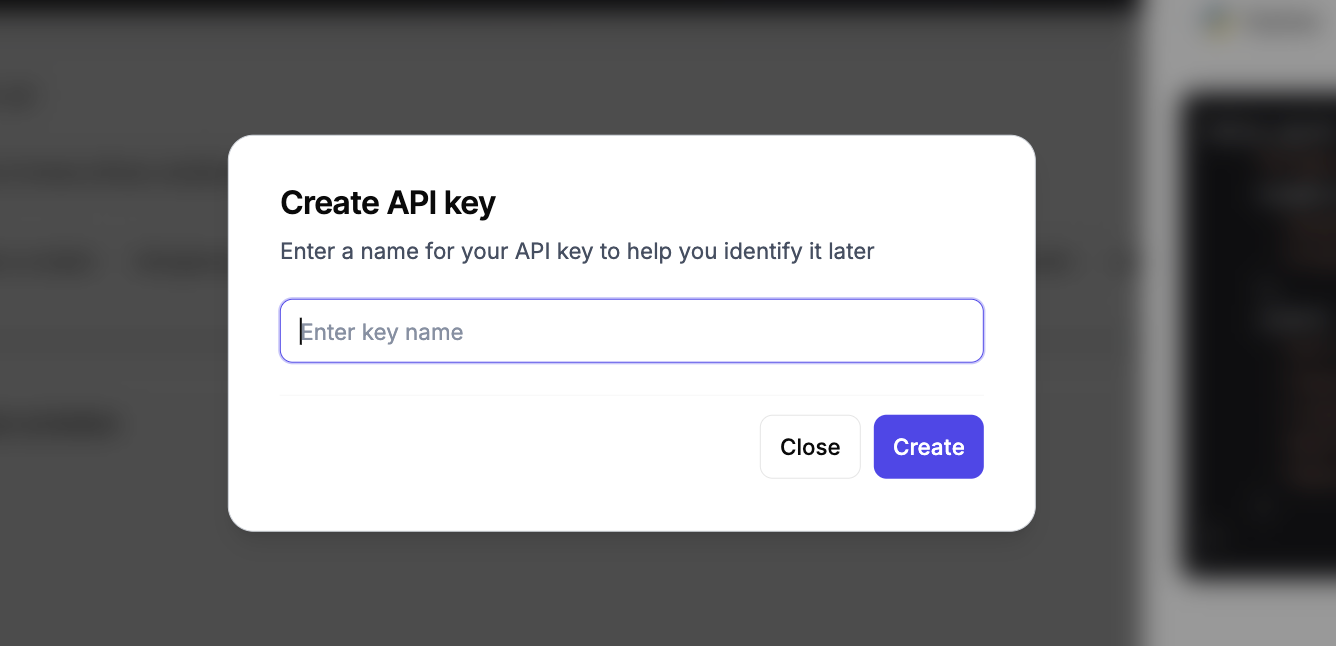
New accounts come with five free scrapes, so you can follow this entire tutorial without paying anything.
The requests library typically comes pre-installed, but you can just run this command to ensure it’s properly installed:
pip install requests beautifulsoup4Once that is done, create a new project folder and file:
mkdir zillow-scraper
cd zillow-scraper
touch zillow_scraper.py
Now, you are ready to go.
Sending the First Request
The first thing most people try is a normal Python request. That usually looks like this:
import requests

url = "https://www.zillow.com/boston-ma/"
response = requests.get(url)

print(response.status_code)
print(response.text)
But when I tested this, it did not even take two tries, as my very first request came back blocked. I got a 403 response with a PerimeterX block page:
403
<!DOCTYPE html>
<html lang="en">
<head>
  <meta charset="utf-8">
  <meta name="viewport" content="width=device-width, initial-scale=1">
  <meta name="description" content="px-captcha">
  <title>Access to this page has been denied</title>
</head>
Now, this is the problem with scraping Zillow directly. A normal Python request does not behave like a real browsing session. It also does not have the right browser fingerprint, IP quality, or JavaScript rendering which allows Zillow to spot it immediately and block the request.
That is why I do not build the main scraper around direct requests() calls to Zillow. Instead, I send my requests through Floppydata’s Web Unlocker and let it handle the hard parts.
Scraping Zillow with Floppydata Web Unlocker
Let’s send a request to the search page using the Web Unlocker. Zillow isn’t the toughest target to scrape, but it does care about IP reputation and browser behavior.
This is where the Web Unlocker comes in. It routes your request through a trusted residential IP, applies a real browser fingerprint, and returns the fully rendered HTML.
One thing I really like about Floppydata is that you only pay for successful requests. If a scrape fails, it does not count against your usage.
The dashboard also shows real-time request analytics, so you can track your usage, success rates, and remaining credits without leaving the page.
Before writing any code, I like to test the target URL in the no-code Web Unlocker first. This lets me see the response HTML before building a parser, so I know exactly what selectors and data to expect.
Using the Web Unlocker tool is literally as easy as ABC. Simply open the Web Unlocker from your Floppydata dashboard. Then paste this URL “https://www.zillow.com/boston-ma/“, click the Scrape button and wait a few seconds
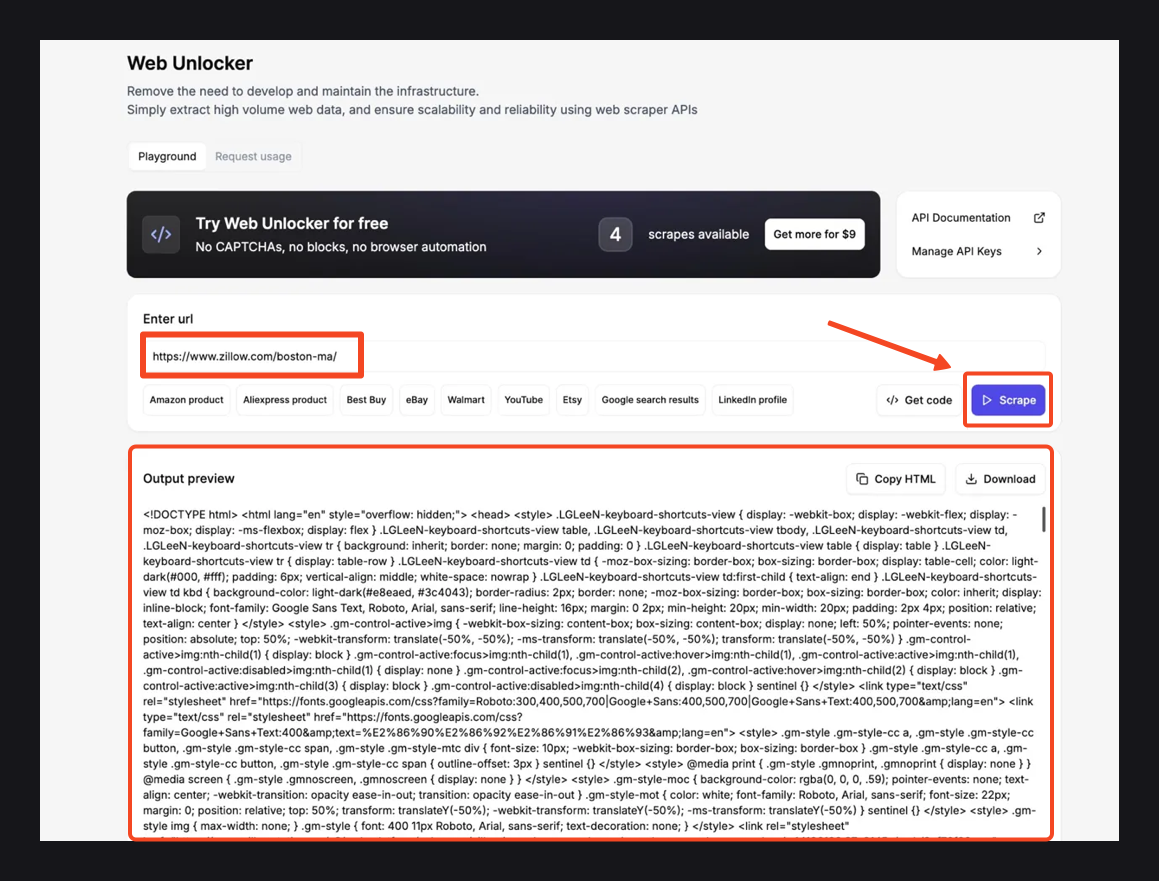
Once the scrape finishes, check the Output preview panel below. You should see the full page HTML containing our Zillow search results.
If the data looks good, use Copy HTML to grab it or Download to save the file locally.
Understand Zillow’s Pagination Structure
The output preview returned raw HTML, which is useful because I can inspect the exact structure before writing code.
This is similar to opening browser developer tools by pressing F12 and inspecting the page directly. Inside the downloaded HTML, I found one important thing that makes the parser much easier.
Most tutorials will tell you to grab listing cards with CSS selectors, but Zillow only renders 9 cards in the page markup. The other 32 load as you scroll, so scraping with CSS selectors misses most of the data.
Rather, the search results are inside a large JSON object in the page HTML. That JSON sits inside this script tag:
<script id="__NEXT_DATA__" type="application/json">The page uses that JSON to load the data on the frontend, and we can read it too. Inside that JSON, the listings sit at this exact path:
data["props"]["pageProps"]["searchPageState"]["cat1"]["searchResults"]["listResults"]So our parsing plan is simple.
We’ll find the __NEXT_DATA__ script with BeautifulSoup, parse the JSON, move into the listResults array, and pull the fields we need.
Zillow web scraping with Python and Web Unlocker
Now we can move from the dashboard to code.
The dashboard snippet uses httpx, but I will use requests here because it is more familiar for most Python readers.
Step 1: Set up the request
Let’s start with the basic configuration. We need the Web Unlocker endpoint, our API key, and the target Zillow URL:
import requests
import json
from bs4 import BeautifulSoup

API_URL = "https://client-api.floppy.host/v1/webUnlocker"
API_KEY = "YOUR_API_KEY"
SEARCH_URL = "https://www.zillow.com/boston-ma/"

SEARCH_URL = "live_zillow_boston.json"
Replace YOUR_API_KEY with the key from your Floppydata dashboard.
I’m using Boston as the target market here, but if you want to scrape another city, just replace the search URL.
Step 2: Fetch the page through Web Unlocker
The Web Unlocker takes a JSON payload with the target URL and a few options. It returns a JSON response that contains the rendered HTML in an html field:
Now I create a function fetch_html()to send the Zillow URL to Web Unlocker and return the rendered HTML
def fetch_html(url):
    response = requests.post(
        API_URL,
        headers={
            "Content-Type": "application/json",
            "X-Api-Key": API_KEY,
        },
        json={
            "url": url,
            "country": "US",
            "city": "Boston",
            "difficulty": "medium",
            "expiration": 0,
        },
        timeout=120,
    )
    response.raise_for_status()

    data = response.json()
    html = data.get("html")

    if not html:
        raise ValueError("Unlocker response did not include an 'html' field.")

    return html
A few things are happening here. The country and city fields help the request match the target location better. I used difficulty: “medium” because Zillow is not a simple static page, so it needs a stronger unblocking process.
The expiration field is set to 0, so I get a fresh response. After the request succeeds, Web Unlocker returns a JSON response, and the rendered HTML is inside the html field.
Step 3: Extract the listings
Now we can apply the parsing plan from earlier. I’ll create an extract_listings() function. This function takes the HTML, finds Zillow’s JSON data, and pulls out the listings:
def extract_listings(html):
    soup = BeautifulSoup(html, "html.parser")
    next_data = soup.find("script", id="__NEXT_DATA__")

    if not next_data or not next_data.string:
        raise ValueError("Could not find Zillow's __NEXT_DATA__ script.")

    data = json.loads(next_data.string)
    search_state = data.get("props", {}).get("pageProps", {}).get("searchPageState", {})
    list_results = (
        search_state.get("cat1", {})
        .get("searchResults", {})
        .get("listResults", [])
    )

    listings = []

    for item in list_results:
        listings.append(
            {
                "zpid": item.get("zpid"),
                "address": item.get("address"),
                "price": item.get("price"),
                "beds": item.get("beds"),
                "baths": item.get("baths"),
                "sqft": item.get("area"),
                "status": item.get("statusType"),
                "url": item.get("detailUrl"),
            }
        )

    return listings
Using BeautifulSoup, I can easily go straight to the structured JSON inside the page. Then I parsed the script content as JSON and got the listResults array.
Each item in listResults is one property listing, and from each listing, we can collect valuable data such as:
- address
- price
- beds
- baths
- area
- statusType
- detailUrl
I renamed the area to sqft in the final output because that is easier to understand.
Step 4: Save the results to a JSON file
Finally, we can add a main() function to run the scraper and save the output to a JSON file:
def main():
    print(f"Fetching data from: {SEARCH_URL}")
    html = fetch_html(SEARCH_URL)
    listings = extract_listings(html)

    if not listings:
        raise SystemExit("No listings found in Zillow's JSON data.")

    with open(OUTPUT_FILE, "w", encoding="utf-8") as file:
        json.dump(listings, file, indent=2)

    print(f"Found {len(listings)} listings")
    print(f"Saved results to {OUTPUT_FILE}")
This function fetches the page, extracts the listings, checks that the list is not empty, and saves everything to a JSON file. Once the data looks good, we can convert it to CSV later or use the data directly in our applications.
The Complete Script
Here’s all the code I used to successfully extract my Zillow listings:
from bs4 import BeautifulSoup
import requests
import json

API_URL = "https://client-api.floppy.host/v1/webUnlocker"
API_KEY = "Your_API_KEY"
SEARCH_URL = "https://www.zillow.com/boston-ma/"
OUTPUT_FILE = "live_zillow_boston.json"


def fetch_html(url):
    response = requests.post(
        API_URL,
        headers={
            "Content-Type": "application/json",
            "X-Api-Key": API_KEY,
        },
        json={
            "url": url,
            "country": "US",
            "city": "Boston",
            "difficulty": "medium",
            "expiration": 0,
        },
        timeout=120,
    )
    response.raise_for_status()

    data = response.json()
    html = data.get("html")

    if not html:
        raise ValueError("Unlocker response did not include an 'html' field.")

    return html


def extract_listings(html):
    soup = BeautifulSoup(html, "html.parser")
    next_data = soup.find("script", id="__NEXT_DATA__")

    if not next_data or not next_data.string:
        raise ValueError("Could not find Zillow's __NEXT_DATA__ script.")

    data = json.loads(next_data.string)
    search_state = data.get("props", {}).get("pageProps", {}).get("searchPageState", {})
    list_results = (
        search_state.get("cat1", {})
        .get("searchResults", {})
        .get("listResults", [])
    )

    listings = []

    for item in list_results:
        listings.append(
            {
                "zpid": item.get("zpid"),
                "address": item.get("address"),
                "price": item.get("price"),
                "beds": item.get("beds"),
                "baths": item.get("baths"),
                "sqft": item.get("area"),
                "status": item.get("statusType"),
                "url": item.get("detailUrl"),
            }
        )

    return listings


def main():
    print(f"Fetching data from: {SEARCH_URL}")
    html = fetch_html(SEARCH_URL)
    listings = extract_listings(html)

    if not listings:
        raise SystemExit("No listings found in Zillow's JSON data.")

    with open(OUTPUT_FILE, "w", encoding="utf-8") as file:
        json.dump(listings, file, indent=2)

    print(f"Found {len(listings)} listings")
    print(f"Saved results to {OUTPUT_FILE}")


if __name__ == "__main__":
    main()
If everything is set up correctly, you should see an output like this:
[
  {
    "zpid": "59174136",
    "address": "45 Garden St APT 3, Boston, MA 02114",
    "price": "$685,000",
    "beds": 2,
    "baths": 1,
    "sqft": 525,
    "status": "FOR_SALE",
    "url": "https://www.zillow.com/homedetails/45-Garden-St-APT-3-Boston-MA-02114/59174136_zpid/"
  }
]
At this point, your scraper is working, which means that you’re now able to scrape key info from any Zillow listing.
Troubleshooting Common Issues
If you scrape Zillow property data often, you’re bound to hit some walls at some points. I’ve faced a couple of them myself. Therefore, I can tell you what to expect, including:
- 403 errors: It means that Zillow has blocked your bot. Try changing your headers or using a proxy to continue scraping Zillow data.
- Empty responses: That could be due to JavaScript rendering. Try using a tool that fully renders the page before returning the HTML, like the Web Unlocker.
- Missing data: Not all listings have the same information. Always use .get() when pulling Zillow data so your scraper does not crash on a missing key.
Since Zillow doesn’t offer a free API, you’ll have to find a way to work around it. If you need a reliable way to access Zillow’s listing data, Floppydata’s Web Unlocker is your best bet.
Conclusion
Zillow does not look like a high-security site, but it is protected by PerimeterX and a layered detection system that watches your IP, headers, TLS fingerprint, and behavioral signals. Acting suspicious will get you flagged and banned indefinitely.
Hence, you need to be careful while scraping it. That is where Floppydata Web Unlocker comes in. It:
- Rotates premium residential proxies
- Rotates headers and real browser fingerprinting
- Loads clean and fully HTML every time
- Only bills for successful responses
With this setup, you do not have to fight Zillow’s anti-bot system by yourself; let the Floppy Data Web Unlocker help you. Start scraping Zillow now with 5 free scrapes.