Telegram has become an essential messaging and business tool for millions of users and businesses worldwide but access to it just got complicated in Vietnam. A few days ago, Vietnam’s Ministry of Information and Communications began issuing directives to local Internet Service Providers (ISPs) to block access to Telegram completely.
I heard the news from an agency I worked with in Vietnam. Their whole business operation was affected due to not being able to communicate via Telegram. After digging into the news and testing a few solutions, I came up with a solution for my agency that I want to share for all affected businesses.
In this guide, I’ll explain how to use Telegram in Vietnam without a VPN by setting up proxies. I’ll also share what worked best for my client, how different proxy types compare, and how to configure them on desktop and mobile.
Why is Telegram Blocked in Vietnam?
The blocking of Telegram is not unexpected due to its higher level of privacy in comparison to Whatsapp. Reuters reported that Vietnam’s tech ministry had ordered the country’s largest ISPs to block Telegram by the end of the month. Following this Vietnam orders directive, authorities instructed providers to block access to Telegram.
Telegram is officially blocked in Vietnam from May 2025. Authorities justified the block by citing alleged crimes such as drug trafficking, anti state content, and other illegal activities on telegram channels, referencing police claims about law-violating material and the platform’s non-cooperation. The Ministry of Information and Communications reported that nearly 70% of Telegram channels contained harmful or illegal content, including scams and anti-state material.
Tens of thousands of users, groups, and telegram channels were affected, especially those involved in sensitive or law-violating activities. Many users and journalists experienced difficulties accessing Telegram due to the block. Authorities are combating alleged crimes committed on Telegram by launching criminal investigations and taking steps to prevent Telegram’s activities related to illegal content. Telegram’s failure to share user data or respond to legal requests and requests from the government, as stated by a telegram representative, contributed to the decision. Telegram’s failure to comply with government requests and legal requests, especially regarding data sharing and content moderation, was a key factor. New rules now require platforms to verify user identities and share user data with authorities for criminal investigations, raising data breach concerns among users. Telegram is often described by local authorities as a ‘paradise’ for cybercrimes and unfiltered content sharing. The government also instructed ISPs to deploy solutions to block or restrict Telegram.
Users like my agency and many others across Vietnam suddenly lost access to personal chats, business discussions, team channels, and more. Telegram is popular among IT and internet professionals and marketing experts for community outreach and coordination. Prior to the ban, Vietnam had one of the largest Telegram user bases globally, with approximately 17.6 million users by early 2026, and cumulative downloads reached about 14.86 million. Before the ban, Vietnam was one of Telegram’s largest markets, with around 31.5% of internet users aged 16–64 utilizing the platform, and Telegram ranked as the 4th most popular messaging/calling app after Zalo, Facebook Messenger, and Gmail. Telegram’s popularity is driven by its high privacy, encrypted communication, large group capacity, and lack of content censorship. Users frequently follow news, entertainment, and educational channels on Telegram, with 85%, 62%, and 58% engagement respectively. Telegram maintains a usage rate of about 22% among social media users in Vietnam despite the block.
Why is Telegram Important for Businesses? (Especially Vietnam)
The ban might apply to everyone, but not everyone can afford to go offline.
1. Remote Teams and Freelancers Using Telegram
Many businesses rely on Telegram for team coordination, especially remote-first startups. Blocking access means losing project updates and discussions.
2. Crypto and Web3 Projects on Telegram
Telegram is still one of the most popular platforms for token communities and blockchain teams. In Vietnam’s growing crypto market, this ban hits hard.
3. Digital Creators and Content Marketers Using Telegram
I use Telegram to communicate with collaborators, deliver client content, and join niche marketing groups. Without it, my workflow gets blocked.
How Can I Access Telegram in Vietnam?
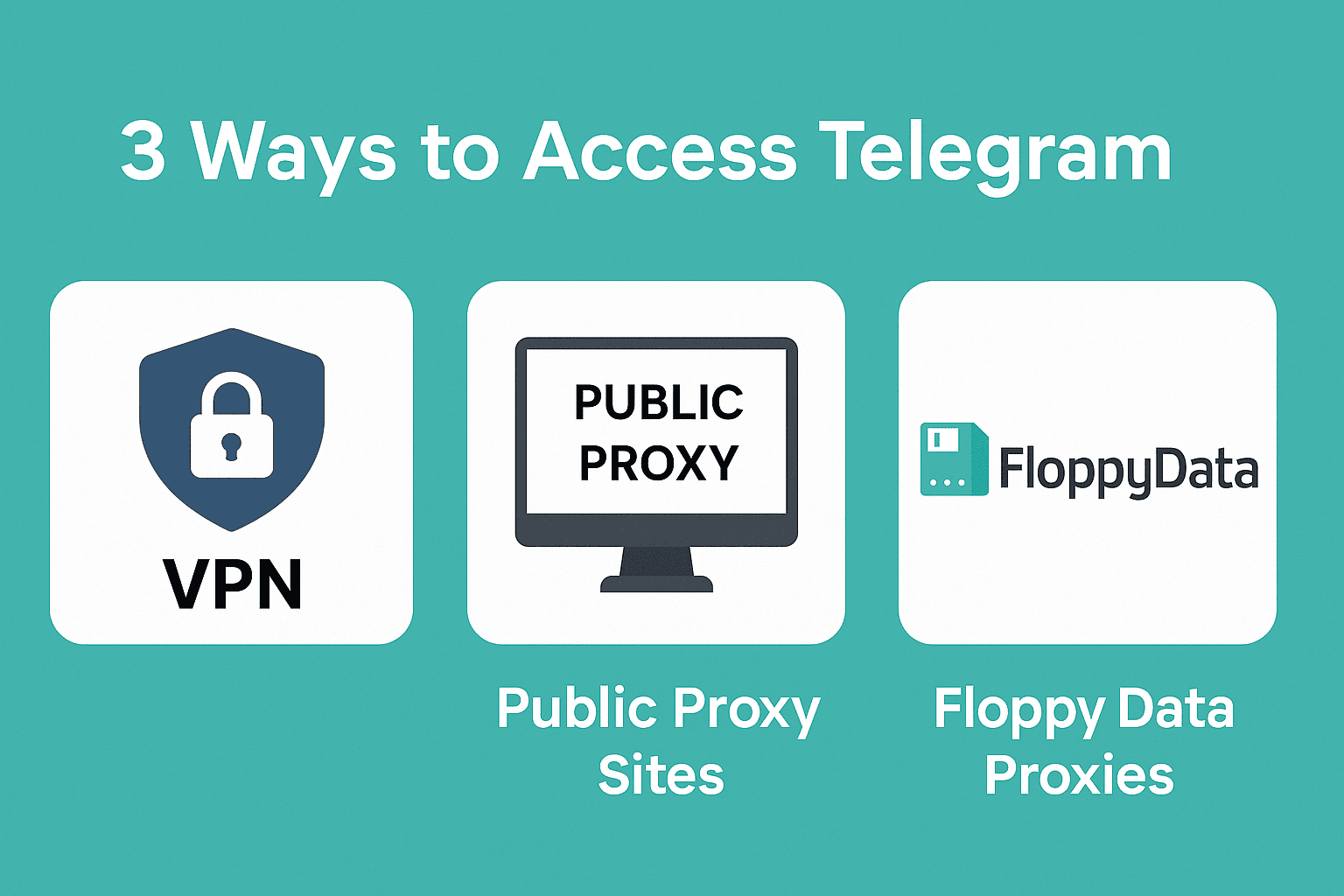
There are 3 primary methods people use to unblock Telegram:
- VPNs: Widely known method, but unreliable in Vietnam.
- Free Proxy Sites: Easily accessible, free but dangerous.
- FloppyData Proxies: Private, reliable, and fast (this is what I use now).
Let’s break these down.
Method 1: Using VPN to Access Telegram in Vietnam
When I first realized Telegram was blocked, I instinctively asked my clients to try VPN. They used a premium service, and while it was connected, Telegram didn’t sync. Using a VPN can help users in Vietnam access Telegram by routing their connection through a server in another country, although many VPNs are blocked or slow in Vietnam. Here’s what I learned:
- Vietnam’s firewalls now block many VPN domains and ports.
- Even if your VPN works, a drop in connection can expose your real IP and may block Telegram access mid-session.
- VPNs reroute all traffic, making Telegram feel sluggish and unreliable for calls and media.
- Your ISP still sees you’re using a VPN and may flag your connection.
VPNs are good for full device masking, but they’re not built for app-specific access like Telegram. This led me to search for a better option.
Method 2: Using Free Proxy Websites to Access Telegram in Vietnam
I found sites offering “Telegram unblocked via browser” or “free proxy for Telegram in Vietnam.” Here is how this process works: You open some free proxy website, type Telegram URL in its search bar and it uses a third-party proxy to route your traffic through another server to grant you access. I tried three of the top ones and here is what I found:
- Messages took forever or failed to load.
- These proxies don’t offer HTTPS or encryption of any kind.
- The pages are often filled with ads, redirection scripts, and questionable tracking behavior.
- Public proxies are used by hundreds of people, which gets them flagged quickly.
These are fine for temporary access, but not a safe long-term solution, especially for business or sensitive communications. Another problem is that those third party proxies are unsafe (you don’t know how your data is being routed, interrupted or being read), and the whole experience will be super slow and frustrating if you need to stay logged-in for the entire day.
Method 3: FloppyData Proxy for Telegram in Vietnam
After testing VPNs and free proxies, I landed on FloppyData. Their proxies aren’t just stable, they’re designed for apps like Telegram, Instagram, and more.
How FloppyData Proxies Help Unblock Telegram in Vietnam
- You get access to clean, private IPs from other countries.
- Your connection is private, secure and super fast.
- You can pick from 3 proxy types for mobile, desktop, or high-speed browsing.
Telegram sees your connection as coming from the US or Germany etc. Vietnamese ISPs see nothing and you stay connected and safe.
Moreover, these proxies are not blocked by the ISPs unlike tons of other popular VPN apps.
Option 1: Configuring Telegram’s Built-in Proxy Settings
This method only applies the proxy to Telegram. Your other apps and browsing remain connected via your regular Vietnamese network.
TegeramMobile (iOS/Android):
- Go to FloppyData.com and create an account.
- Choose a Mobile or Residential Proxy Plan.
- Copy your proxy credentials (IP, Port, Username, Password).
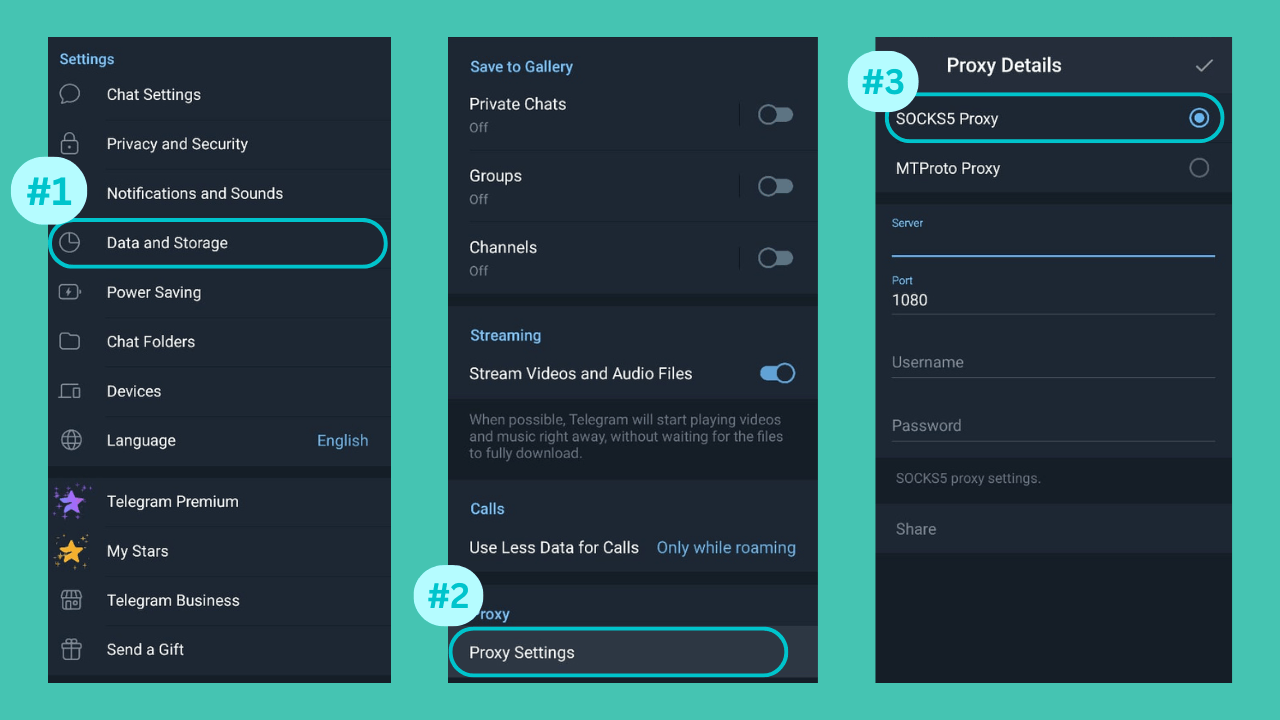
- Open Telegram > Settings > Data & Storage > Proxy.
- Tap Add Proxy, choose SOCKS5.
- Enter your FloppyData proxy credentials.
- Save and connect. Telegram should now sync.
Option 2: Apply Proxy to Your Device’s Settings (Recommended for Privacy)
Instead of just routing Telegram, this method applies the proxy to your whole device connection. Your full mobile or desktop activity routes through FloppyData, improving security. This protects all apps and browser activity and is Ideal for business users and privacy-conscious travelers.
- Create a FloppyData account.
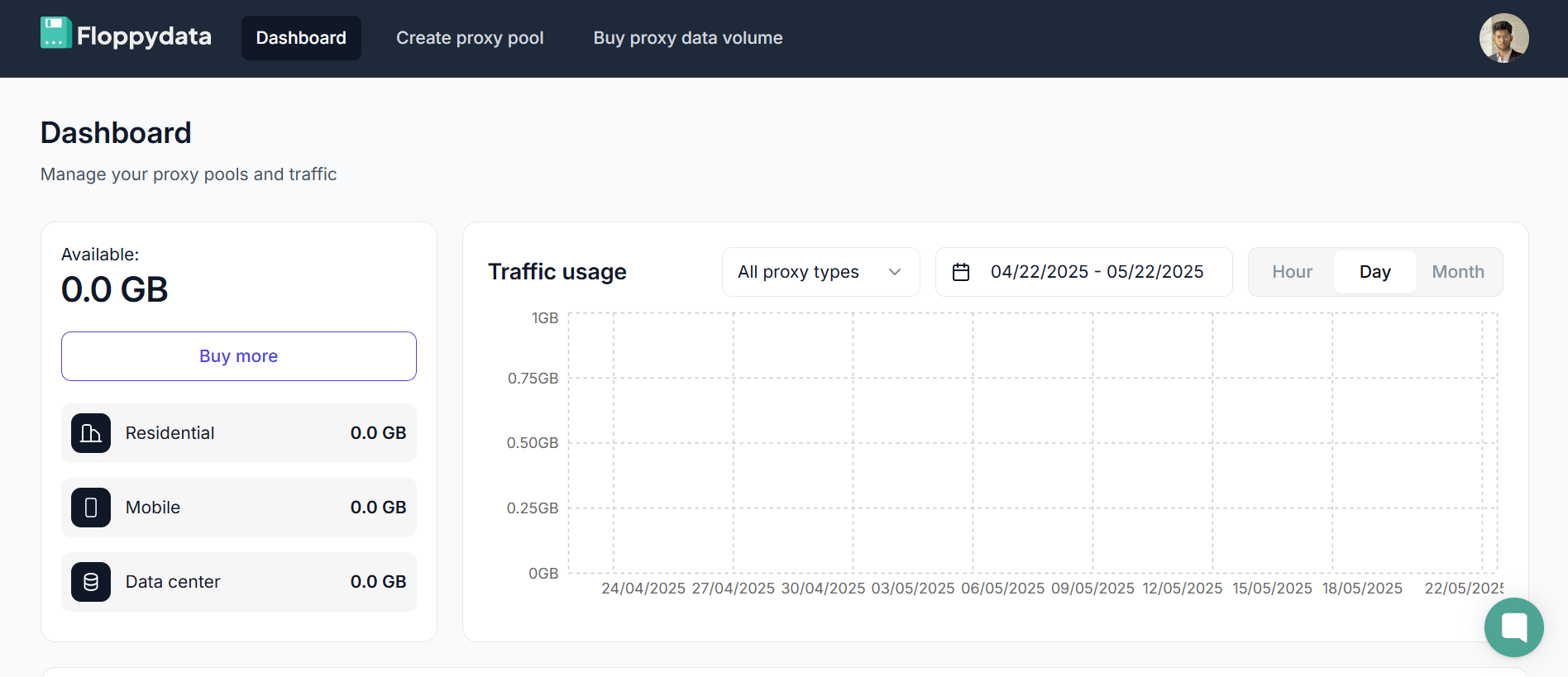
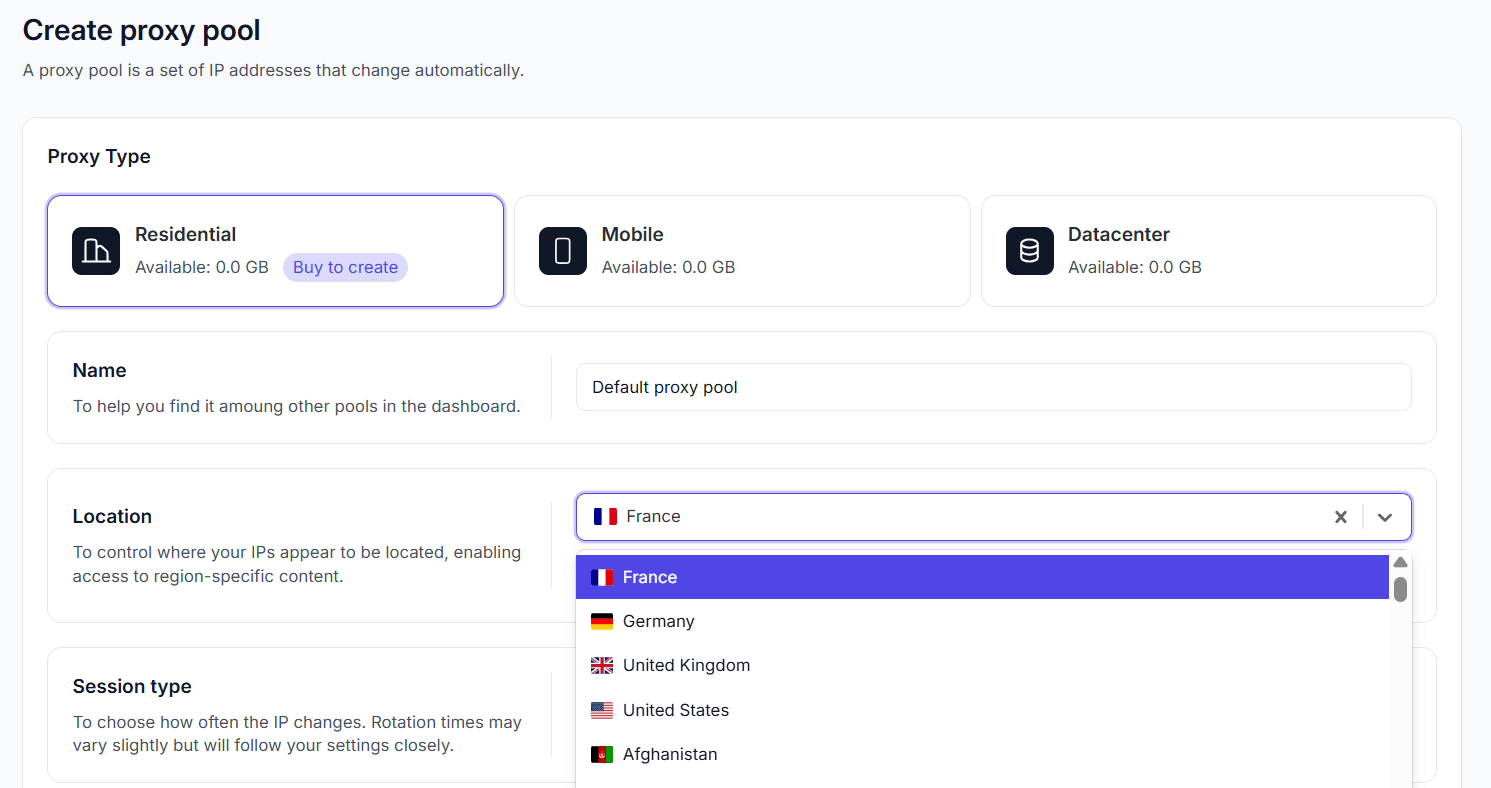
- Pick a location where Telegram isn’t blocked (e.g., USA, UK).
- Copy your proxy details (IP, port, username, password).
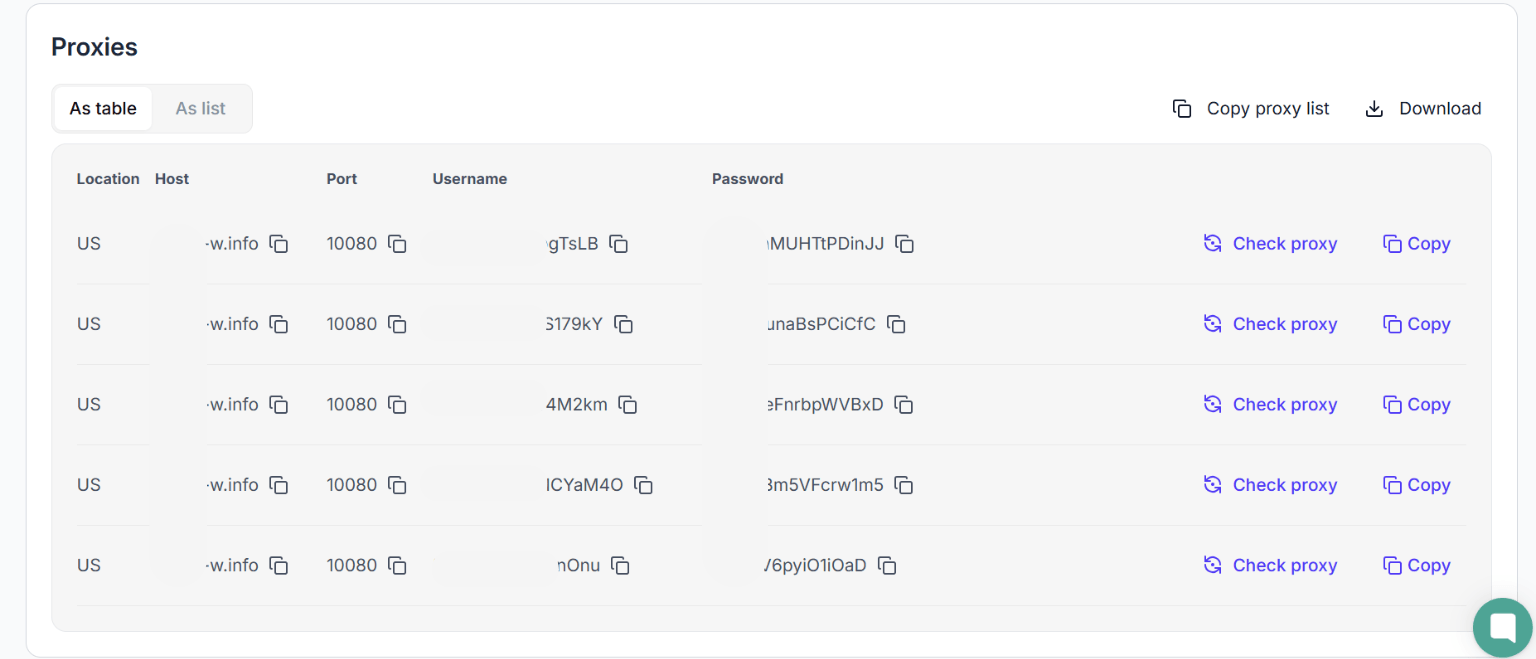
- Configure the proxy in your device or browser settings.
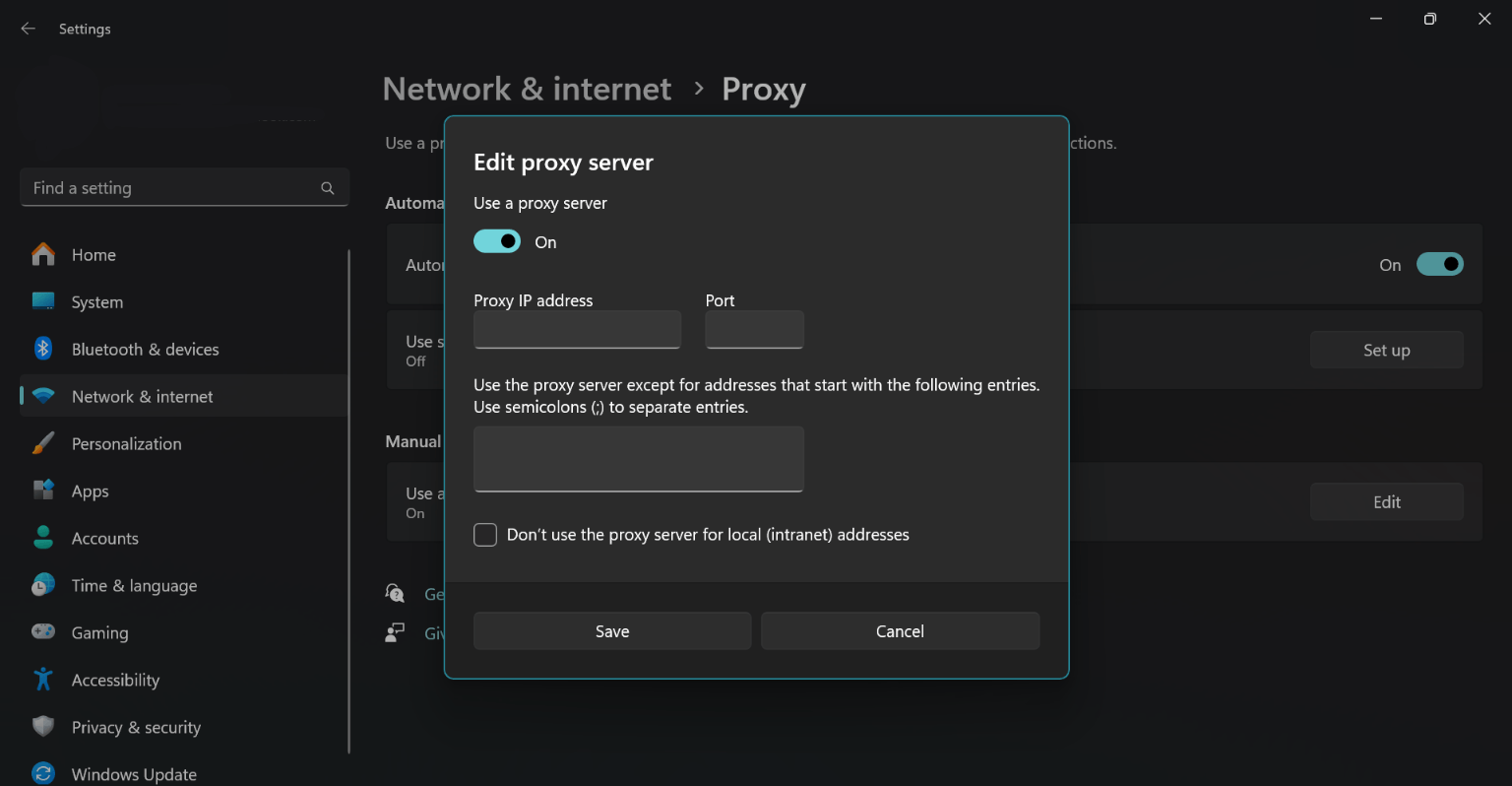
Now launch Telegram and it will now work as if you’re outside Vietnam.
Learn How to Add a Proxy to Your Device
Read the following guides on adding proxies to your device:
- Add FloppyData Proxy to Android
- Add FloppyData Proxy to IOS
- Add FloppyData Proxy to Windows
- Add FloppyData Proxy to MacOS
Explore FloppyData’s proxy types and use cases for more information.
Which FloppyData Proxy Type is Best for You?
| Proxy Type | Best For | Pros | Considerations |
| Residential | General users, business use | Real home IPs, high trust | Slightly more expensive but stealthy |
| Mobile | Mobile users, travelers | Real 4G/5G IPs, best for Telegram app | Limited supply, high reliability |
| Datacenter | Desktop users, high speed needed | Fast, cost-effective | Less stealth, but great for Telegram Web |
See full details on FloppyData Proxy Types.
Is Using Telegram With a Proxy Legal in Vietnam?
As of now, there is no law in Vietnam that criminalizes the use of proxies for personal communication. That said, always use proxies responsibly:
- Don’t impersonate other users.
- Don’t spam or automate illegal content.
- Don’t use free proxies that may leak your data.
FloppyData proxies are encrypted, secure, and run through clean IP pools, which reduces risk and ensures reliable connectivity.
Final Thoughts: The Best Way to Unblock Telegram in Vietnam
If you’re in Vietnam and rely on Telegram for personal or business use, you can’t afford disconnections. VPNs and free proxies are unreliable and risky.
I’ve tested everything and can say this confidently: You don’t need a VPN… you need FloppyData.
Still unsure? Explore FloppyData’s use case examples or reach out to their support. Setup is simple, safe, and effective.
FAQ
Why use a proxy to access Telegram in Vietnam?
Vietnamian ISPs block Telegram, making it inaccessible locally. By using a proxy from a country where Telegram isn’t blocked - like the US or UK - you can bypass censorship and regain full access to your chats.
How can I set up Telegram to work in Vietnam without a VPN?
Sign up at FloppyData, choose a proxy type (Mobile, Residential, or Datacenter), and copy your proxy credentials. Then either enter them directly in Telegram’s Settings → Data & Storage → Proxy (SOCKS5) or configure your device’s system proxy to route all traffic.