How to Bypass GoGuardian with Floppydata in 4 Steps
I assume that you’re a student who wants to bypass GoGuardian to access the internet more freely. GoGuardian monitors your online activity and creates URL blocks. But sometimes it can block websites that you actually need to access to study. That’s where Floppydata comes in!
You can use Floppydata (along with an antidetect browser) to get past GoGuardian easily. I’ve explained this method to many pupils of mine. Here’s how this GoGuardian unblocker works:
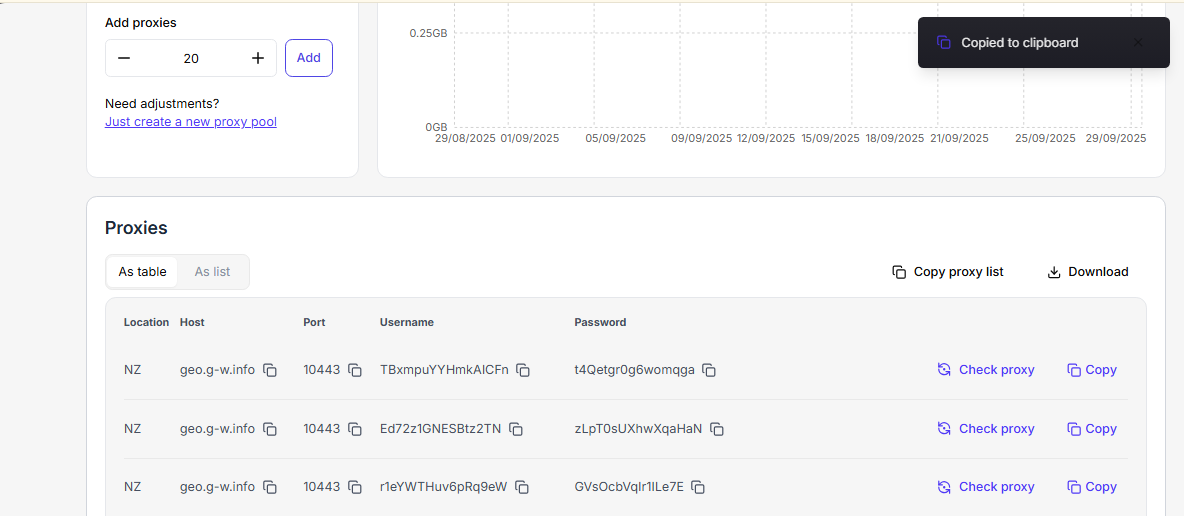
Step 1
- You should create an account with Floppydata
- Get a proxy plan that’s perfect for you (based on which sites you wish to visit)
- After creating your pool of proxies (which will give you 10 proxies), you should copy the required proxies from the dashboard (or just copy them all in bulk)
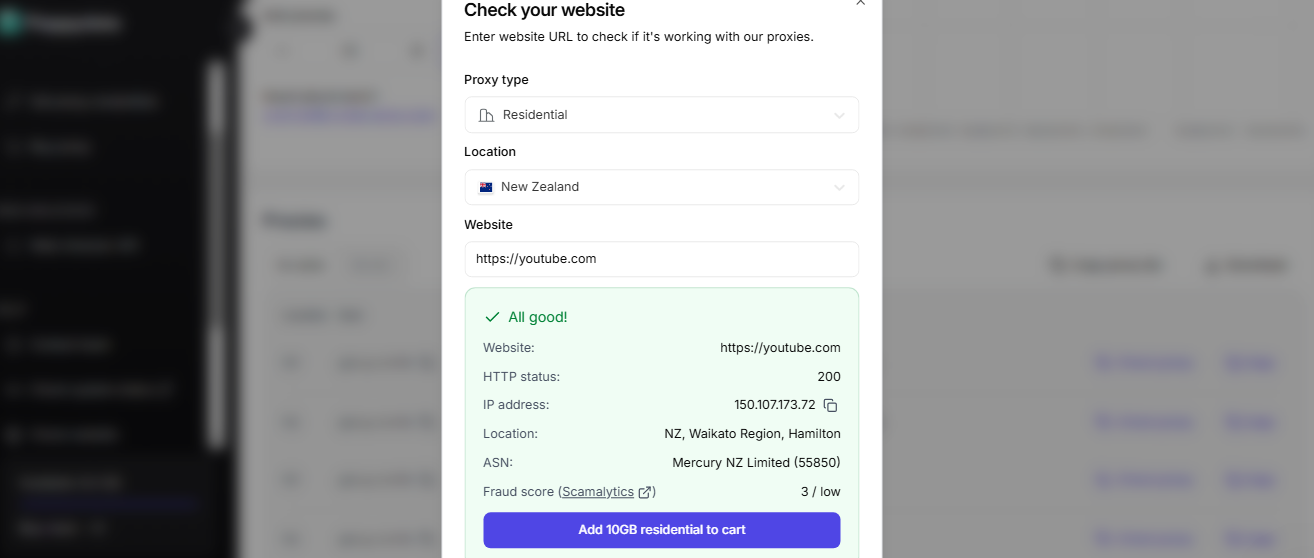
- Use the new Check website feature to see if you can access your required site with Floppydata proxies, or test if a specific blocked url is accessible through the proxy
Step 2
- Get an antidetect browser (like Gologin) for your web sessions (normal browsers won’t cut it)
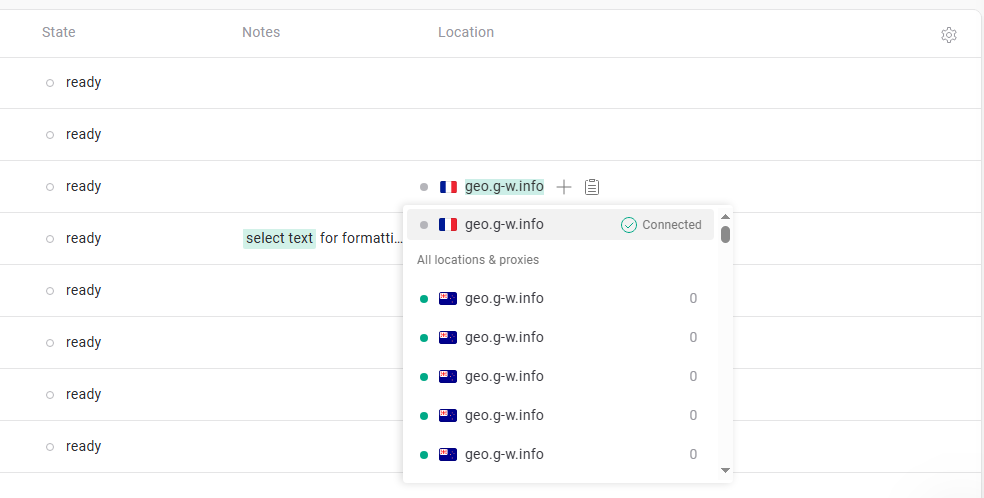
- Check if your Floppydata proxies are working on this browser (by pasting them in bulk)
- Alternatively, you can connect to a different network, such as a mobile hotspot, to bypass GoGuardian restrictions
Step 3
- Create different profiles for your various site navigation needs
- You may create a new profile by clicking the Add a quick profile option
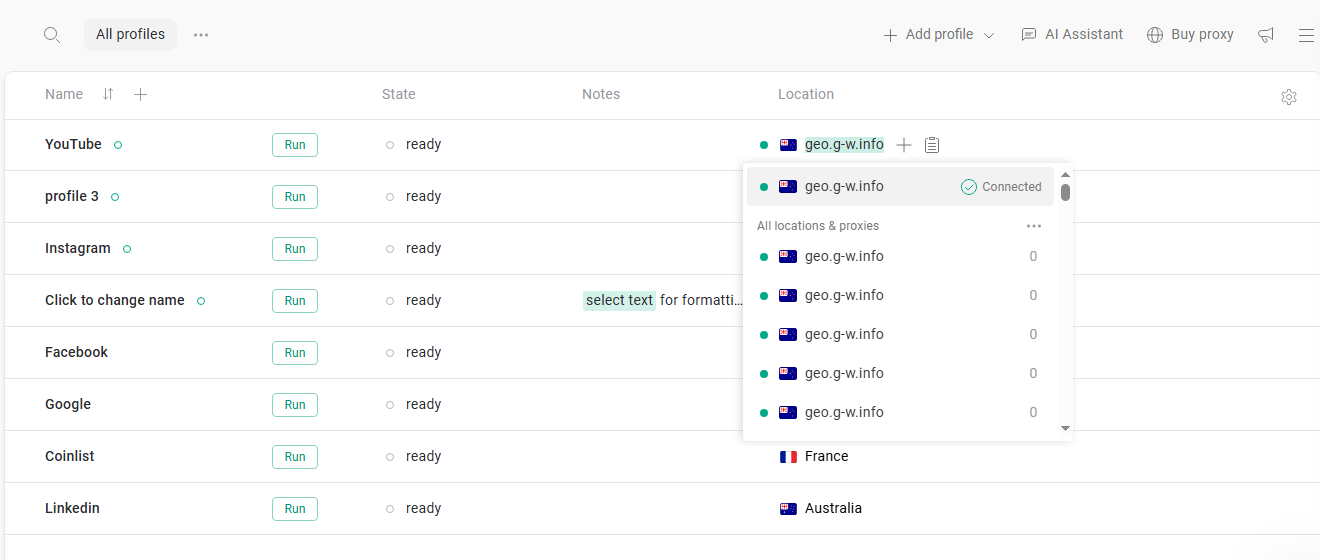
- Paste Floppydata proxies there (you can also paste all 10 proxies in bulk)
- Just make sure you’re using different proxy IPs for each profile to separate them
Step 4
- You can now check the state of your profile (ready)
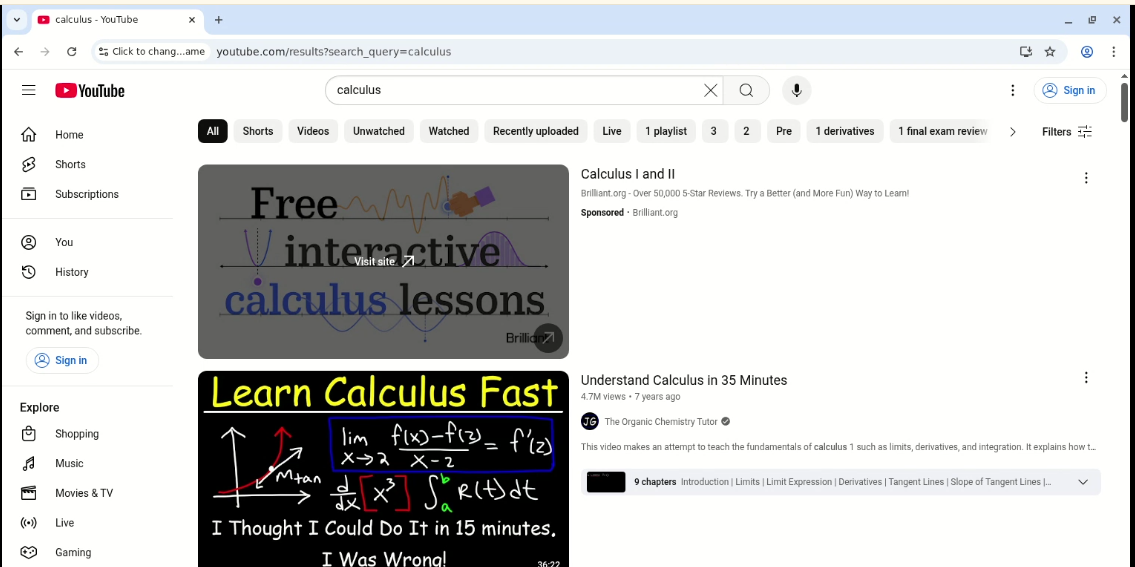
- Run your profiles and open any blocked webpage, such as YouTube
- After your work is done, you may close your profile on Gologin
What’s GoGuardian?
If you are curious to learn how to unblock GoGuardian as a student, the process I discussed above will work. But what is GoGuardian? Let’s talk about this monitoring system a little bit.
GoGuardian is a web filtering & monitoring tool. Schools use it to manage student education. It’s an AI spyware that became quite famous after the pandemic. Your school’s admin or administrator configures which sites are blocked using GoGuardian Admin policies. Your school will use it to keep tabs on your online activity. Which sites do you visit? Do you visit social media platforms often?
GoGuardian sure helps kids stay focused on their learning. But it’s kind of creepy and bizarre!
It can sometimes block access to actually helpful sites like YouTube. Sometimes, a site is blocked by GoGuardian admin policies, which only an administrator can change. Imagine you’re a kid who clicks on a YouTube video to understand a complex derivation, but can’t access the website!
GoGuardian blocks are frustrating & invasive. That’s why I want students to help bypass them.
Why Does GoGuardian Block Everything?
Before you learn how to bypass Go Guardian, you should realize why this spyware bans your access to different websites. GoGuardian does it because it is an AI; it follows a pattern. It does not understand when it’s blocking innocent websites. It simply does this:
- Restricts access to inappropriate content or distracting websites
- Helps schools comply with the Children’s Internet Protection Act (CIPA)
- Blocks social media, gaming sites, adult content, violent videos, gambling sites, etc.
- Uses browser extensions and network filters to keep an eye on your web traffic
- Applies tiered filtering, with some content allowed for older kids but blocked for younger students
- Enforces assigned policies, which are applied to specific groups or organizational units and determine what content is blocked for each group
GoGuardian enforcement is applied to enrolled devices managed by the school’s IT department. On these school-managed devices, certain restrictions or features cannot be disabled by students.
When GoGuardian blocks websites like YouTube, you may try to use mobile proxies to bypass these blocks. Let me share some more ingenious methods to go around GoGuardian bans.
Preparing for the Bypass Process
Before you try any GoGuardian bypass method, it’s important to understand what’s at stake. Bypassing GoGuardian to access blocked websites on your school device isn’t just a technical challenge – it comes with real risks. If you’re caught bypassing GoGuardian, you could face disciplinary action from your school, such as losing access to your device, getting a warning, or even more serious academic penalties. Remember, you’re doing this at your own risk.
Instead of jumping straight into bypassing GoGuardian, consider reaching out to your teachers or school administrators if you need access to a blocked website for educational purposes. Sometimes, a simple conversation can get a site unblocked without any trouble. Schools often block websites to keep students focused and safe, but mistakes happen, and legitimate educational resources can get caught in the filter.
If you decide to search online for GoGuardian bypass methods, be cautious. Not all sources are trustworthy, and some may lead you to risky downloads or scams. Always double-check the information and remember that you are responsible for any actions you take on your school device. Bypassing GoGuardian is not only about getting past restrictions—it’s about understanding the consequences and making informed choices. Weigh the benefits against the risks before you attempt to access blocked content, and know that you could be held accountable if things go wrong.
Other Methods to Bypass GoGuardian
Many kids in my family have asked me how to get past GoGuardian for good. These methods can help users unblock sites on school devices, but should be used responsibly:
- Using proxy servers that can access blocked content (but risk IP bans and may expose the user to security risks)
- Changing your DNS settings to public DNS servers like Cloudflare (1.1.1.1) to try to unblock sites
- Using VPNs to encrypt traffic and route it through different websites (users should be aware of the risks and responsibilities involved)
- Connecting to mobile hotspots instead of your school’s WiFi to avoid GoGuardian bans
- Using bypass scripts and extensions (they normally work on personal devices and may be blocked on the ones you get from your school)
The Rationale behind Bypassing GoGuardian
The thing about spyware like GoGuardian is that they don’t just track a student’s activities & web sessions; they basically spy on students. That’s why parents are worried about AI spyware. This spyware also bothers students who get “caught” using websites like YouTube. Also:
- It mistakenly blocks educational videos and tutorials on YouTube
- Sometimes, students make a mistake and get blocked from sites they need for schoolwork. In these cases, it’s important to communicate honestly with teachers or administrators to resolve the issue.
- Students find it hard to create study groups on Instagram or WhatsApp
- Instagram and TikTok can also come under GoGuardian bans
- Screen monitoring can be invasive and makes students feel watched 24/7
- Students find it difficult to cool off and visit entertaining websites to calm their nerves
- Legitimate sites may be over-filtered due to AI’s pattern-finding abilities
- Students are afraid that their normal browsing history could be wrongly flagged
Note: Always use school devices and networks responsibly. Attempting to bypass GoGuardian filters can result in disciplinary action. If you see a message or alert about a blocked site, consider reaching out to your teacher or administrator instead of trying to bypass the restriction.
Use Floppydata to Surf the Web Freely
Are you ready to visit the internet with freedom and explore your genuine interests as a student? Use Floppydata to navigate the web confidently and bypass GoGuardian’s incorrect bans.
Floppydata offers reliable proxies with great uptime and fast speeds for smooth browsing. You get strong privacy and security protections. It’s easy to set up without complex installation. You get frequent IP rotation to reduce the risk of detection and various locations around the world.
Bypassing GoGuardian to access blocked sites on your school device can seem tempting, especially when you need to unblock websites for a project or just want to visit a favorite page. However, it’s important to remember that bypassing GoGuardian comes with significant risks. While there are ways to unblock websites and get around blocked content, doing so without permission can lead to disciplinary action, loss of device access, or even academic trouble.
GoGuardian is set up by your school to help maintain a focused, educational environment and to prevent access to websites considered inappropriate or distracting. If you genuinely need to access a blocked site for educational reasons, the best approach is to contact your teachers or administrators and request that the site be unblocked. This way, you avoid the risk of getting into trouble and can continue to use your device responsibly.
Ultimately, navigating the online world as a student means making smart choices. Use your school device for its intended purpose, follow school policies, and avoid risky attempts to bypass GoGuardian. By understanding the risks and consequences, you can make informed decisions and ensure a safe, productive online experience. Remember, responsible use of technology not only keeps you out of trouble but also helps you get the most out of your educational journey.
Use Floppydata and Gologin to get rid of GoGuardian blocks to surf the web on your terms!
FAQ
Can GoGuardian block proxy users?
Yes, GoGuardian is an advanced spyware program. It can detect normal methods used to get past its ban. Some proxies may be blocked very quickly. That’s why you should use residential proxies to reduce the risk of detection by GoGuardian.
Can I use Floppydata proxies on my school Chromebook?
It depends on whether your school allows proxy settings or not. Does it limit administrative control? Some managed devices do not allow proxy configurations. That’s why you should be careful when using proxy servers on your school Chromebook.
Are free proxies a good alternative?
No, free proxies are less secure and slower than paid proxies. They are also more likely to be already blacklisted by GoGuardian. Paid proxies are much more reliable. They may cost you, but they do the job.
Does using a VPN work better than using proxies?
VPNs encrypt all traffic, so they have their advantage. But VPNs are more likely to be banned by GoGuardian. Your best bet is to use a combination of reliable proxies and the world’s best antidetect browser to get past GoGuardian.