
Imagine you wake up one day and pick up your phone only to see a message from Instagram stating that your account has been banned. It’s happened to lots of people. I had a friend who posted a meme on Instagram and received an instant ban.
If you’re wondering why Instagram blocked my IP address, I have bad news and good news for you. Bad news: It’s probably Meta’s new AI that’s automatically blocking people’s accounts. Good news: I know a few secret ways to bypass this block and restore your account.
If you want to learn why Instagram is blocked and how to bypass Instagram block without relying on those nasty VPNs, please keep reading this blog.
Instagram IP Ban: What is it?
I’ve seen many people on Reddit and other forums complaining about Meta banning their IDs without valid reasons. There was even a petition in August, signed by 36,000+ people, that protested Meta’s excessive use of AI and blind user account blockage.
Let me explain what an Instagram ban actually means. It means that Instagram has blocked your IP address from accessing its social platform. Instagram IP bans can be either temporary bans, typically lasting 24 to 48 hours for minor violations, or permanent bans for severe or repeated violations, and most users are unaware of these technical enforcement details. This ban aims to curb:
- Spamming
- Automated bots
- Suspicious activity
- Threats of violence and harassment
- Terrorism
When Instagram bots detect unusual activity coming from your IP address, it can impose some restrictions on your account. Moderation bots and Meta’s team are responsible for detecting and enforcing these bans, often without directly notifying users, which makes it difficult for users to realize they have been banned. When this happens, you are not able to:
- Like someone’s posts
- Comment under a post
- Upload something
- Even log in to your account
Keep in mind that Instagram bans are usually linked to your IP address, but bans can affect all accounts and devices on the same network or internet connection. Even if you change your IP, using the same device may still result in restrictions due to device fingerprinting and other tracking methods.
That’s why you often have to rely on VPNs or Floppydata proxies to access your account after your particular IP has been blocked. We’ll explain more in the next few sections.
Reasons for an Instagram Ban
- Automated Actions: I was once commenting under lots of Facebook posts in a certain group (over a decade ago), and someone asked me, “Are you a bot?” Turns out, rapid liking and commenting can make Meta suspicious of bot activity and ban your IP. So, don’t do stuff that makes you look like a bot.
- Use of Bots: If you’re actually using bots to automate certain actions (like accepting too many friend requests on FB), yeah, that’ll make you get an IP ban as well.
- Suspicious Logins: If you enter the wrong password multiple times or try to open your Instagram account on various devices (using the same IP), you may get blocked (Insta does this to keep your ID safe from hackers).
- Violating Terms of Service: Uploading prohibited content online also leads to a ban.
- Mass Account Management: Managing multiple Insta accounts from a single IP is also a key reason why Instagram blocks IPs. Managing too many accounts from one IP address or the same device can flag your network and potentially lead to blocked or banned accounts, and this can also affect other accounts sharing the same network.
Duration of Instagram Ban
I understand that now you have some more questions on your mind. Is Instagram IP ban permanent? How long does Instagram IP ban last? Let me put them to rest.
|
Temporary Bans (24-48 Hours) |
Temporary Bans (Up to 72 Hours) |
Permanent Bans (Indefinite |
|
Instagram often imposes temporary bans for minor violations or unusual activity, typically lasting 24 to 48 hours. Waiting for a temporary ban to expire is sometimes the simplest solution. |
In some cases, temporary bans can last up to 72 hours, especially for repeated or more serious offenses. These bans are usually lifted automatically after the period ends. |
Permanent bans are indefinite and are imposed for severe or repeated violations. With a permanent ban, your IP address is completely blocked from accessing Instagram, and even creating new accounts may not bypass the restriction due to device fingerprinting and account linking. |
What Happens When Instagram Blocks Your IP Address?
Not everyone gets an Instagram 24 hour ban; for some users, their IP gets blocked forever. When an IP address is banned, users lose access to all accounts on that network, but Instagram does not notify users directly, making it difficult to realize they have been banned.
Now, while I was doing research for this blog, I came across a lot of badly-written articles that claimed that Instagram IP blocks are always permanent. This is simply not true.
Instagram may block your IP for 24 hours. A shadow ban lasts several days (or even weeks). But not every IP ban is permanent. Though it’s something else entirely if Instagram blocks your account. Instagram’s detection systems and moderation bots can track activity down to the physical address or even your router, making bans difficult to evade. When your IP is blocked, you usually face notifications like these:
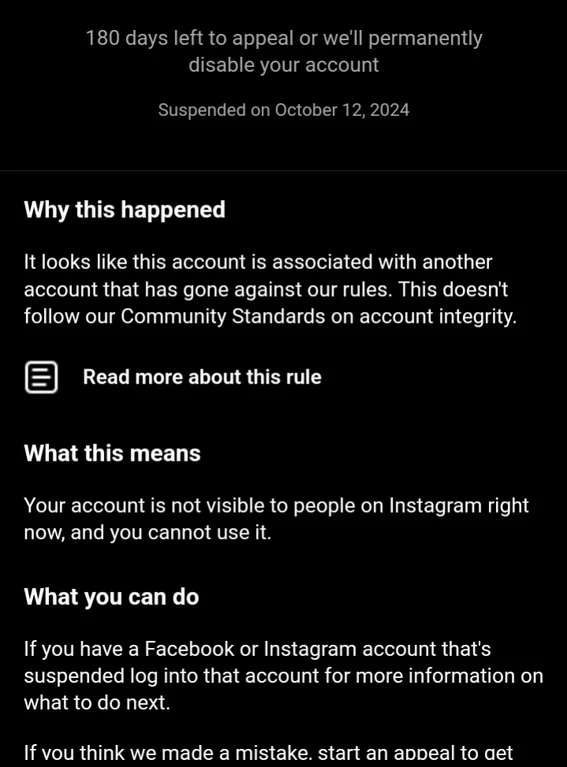
But you can still bypass this ban by using Floppydata’s premium proxy services right away.
Wondering if you’ve been IP banned on Instagram? Unlike some platforms, Instagram doesn’t send a clear notification when your IP address is blocked. Instead, you’ll notice a few telltale signs. The most obvious is that you suddenly can’t access Instagram from your usual network or device. You might see error messages when trying to log in, load your feed, or interact with posts—these can range from “Couldn’t refresh feed” to “Action blocked” or even a generic “Something went wrong.”
To confirm if it’s really an IP ban, try accessing Instagram from a different network, such as your mobile data instead of Wi-Fi, or use another device. If Instagram works elsewhere but not on your original network, it’s a strong sign your IP address has been blocked. Another quick trick is to restart your router—if your internet service provider uses dynamic IP addresses, this might assign you a new IP and restore access. Alternatively, you can use a proxy server to mask your IP address and see if you can access Instagram that way. If switching networks or using a proxy lets you back in, you’ve likely been IP banned.
How to Bypass a 24-Hour Ban with an Instagram Proxy
Insta IP bans can be really brutal sometimes. There was a user who claimed that their IP was blocked by Meta without giving them the right to appeal; Meta’s AI seems to be doing a number on innocent Facebook/Instagram users.
But you can always bypass these bans by using proxies for Instagram rather than VPNs. Here’s how you can make it happen:
- Choose a trusted mobile or residential proxy provider with fast speeds, high uptime, and good reviews. High-quality residential or mobile proxies are recommended for managing multiple accounts, especially for businesses.
- Configure the proxy on your Instagram app or browser (use an anti-detect one), and make sure to adjust your proxy settings correctly for your device or platform (iPhone, Android, desktop, etc.).
- Use Instagram normally without rapid liking, following, unfollowing, posting, etc. Remember, an account is needed to access Instagram, and automation tools should be used responsibly to avoid triggering anti bot systems and bans.
- Change your IP address from time to time to avoid detection & re-banning. Rotating proxies and rotating IPs help avoid detection by Instagram’s anti bot systems by frequently changing your IP, making it harder for Instagram to spot unusual patterns.
Proxies work by masking your real IP address and routing your connection through another server, allowing you to bypass IP-based restrictions and manage multiple accounts without triggering Instagram’s security measures. There are several proxy types: residential proxies (IP addresses from real devices), mobile proxies (from mobile networks), datacenter proxies (from data centers, fast but more easily detected), and free proxies (often shared and risky). For Instagram, using high-quality residential or mobile proxies is best for multi account management, as they are less likely to be flagged.
Sticky sessions are a proxy feature that lets you keep the same IP address for a set period (like 10 to 120 minutes), making your account activity appear more natural and consistent.
Live proxies and a robust proxy network with support for concurrent connections are important for automation tools and multi account management, ensuring stable, scalable, and uninterrupted access. Avoid using free proxies or free VPNs, as they often use shared or blacklisted IPs, increasing your risk of being banned by Instagram.
Rotating proxies and rotating IPs ensure privacy and lower the chances of an IP ban by constantly changing your IP address, making it difficult for Instagram’s anti bot systems to detect automation or suspicious behavior. Using different networks or high-quality proxies for multiple accounts can help you avoid being flagged. Always use verified automation tools and APIs responsibly to reduce the risk of bans.
Easy Steps to Override Instagram Ban with Floppydata + Gologin
Many of you are professional users who have to manage multiple Instagram accounts for a living. I used to work as a social media account manager + content writer in my heydays. So, yeah, I get it! Here’s a solution specifically for folks like you to bypass an Instagram ban:
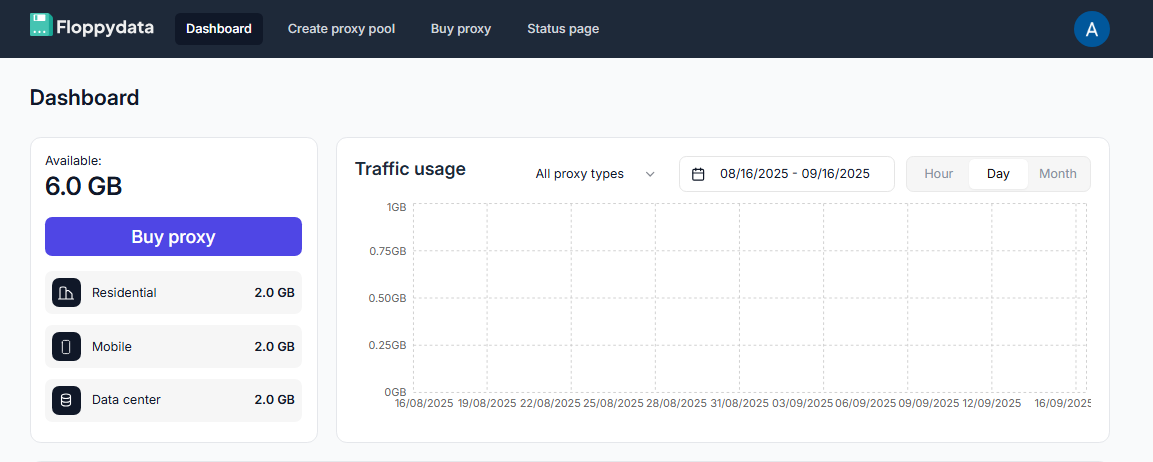
Step 1
- You should start by signing up for a Floppydata account
- Choose a proxy plan that offers you suitable proxies for Insta (recommended to use mobile proxies)
- Copy one or many proxies from Floppydata dashboard.
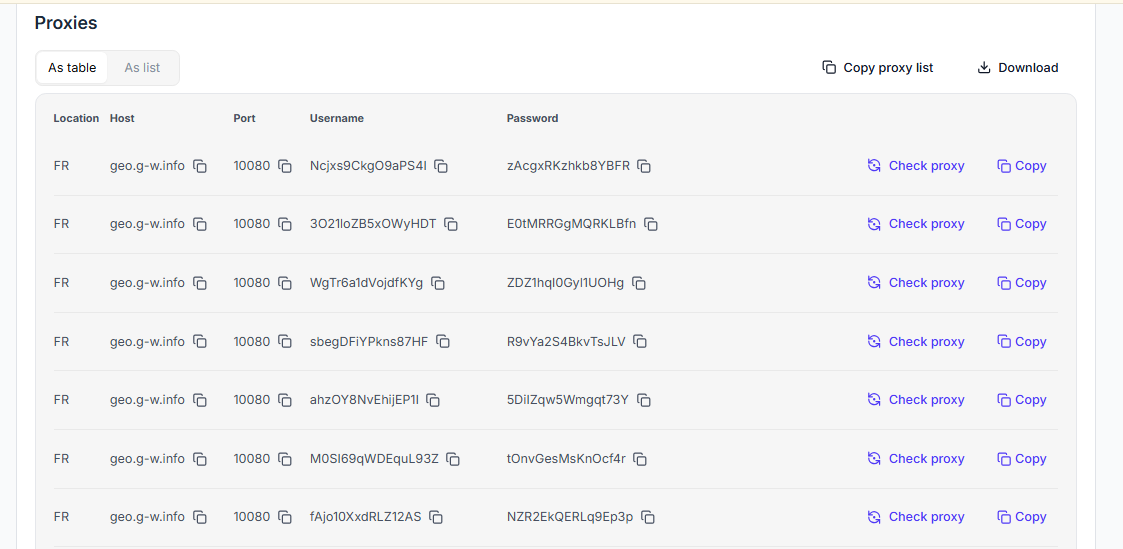
Step 2
- Now, you need an anti-detect browser (I use Gologin)
- Install the anti-detect browser or simply use it online (via cloud on the website)
Step 3
- Create a new browser profile for each of your accounts. These are basically separate devices.
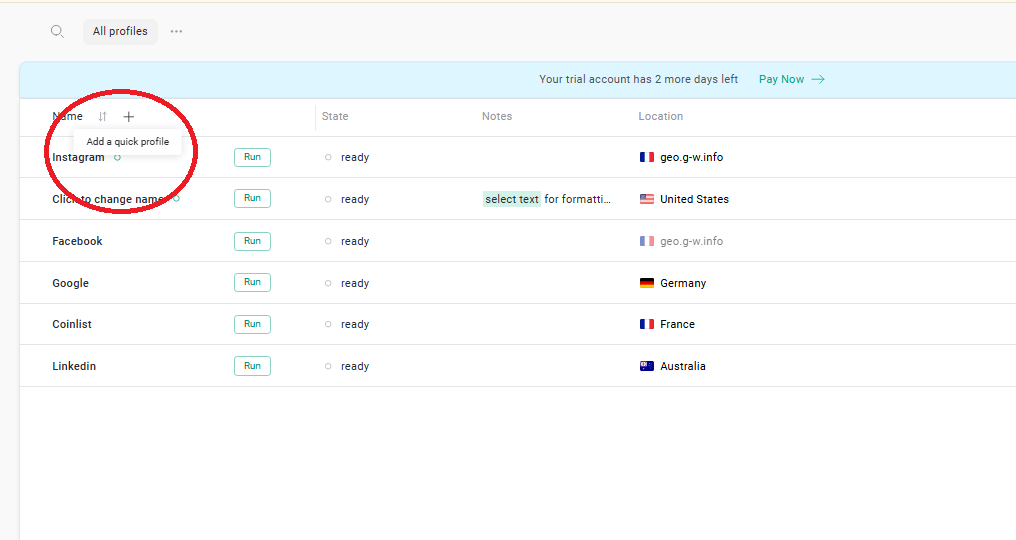
- Copy the proxies from Floppydata in bulk with Paste Proxies button at Location column
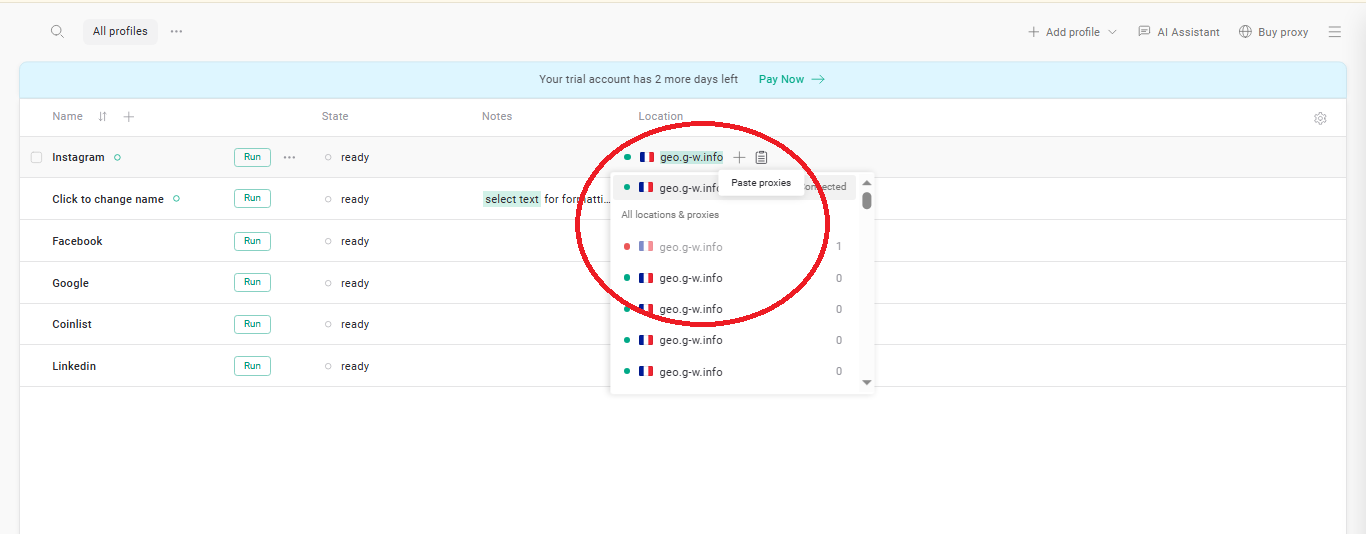
- Pick different proxy IPs for each profile so they are separated
Step 4
- Run the profiles and log in your Instagram accounts in new windows. They will now use different devices and IPs so there are no bans.
- Make sure you use separate profiles for various Instagram accounts
- Run your proxy as long as you want, and then close the window when you’re done.
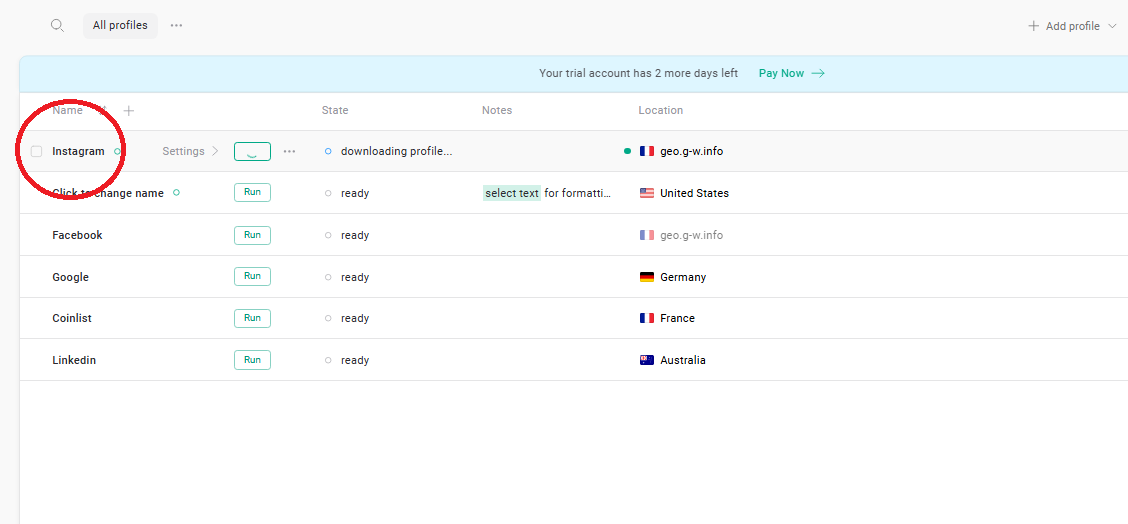
That’s it! You’re now safe from IP bans on Instagram and any other social media.
Bypass Instagram Ban with Floppydata
I hope you now understand how to bypass an IP ban.
Does Instagram block IP addresses? It sure does. But this ban isn’t always permanent. You can also bypass this ban by using proxies (and not VPNs). Get Floppydata right now by signing up, and easily bypass Instagram IP bans!
FAQ
Does Instagram block IP addresses?
It sure does. Instagram restrictions, including blocked accounts and banned accounts, can result from IP bans, but these are not always permanent. You can often bypass such restrictions by using residential or mobile proxies, which mask your original IP address. Additionally, clearing cookies and cache or restarting your router may help lift an IP ban by assigning a new IP address. To avoid future bans, maintain a clean reputation by respecting action limits and posting original content. If bans persist, contact Instagram support to appeal and resolve the issue. Get Floppydata right now by signing up, and easily bypass Instagram IP bans!
How can I bypass an Instagram IP ban?
Use a trusted proxy network with the right proxy type for Instagram. Proxy types include residential, mobile, datacenter, and free proxies. Residential proxies use IP addresses assigned to real homes by ISPs, offering the highest level of anonymity and legitimacy, with detection rates below 5%. Mobile proxies are also highly effective but can be more expensive. Datacenter proxies, which originate from data centers, provide high speeds and affordability but are more easily detected by Instagram, with detection rates around 40-60%. Free proxies are generally not recommended, as they often lead to blocks within the first few hours due to poor performance and high detection rates. Configure your chosen proxy in your app or an anti-detect browser (e.g., Gologin), avoid rapid automated actions, and rotate IPs periodically to reduce re-bans. Using a robust proxy network with extensive IP pools, regional targeting, and high availability ensures more reliable and unblocked access to Instagram.
Avoiding Instagram IP Bans
If you want to avoid Instagram IP bans, it’s crucial to use your account in a way that mimics real user behavior and respects Instagram’s community guidelines. Avoid excessive automation, spamming, or managing too many accounts from the same IP address, as these are common triggers for bans. Using free proxies or unreliable proxy services can also put your accounts at risk, since these are often flagged by Instagram’s detection systems.