Table of Contents
Many people manage multiple LinkedIn accounts these days. I know I do: my clients’ accounts. But two LinkedIn accounts of your own are a problem: LinkedIn may ban you from the platform for having duplicate IDs.
People do all sorts of stuff on LinkedIn. Some people post fake job ads to boost engagement. Others share Facebook memes on this professional site. Some folks use ChatGPT to create posts and write comments on LinkedIn. Some try to create multiple LinkedIn IDs.
LinkedIn actually recommends merging or closing duplicate accounts to avoid a ban. But what about a social media manager? I used to work as a content creator and had to upload stuff on the social media accounts of a dozen clients by using only my work laptop. How did I manage?
This article will explain how to operate several clients’ LinkedIn profiles from the same computer, within LinkedIn’s rules.
The need for multiple LinkedIn accounts
We’ll look into how to link two LinkedIn accounts successfully. But we should first check why someone needs two LinkedIn profiles.
People often think they need another LinkedIn account. For instance, I saw a guy on Reddit who said that he worked as a data scientist and scriptwriter and wanted two LinkedIn profiles for his dual professions. LinkedIn’s answer is one profile that shows both jobs.
Managing other people’s LinkedIn accounts, on the other hand, is a professional duty for many social media managers…
Can you get two LinkedIn accounts?
Can you have 2 LinkedIn accounts? Can you have more than one LinkedIn account? The answer is: one personal account per person.
The platform wants every member to have only one profile. That’s because:
- They don’t want scammers impersonating you.
- Having 2 accounts will make them less dedicated to one.
- If one account gets verified as you via passport, the other one might look like a fake.
- They find it easier to curb bot activity by limiting each user to one account.
What happens when you have multiple accounts on LinkedIn?
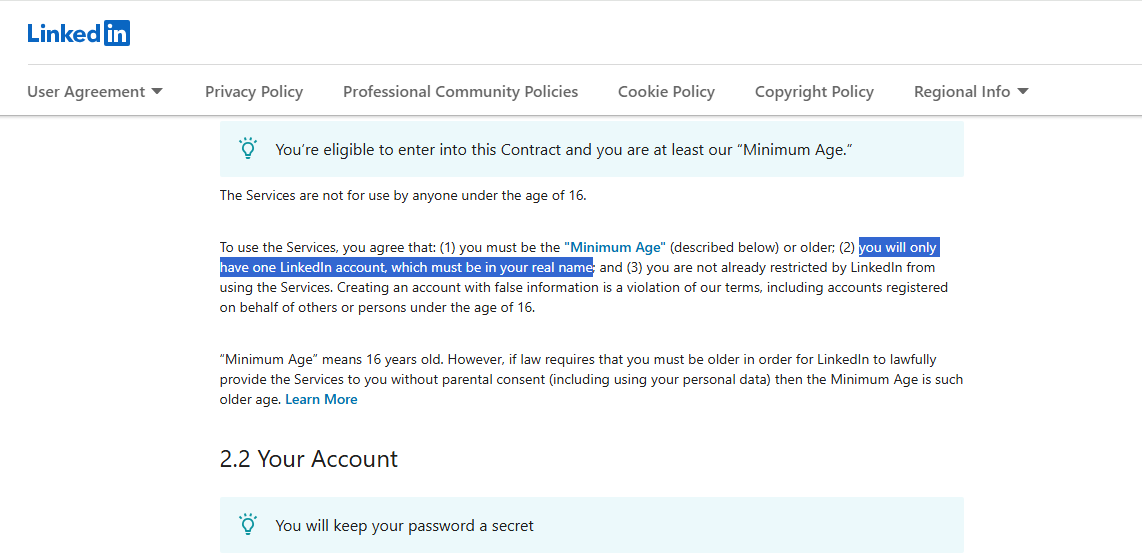
The “User Agreement” that you sign upon creating a new LinkedIn account states that you can only have a single LinkedIn account. They don’t want people using someone else’s profile on their platform. It undermines the credibility of LinkedIn as a professional platform.
LinkedIn keeps an eye on its platform activity to spot “bad apples.” These bad apples are people who create fake profiles to spam people. Someone creates a fake ID pretending to be OpenAI’s recruiter and steals people’s information by receiving their job applications.
LinkedIn keeps a track of everybody’s digital fingerprints. This digital identity is based on your device, OS, IP address, browser, cookies, and other identifiable elements.
If LinkedIn realizes that you’re using duplicate accounts, the management can ban all of your accounts as a penalty.
So the only safe setup is one account per person. What you can manage is the accounts of different people who asked you to.
Unique ways to manage multiple LinkedIn IDs
Don’t worry. You can manage your clients’ different IDs on LinkedIn for ethical reasons.
LinkedIn just wants a real person to manage different clients’ accounts. You cannot rely on bots for this job. Automation tools won’t cut it either.
- You will then target diverse segments of your core audience.
- Post awesome content from all profiles and engage with your audience.
- Make sure that your multiple accounts provide value to visitors.
- Don’t spam people with connection requests.
But here’s the problem: logging in to a dozen clients’ accounts from one laptop can look like “suspicious activity” and trigger security checks for your clients. That’s why I use FloppyData’s proxy servers: each client’s account gets a stable IP in the client’s own country.
There are many other methods for you to manage different IDs on LinkedIn.
1. Keep alternating between LinkedIn profiles
The most straightforward method is to switch between different LinkedIn IDs.
You can click on your profile picture to change your account. It’ll let you log out of your first ID and log in to your second ID. This method is helpful if:
- You only have two profiles on LinkedIn
- You wish to alternate b/w your personal and corporate IDs
- You’re already using a powerful proxy along with a browser like Gologin
2. Log In and Out of your main LinkedIn ID
The second method is very simple, too. You can log out of your ID and then log in to another ID. That’s how you can manage different LinkedIn profiles at the same time. But here’s the catch:
- You need to manually enter your credentials every time
- The platform may ask for two-factor authentication (complicating the process)
- LinkedIn may even trace your usage of multiple accounts and hit you with a ban
- This method is ideal for someone who needs to manage up to 5 LinkedIn accounts
3. Dedicate a Chrome profile for a LinkedIn account
Google Chrome lets you set up unlimited Gmail IDs on a single browser. Right now, I am using 5 different Gmail addresses, and they’re all linked with a single browser.
Here’s what you should know. Each profile that you make on Chrome has its unique cache and cookies. You can bypass LinkedIn’s algorithm detection by using a powerful proxy. Using a new proxy with each account can help you manage multiple LinkedIn IDs hassle-free.
But this method isn’t foolproof. You should go to the next method to learn more.
4. Get more devices to manage more accounts
This option is very safe. I’ve also discussed it when talking about managing multiple accounts on X (formerly Twitter). If you manage two clients’ accounts on LinkedIn, the simplest way is to get two smartphones. Set different proxies and you’re good!
But you can see the problem with this method. This method works when you have like 5 to 10 LinkedIn IDs to manage; managing like 20 IDs becomes chaotic.
Also, it’s very expensive to have twenty phones to moderate 20 different IDs.
5. Use proxies In multi-accounting browser
Another tried-and-trusted method is to download an anti-detect browser, such as Gologin.
These browsers can separate the digital footprint of one account from the data created by other accounts. So, in theory, you can manage multiple accounts at the same time.
Anti-detect browsers keep each LinkedIn account in its own profile, with its own cookies. You won’t have to log in and out of multiple accounts. Also, you may add tags and notes for each of your profiles. But keep in mind that these browsers aren’t 100% secure…
Managing different LinkedIn IDs with FloppyData’s proxies
The best way to manage different LinkedIn IDs is to use proxy providers like FloppyData. I’m going to break this entire process down into a few easily digestible chunks:
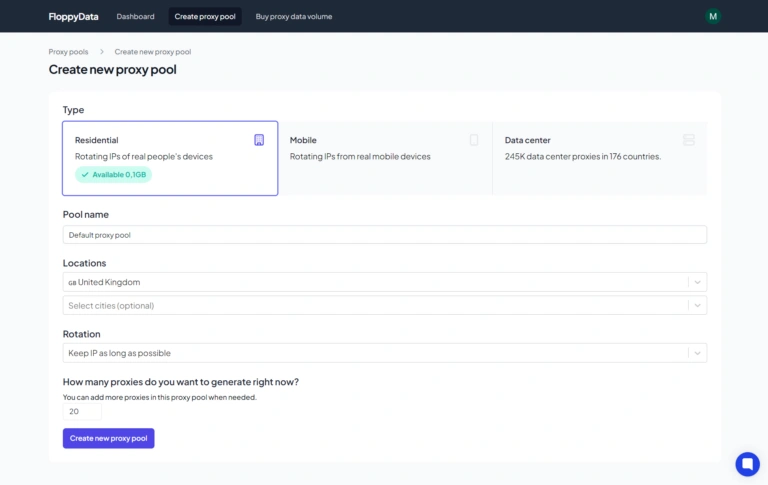
Step 1
- Create a new account with FloppyData
- Access your dashboard to create & manage proxies
Step 2
- Create a new proxy pool
- Choose a proxy for your LinkedIn multiple account management needs by choosing:
- Residential or mobile proxies
- Your favorite geographical location
- Proxy quantity
- Copy your proxy pool to paste it into antidetect browser.
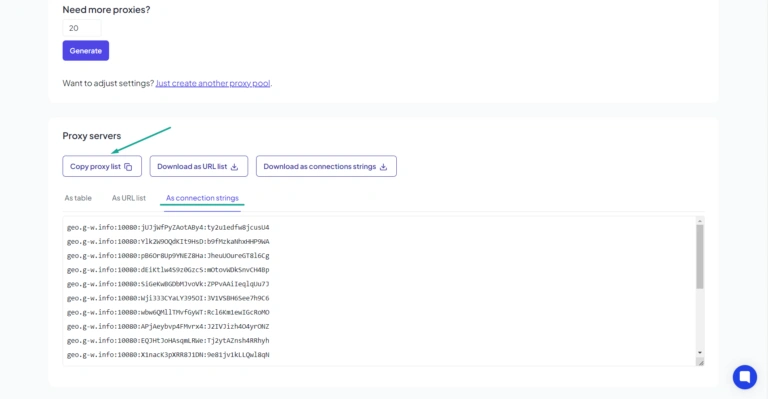
Step 3
- Choose an anti-detect browser (I prefer Gologin or 1Browser as a free option).
- Create a new profile on that particular browser.
- Give your profile a unique name so you recognize it easily.
Step 4
- In Location column of your browser profile, click Paste Proxies.
- Pick a separate IP address for each of your profiles from the list in Location column.
- Click Run to launch the profile with proxy.
- Visit an IP lookup site to make sure that your location matches the IP.
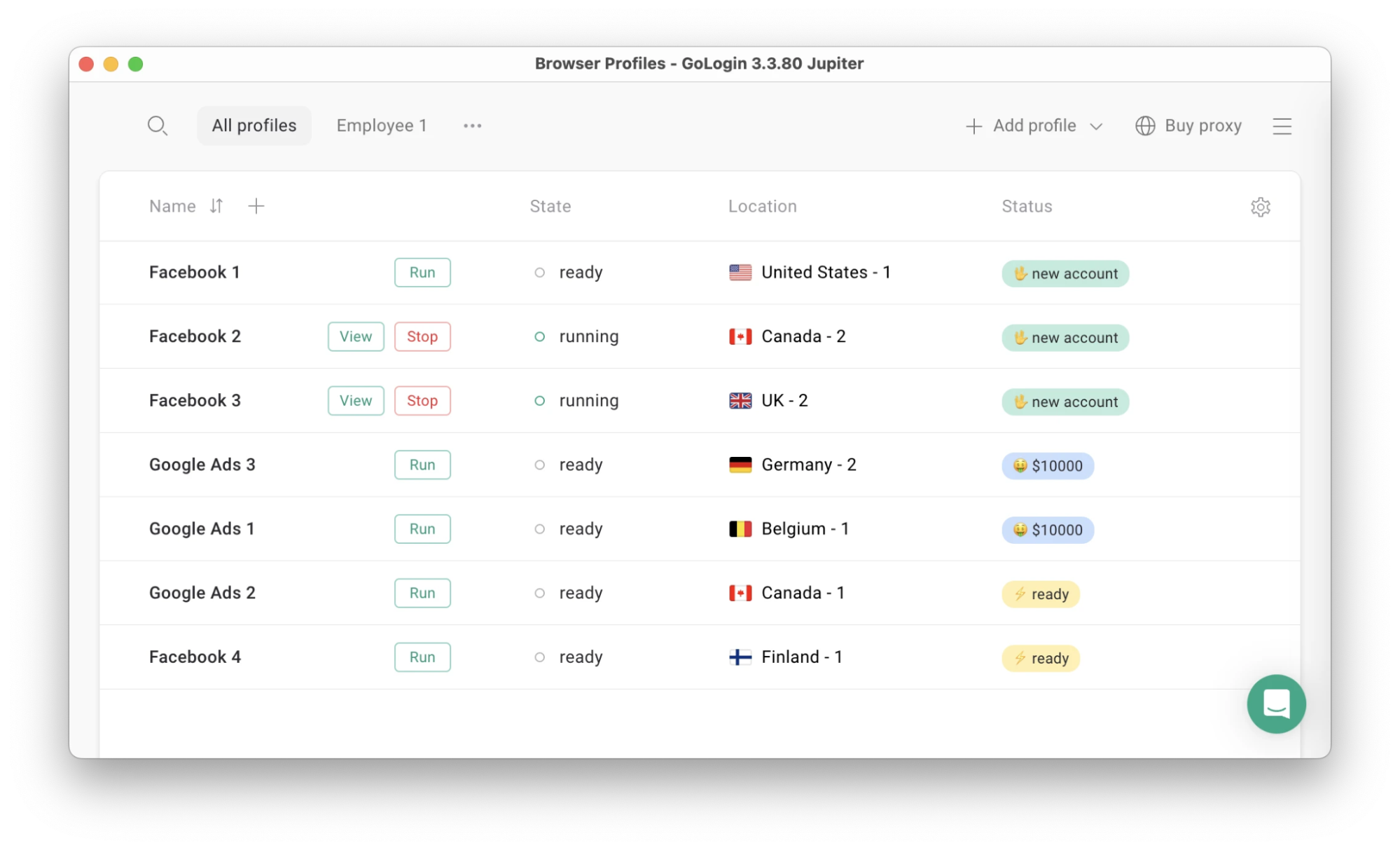
Step 5
- You can now start opening all your LinkedIn accounts on Gologin
- Give a unique proxy to each LinkedIn account you’re using
- Switch between different LinkedIn IDs simply by changing browser profiles or automation tool sessions
- Keep each client on their own proxy IP, so their sessions never mix
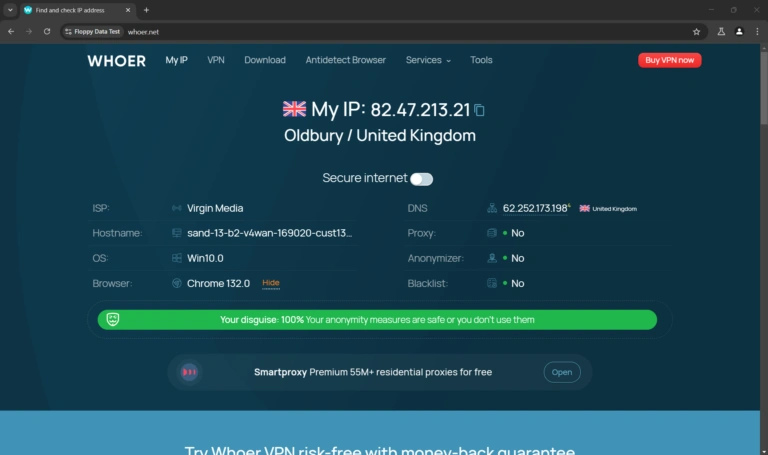
Manage LinkedIn IDs confidently
I have observed that residential proxies are the best for LinkedIn sessions. Keep each account on a stable IP in its owner’s country (FloppyData proxies from various locations), and check the health of your proxies.
Pairing FloppyData’s proxies with anti-detect browsers like Gologin keeps every account’s sessions apart. Mobile proxies are ideal when using the LinkedIn app.
I suggest you focus on how you manage your account on LinkedIn. This is important if you do not want LinkedIn to flag your account.
Your LinkedIn account is an extension of how you are presenting yourself professionally online. You need to find safe and risk-free methods to operate them.
FloppyData is the perfect proxy service provider for social media managers and folks who manage several clients’ LinkedIn profiles. I use FloppyData all the time. Their proxies are cheap & effective…
FAQ
Can I use different LinkedIn IDs on the same device?
You should use an anti-detect browser to create different browser profiles. Each profile will have its own digital footprint. That’s how you can run different LinkedIn accounts at the same time by using only a single device.
Can two people use the same LinkedIn account simultaneously?
LinkedIn’s User Agreement doesn’t allow sharing your account with others. For teamwork, use a LinkedIn company Page, where several admins can post.
Is it possible for me to have two LinkedIn IDs?
No, LinkedIn lets you have one personal and one business account. Creating multiple accounts goes against your User Agreement.
Can I merge my different LinkedIn IDs?
LinkedIn doesn’t like it when people merge accounts. It leads to data loss and other issues. I believe you should manage each profile separately to keep your contacts intact.
Can I manage my two accounts on LinkedIn with just one phone?
LinkedIn allows one personal account per person. If you manage clients’ accounts, an anti-detect browser like Gologin with FloppyData’s proxies keeps each one in its own profile; I’ve explained this method in 5 steps in this article.
How do I manage different LinkedIn accounts without getting banned?
Follow LinkedIn’s rules: one account per person, no automation and no spam. Don’t share your browser sessions across clients’ accounts, so one client’s activity never affects another’s.