If you asked me how to get a UK IP address, the biggest lie I’d tell you is to use a VPN. It became an outdated method that just doesn’t work anymore.
After the years I spent in the field, I’ve discovered other ways that allow me to literally trick the internet into thinking I’m a pure Brit residing in London – and it’s been a long time since I’ve gone through any blocks or security bans from any website!
To teach how I did it, I wrote this guide in detail, where I both exposed the worst methods to get a United Kingdom IP address and explained how to use the best ones.
Let’s get into it.
Why You Might Need a UK IP Address?
The benefits of a United Kingdom IP address are endless. Some of the most popular use cases are:
- Accessing geo-restricted content, such as streaming platforms, UK banking, local news sites, or even social media if they’re blocked in your country.
- Multi-accounting and safely managing multiple UK-based social media or e-commerce accounts from a single device.
- Getting the same search results (on Google, for example), the same ads, and the same product pricing as a real user located in the UK for market research.
- Web scraping & data collection for market research and many other goals.
The Different Methods I’ve Tested but Disappointed Me
Here’s a brief look at what I’ve used before, and why I absolutely don’t recommend them:
- VPNs: Many websites now have huge databases of the most popular VPN server ranges, so the moment you connect to a site using a UK VPN IP, they’ll detect and block you before you even land on the homepage.
- Browser Proxy Extensions: These are lightweight add-ons that can sometimes be useful for quick tasks, but for anything slightly important, they’re best avoided as they often lack support, and they can even leak your IP address.
- Free Proxies: These are tempting, but not only are they slow, but I also always felt like my data was exposed to theft when using them, and also, most websites and UK services blocked them anyway.
Getting a UK IP Address: The Methods That Actually Work
1. Use a reliable proxy provider like Floppydata
The first things I look for in a UK proxy are its speed and IP cleanliness, which I found in Floppydata in ways I didn’t find in any other proxy provider.
Here’s what makes Floppydata stand out:
- It offers a huge pool of 65M+ IPs across 195+ locations. And with its precise city-level targeting, I got IPs from London, Manchester, and even Edinburgh easily.
- With an average response time of under 0.3 seconds and 99.99% uptime, I’ve never had my workflow interrupted once!
- Their network maintains a 95% clean IP rate, so rest assured that you won’t be blocked from any UK service.
- Starting at $1/GB, they offer a premium experience at a fraction of the cost of some other providers.
2. Use a good Antidetect browser like Gologin
Gologin is an anti-detect browser that you can consider as an advanced version of Chrome that gives you multiple online identities and hides your real one.
Why I recommend Gologin:
- It offers a pool of 20 million IP addresses, including UK IPs
- It automatically spoofs over 50 browser fingerprint parameters so that it makes you look clean 100% online, like you’re a whole new person with a new identity.
- It lets you create hundreds of isolated browser profiles and use each profile for a separate task, for each UK client account, for example, or for each social media account you have, and each will have its own identity online, so you avoid any cross-account contamination.
- The best feature is that Gologin has a dedicated proxy manager where you can easily import and assign your Floppydata proxies in bulk!

3. The Ultimate Method: Combine Floppydata and Gologin
Using Floppydata and Gologin together is the ideal method because with these two together, you can beat any detection system, scale to hundreds of UK-based profiles easily, and save both time and money.
Setting up this powerful combination is easy:
STEP 1: Get your UK Proxies from Floppydata
- Sign up for a Floppydata account and log in to your dashboard
- Click “Create proxy pool”, choose your proxy type (residential, mobile, data center), and select the United Kingdom as your target location
- Click the “Create new proxy pool” button and then “Copy proxy list” (in the connection strings format).
See how easy it was? Now, let’s go to step 2, which is even easier:
STEP 2: Set up Gologin and import the proxies
- Download and install Gologin from their website and create an account.
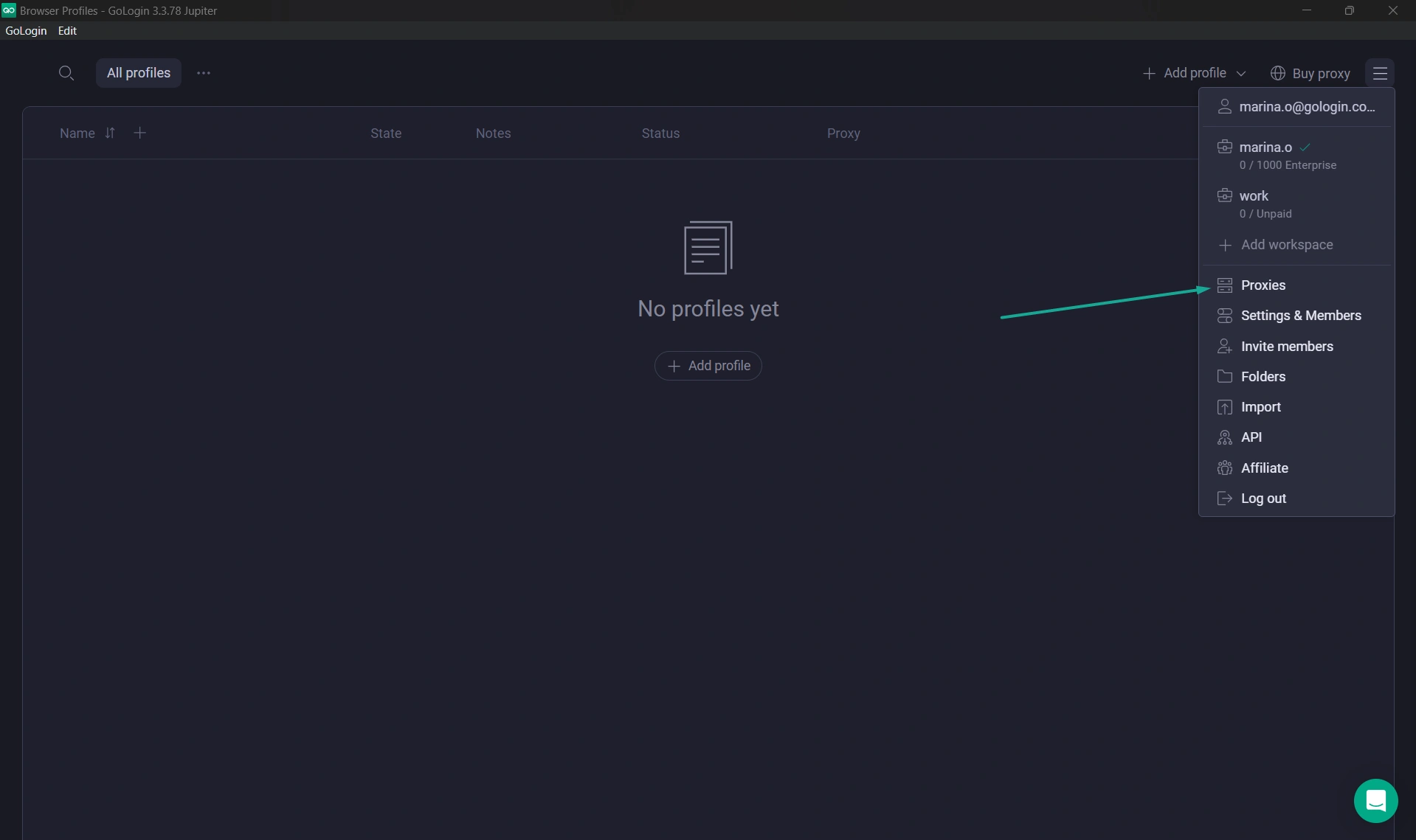
- In the Gologin app, click the hamburger menu (☰) in the top right and select “Proxies.”
- Click “Import proxies” and paste the entire proxy list you copied from Floppydata.
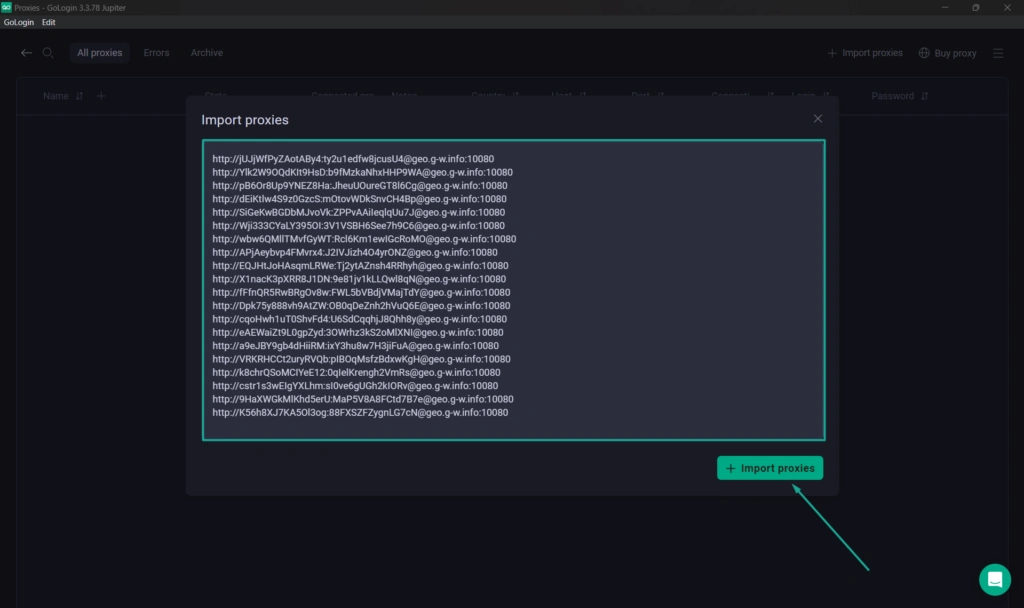
- Once you click “+Import proxies”, Gologin will automatically validate them.
- And there you go, you now have your list of available UK proxies ready to be used:

But how are you going to use these proxies? Easy, follow along:
STEP 3: Create a UK Browser profile
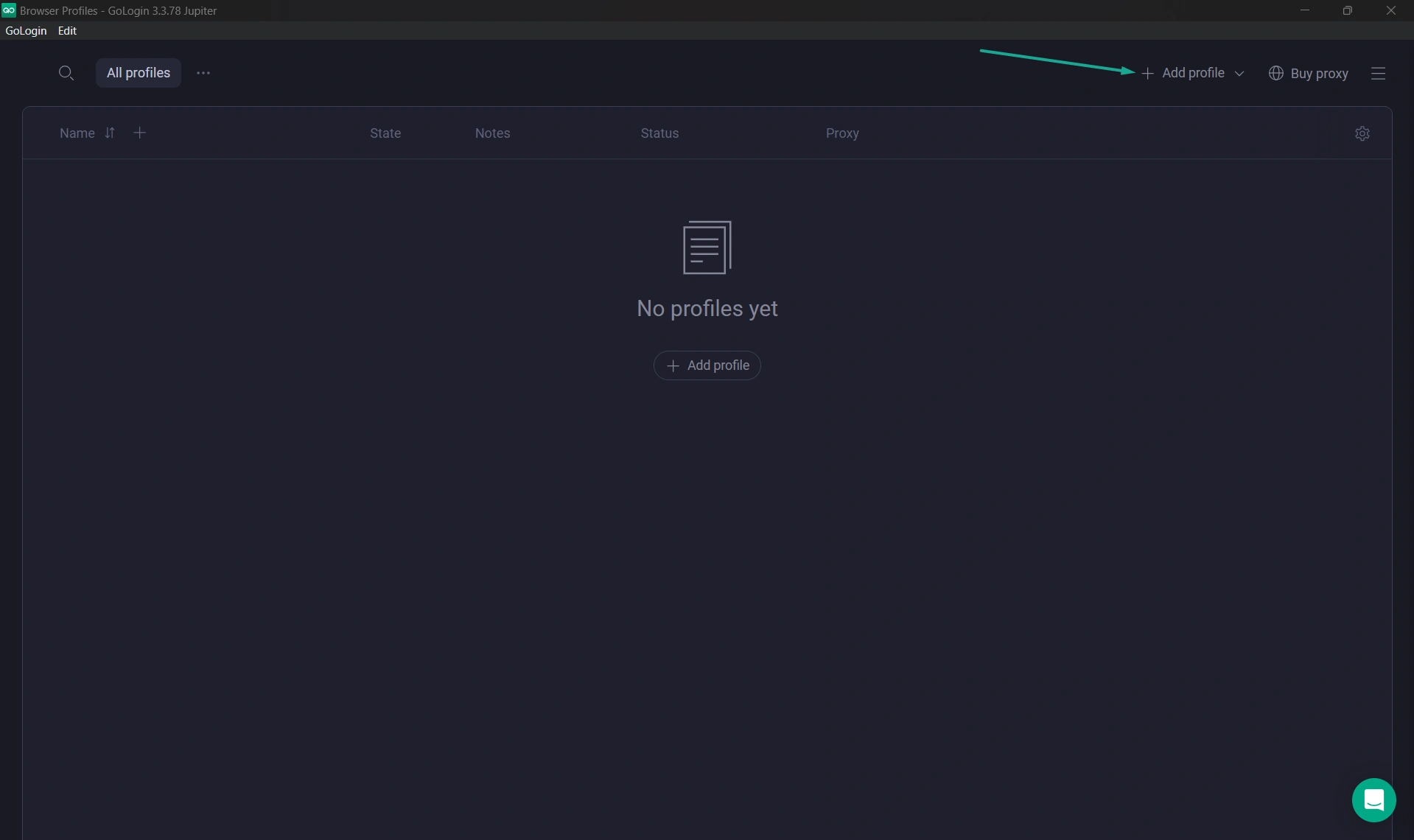
- Go back to the main Gologin screen and click “ + Add profile”
- Give your profile a name, select one of the UK proxies you just imported in the “Your proxy” field, and Gologin will automatically adjust the profile’s fingerprint settings to match.
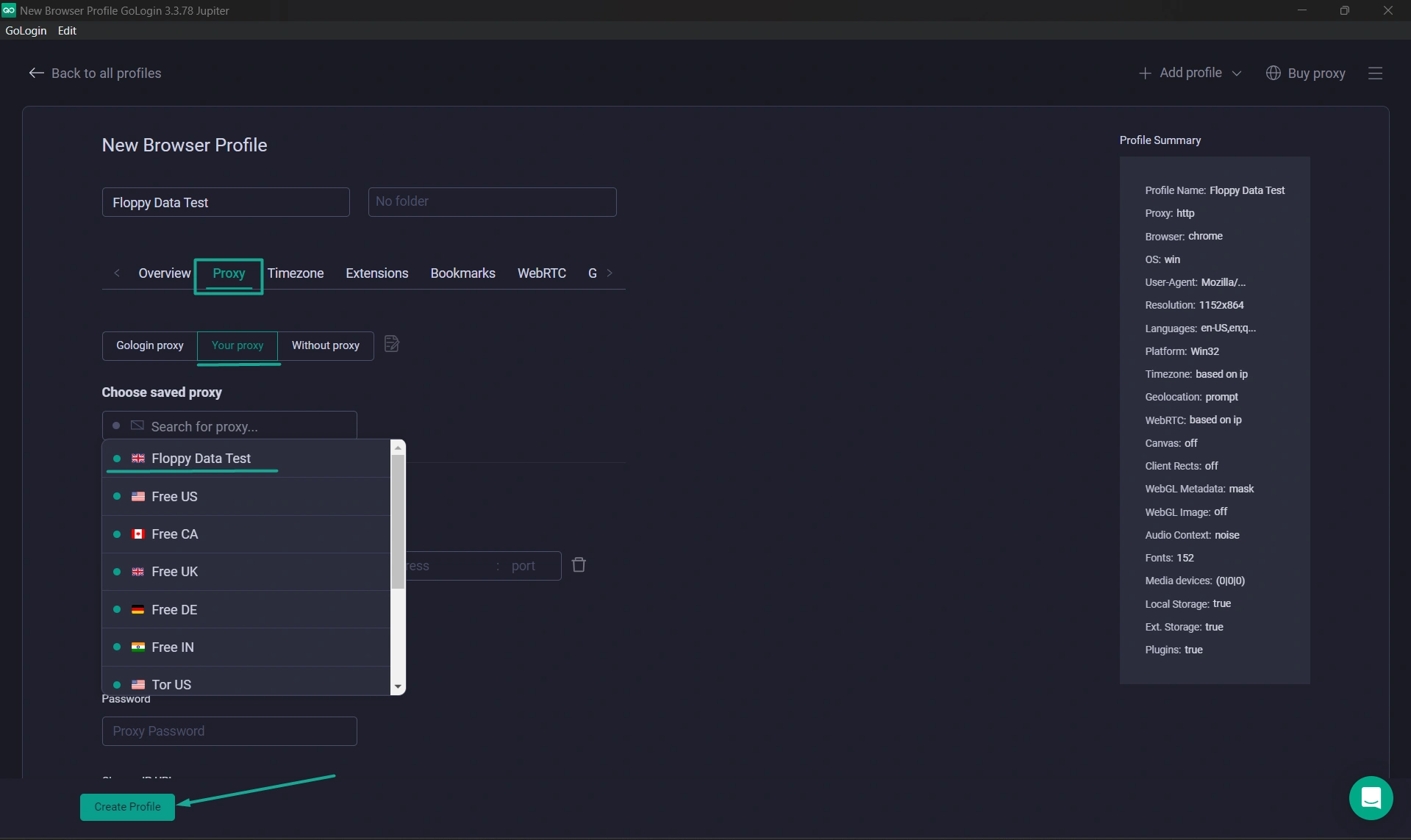
- Click “Create profile”
- Click “Run” on your new profile and a secure browser window will open – nothing extraordinary, it looks like any other browser you’ve used before.
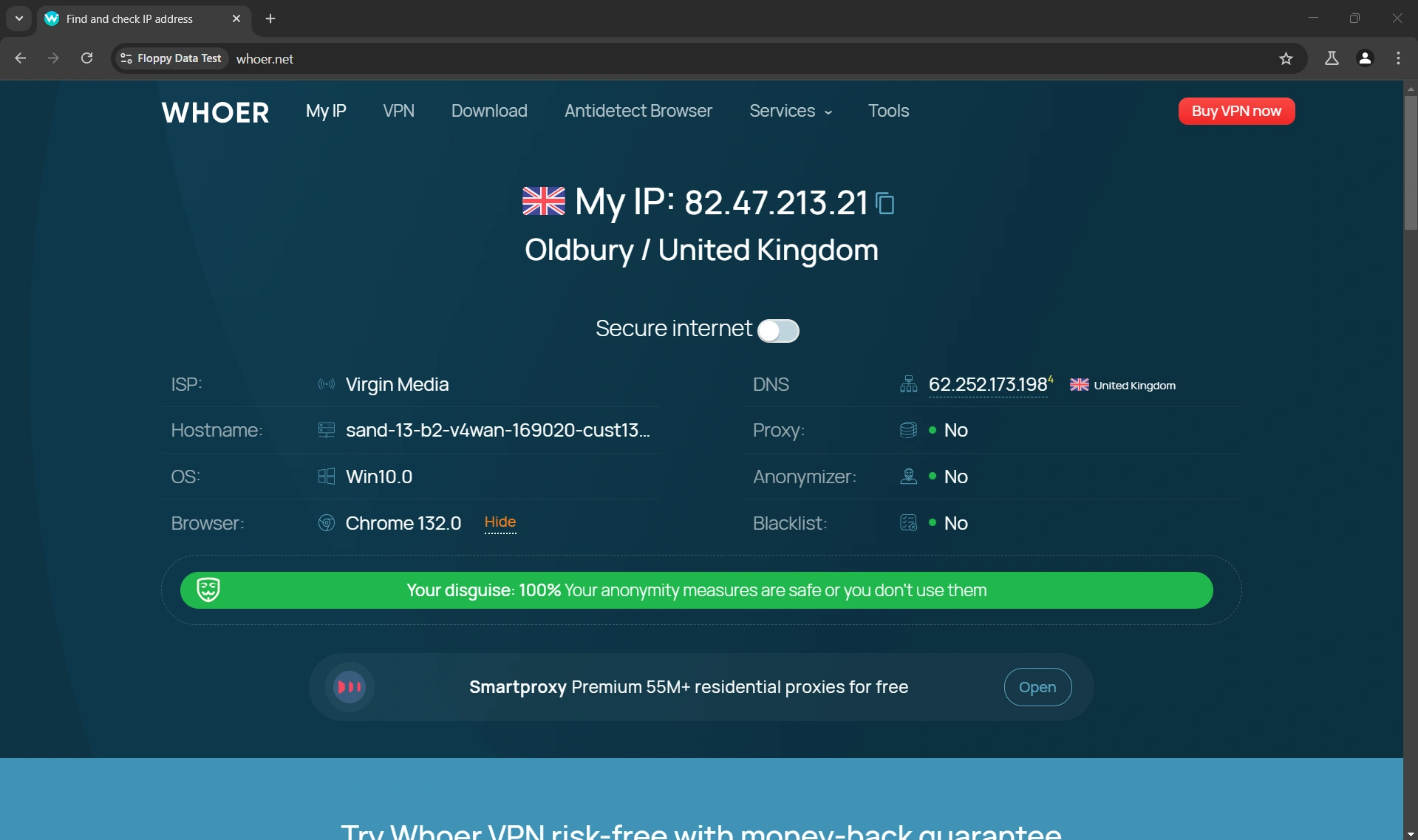
- To confirm you’re really browsing with a UK ip address, open the Whoer site on your browser and see the result for yourself:
Final Thoughts
No need to complicate things when looking for a UK IP address. This guide clearly explained why the most popular methods, like VPN, are to absolutely avoid, and how using the Floppydata and Gologin combo is the absolute best when it comes to getting the best anonymity, speed, and reliability.
Ready to get started?
- Get UK Proxies: Visit Floppydata
- Get the Browser: Visit Gologin
FAQ
Why would I need a UK IP address?
A UK IP helps access UK-only content, avoid regional blocks, get local search results, and test services as a UK user. It’s useful for streaming, SEO, research, and secure browsing.
What’s the easiest way to get a UK IP address?
Use a VPN or UK proxy service to route your traffic through a UK server — this assigns you a UK IP while keeping your original IP hidden.
Are proxies or VPNs better for a UK IP?
Proxies (residential/mobile) are often faster for specific apps or scraping, while VPNs are best for general privacy and full-device UK IP. Choose based on need and performance.